In this Divi review, we look at whether Elegant Themes’ visual builder is worth it after its biggest update in a decade. For years, Divi was the theme you picked when you wanted to design anything you could imagine.
You paid for that freedom in two ways: your content got locked into shortcodes, and your pages loaded slower than they would on a lightweight theme.
Divi 5 goes after both problems. It’s a rebuild, not a patch. Shortcodes are gone, scripts load on demand, and the layout tools finally use modern CSS. Elegant Themes even claims a perfect 100 PageSpeed score on its demo.
Pricing is simple too: $89 a year or $249 once, and both cover unlimited sites. Below, we cover what Divi 5 changed, how it compares on speed, and who should (and shouldn’t) buy it.
- Divi Review: Is It Still Good
- Key Divi Features
- Divi Pro: AI, Cloud and VIP Support
- Divi Pricing in 2026
- Divi Performance and SEO
- Divi for WooCommerce and Landing Pages
- Divi Pros and Cons
- Divi vs Elementor vs Kadence vs GeneratePress
- Who Should Use Divi?
- FAQs Related to Divi Review
- Final Verdict: Is Divi Worth It in 2026?
Quick Answer: Divi is a theme and visual drag-and-drop builder with 200+ elements, 2,000+ premade layouts, a Theme Builder and WooCommerce modules. Divi 5 is a full rebuild: it saves content in a block-based format instead of shortcodes, loads JavaScript only when a page needs it, and adds Flexbox, Grid, design variables and a Loop Builder. It costs $89/year or $249 once, both for unlimited sites, with a 30-day refund. It’s a great buy for designers and agencies. For a speed-first blog, GeneratePress or Kadence is lighter and simpler.
Divi Review: Is It Still Good

Divi at a Glance
| Details | |
|---|---|
| Made by | Elegant Themes |
| Type | Theme + visual builder (the builder also comes as a plugin for other themes) |
| Elements | 200+ |
| Premade layouts | 2,000+ |
| Current version | Divi 5 (rebuilt framework) |
| Free version | No |
| Divi yearly | $89/year, unlimited sites |
| Divi lifetime | $249 one-time, unlimited sites |
| Divi Pro | $277/year (adds Divi AI, Cloud, VIP support and 4 team seats) |
| Refund | 30 days, no questions asked |
Verified on elegantthemes.com.
How We Tested Divi
We’ve used Divi on client sites over the years, and for this review we compared it side by side with GeneratePress, Kadence and Astra.
For the speed test, we built the same homepage (hero, three-column features row, testimonials, blog grid, footer) on each theme, on the same hosting, with caching turned off.
Pricing comes from Elegant Themes’ join page. The Divi 5 changes and performance figures come from the official Divi 5 page. Those speed numbers are Elegant Themes’ own claims from a demo site, and we treat them that way below.
What Is Divi?
Divi is a WordPress theme with a visual page builder built in. You design pages on the front end of your site: click any element to edit it, drag sections around, and see the page exactly as visitors will.
The Theme Builder works the same way for the parts of the site outside your pages. You can design headers, footers, single post templates and archive pages visually, then assign them to any part of the site.
You don’t have to use the Divi theme to get the builder. Elegant Themes also sells the Divi Builder as a plugin, so you can run it on top of another theme.
Elegant Themes says Divi has more than a million customers, which makes it one of the most widely used premium builders for WordPress.
What Changed in Divi 5
Divi 5 isn’t a normal version update. Elegant Themes rewrote the framework from scratch. Here are the changes that matter most.
Shortcodes Are Gone
This is the big one. Older Divi saved every page as shortcodes. If you ever switched themes, your pages turned into walls of [et_pb_section] tags you had to clean up by hand. We’ve done that cleanup for clients, and it isn’t fun.
Divi 5 saves content in a block-based format that works with the WordPress block editor. You’re far less locked in than you used to be.
Faster Front-End Code
Divi 5 loads JavaScript libraries only on pages that use them, and it generates critical CSS automatically.
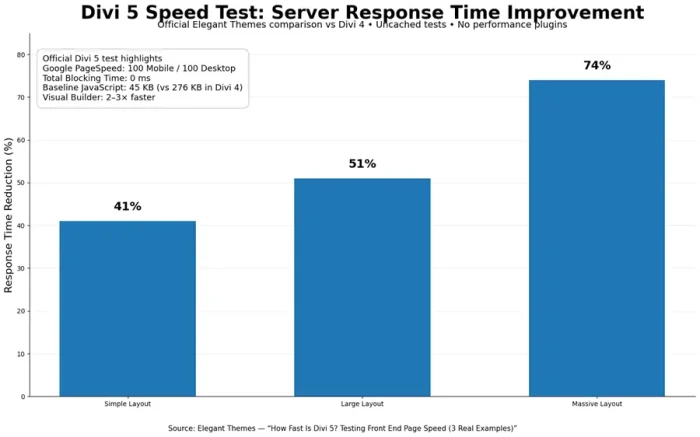
Elegant Themes says its demo page scores 100 on PageSpeed for both desktop and mobile, with a 0.3s First Contentful Paint on desktop (0.9s on mobile), zero Total Blocking Time and zero layout shift.
Those are best-case numbers from a page Elegant Themes built and tuned. Your pages will depend on your images, fonts, plugins and hosting. Still, it’s a big step up from older Divi.
Modern Layout Tools
Divi 5 adds Flexbox controls, a CSS Grid editor and seven breakpoints, and you can change the width of each one.
You no longer need workarounds to get a layout looking right on tablets and small laptops.
A Real Design System
You can set global variables for colours, numbers, images, fonts and sizes. Presets are now class-based, and the Variable Generator builds typography scales and fluid spacing for you.
Change a variable once, and every element using it updates across the site.
Loop Builder
The Loop Builder lets you visually build lists of posts, products, terms or users with a query builder. It works with Advanced Custom Fields, so you can show custom data without code.
Before Divi 5, this usually meant a third-party plugin.
Backward Compatibility
Elegant Themes built Divi 5 to keep existing Divi 4 sites running, including legacy modules. That said, third-party Divi modules and child themes may need updates.
Test on a staging site before you upgrade a live one.
Key Divi Features
- 200+ design elements for content, media, forms, sliders, pricing tables and more
- 2,000+ premade layouts in layout packs for different industries
- Theme Builder for headers, footers, post templates and archives
- WooCommerce modules to design product, cart and checkout pages
- Global presets and variables for consistent styling
- Divi Quick Sites for AI-generated sites and starter packs
- Divi Dash to manage updates and settings across many WordPress sites
For agencies, Divi Dash is worth noting. If you look after 20 client sites, being able to update them from one dashboard saves real time each month.
Divi Pro: AI, Cloud and VIP Support
Divi Pro ($277/year) adds paid services on top of Divi:
- Divi AI writes text, generates images and builds layouts and custom code inside the builder
- Divi Cloud stores your layouts and assets so you can reuse them on any site
- Divi VIP gives you faster support, with a listed 30-minute response time
- Divi Teams gives you 4 team seats
Elegant Themes often adds bonuses (like marketplace credit) to Divi Pro, so check the join page for the current offer.
Is it worth it? For a solo blogger, probably not. Divi on its own does everything you need, and you can use other AI writing tools for content.
For an agency with a team, Divi Cloud and the extra seats can pay for themselves.

Divi Pricing in 2026
| Plan | Price | Sites | What You Get |
|---|---|---|---|
| Divi Yearly | $89/year | Unlimited | Divi theme, Divi Builder, Divi Dash, updates and support |
| Divi Lifetime | $249 once | Unlimited | Same as yearly, with lifetime updates and support |
| Divi Pro (yearly) | $277/year | Unlimited | Divi + AI, Cloud, VIP support, Teams (4 seats), Dash |
| Divi Pro + Lifetime | $297 upfront, then $212/year for Pro services | Unlimited | Lifetime Divi + Pro services |
Prices verified from elegantthemes.com.
Every purchase comes with a 30-day money-back guarantee.
The lifetime deal is the standout. $249 once for unlimited sites, with lifetime updates, is one of the best deals in WordPress for agencies and freelancers. It costs less than three years of most competitors’ yearly plans, and you never pay again.
Elegant Themes usually runs its biggest sale around Black Friday. Check our Elegant Themes Black Friday discount page for the latest offer, or our full Black Friday WordPress deals roundup.
Divi Performance and SEO
How Fast Is Divi?
Speed was always Divi’s weak spot. In our homepage test, it came last:
| Theme | Load Time | PageSpeed (Mobile) |
|---|---|---|
| GeneratePress | 1.1s | 94 |
| Kadence | 1.4s | 88 |
| Astra | 1.7s | 87 |
| Divi | 2.3s | 76 |
Divi 5’s on-demand scripts and automatic critical CSS go straight at this problem. Even so, a visual builder usually outputs more markup than a lean block theme, so GeneratePress and Kadence will still produce smaller pages in most cases.
For more options, see our list of the fastest WordPress themes.
Is Divi Good for SEO?
Yes. Divi works with Rank Math, Yoast and SEOPress, and you can set titles, meta descriptions and schema as usual. Divi 5’s block-based storage also removes the old shortcode lock-in.
That makes a future redesign or theme switch much less painful.
A theme won’t rank your pages for you, though. Content and links do most of the work. Our guide on how to find profitable keywords is a good place to start.
How to Keep a Divi Site Fast
- Use presets and variables instead of styling every element by hand.
- Compress images and set their sizes.
- Avoid stacking several third-party module packs.
- Add a caching plugin. Our WP Rocket vs FlyingPress comparison helps you choose, and our best WordPress caching plugins list includes free options.
- Choose fast hosting. See our tested list of the fastest web hosting providers.
More ideas are in our guide with tips to speed up your WordPress site.
Divi for WooCommerce and Landing Pages
Divi’s WooCommerce modules let you design product, cart and checkout pages visually, which most lightweight themes can’t do without extra plugins. For a store that needs a custom look, that’s a real plus.
Pair it with good hosting; see the best WooCommerce hosting providers and our guide on how to build an online store.
Divi is also strong for landing pages and sales pages. The layout packs give you a head start, and you can build a full page in an afternoon. Our guide on how to build a sales funnel in WordPress covers the rest of the setup.
Divi Pros and Cons
What We Like
- True visual, front-end design, plus a Theme Builder
- Divi 5 drops shortcodes and saves block-based content
- Flexbox, Grid, variables, presets and a Loop Builder
- Unlimited sites on every plan
- $249 lifetime option
- 2,000+ layouts and a big marketplace and community
- 30-day refund
What We Don’t Like
- No free version
- Heavier pages than lightweight block themes
- The builder and design system take time to learn
- AI, Cloud and VIP support cost extra (Divi Pro)
- Third-party Divi 4 modules may need updates for Divi 5
Divi vs Elementor vs Kadence vs GeneratePress
| Divi | Elementor | Kadence | GeneratePress | |
|---|---|---|---|---|
| Type | Theme + builder | Builder plugin | Theme + blocks | Theme + blocks |
| Free version | No | Yes | Yes | Yes |
| Paid from | $89/year or $249 lifetime | $60/year (Essential) | $99/year (Essentials) | $59/year (GP Premium) |
| Sites | Unlimited | 1 site on Essential | Check plan terms | Up to 500 |
| Best for | Designers, agencies | Builder users on any theme | Visual block building | Speed-first blogs |
Divi vs Elementor
Both are visual drag-and-drop builders. Elementor has a free version and works with any theme, but its paid plans charge per site, starting at $60/year for one site.
Divi covers unlimited sites from $89/year or $249 lifetime. If you build many sites, Divi is much cheaper over time. If you only run one site and want to start free, Elementor is the easier first step.
Divi vs Kadence
Kadence uses the WordPress block editor instead of its own builder. It was 0.9 seconds faster in our test and has a strong free version.
Divi gives you more visual freedom for complex layouts. See our Kadence review.
Divi vs GeneratePress
GeneratePress is the fastest theme we tested and costs $59/year. It’s built for speed and clean code, not drag-and-drop design. Bloggers and affiliate marketers usually do better with GeneratePress.
See our GeneratePress review, or our GeneratePress vs Astra comparison if you’re choosing between lightweight themes. Our Astra theme review covers the other popular middle-ground option.
Who Should Use Divi?
Good fit:
- Designers and agencies building many custom-looking sites
- Business owners who want to design visually without code
- Anyone who wants a lifetime license with unlimited sites
- Freelancers who build landing pages and WooCommerce stores for clients
Not the best fit:
- Speed-first bloggers and affiliate sites
- People who prefer the native block editor
- Anyone who needs a free option to start
If you’re still not sure, our guide on how to choose a WordPress theme walks through the decision step by step.
FAQs Related to Divi Review
Is Divi free?
No. Divi costs $89/year or $249 one-time, and both plans cover unlimited sites. There’s a 30-day refund if it isn’t right for you.
What is Divi 5?
Divi 5 is a full rebuild of Divi. It saves content in a block-based format instead of shortcodes, loads scripts only when needed, and adds Flexbox and Grid layouts, global variables, class-based presets and a Loop Builder.
Is Weebly better than Wix?
If you want to create a simple website with better pricing and more accessible eCommerce features, then Weebly is your best choice.
Is Divi 5 compatible with Divi 4 sites?
Elegant Themes says Divi 5 supports existing Divi 4 sites and legacy modules. Test third-party modules on a staging site before upgrading.
Is Divi good for SEO?
Yes. It works with Rank Math, Yoast and SEOPress, and Divi 5 is faster and no longer locks content into shortcodes.
Does Divi slow down WordPress?
Older Divi was heavier than lightweight themes, and it was the slowest theme in our test. Divi 5 improves this with on-demand scripts and critical CSS, but lean block themes like GeneratePress are still lighter.
Does Divi have a lifetime deal?
Yes. The Divi Lifetime plan is $249 one-time for unlimited sites, with lifetime updates and support.
What is Divi Pro?
Divi Pro is a $277/year bundle that adds Divi AI, Divi Cloud, VIP support and 4 team seats on top of Divi.
Divi or Elementor: which is better?
Divi is better value if you build many sites, since every plan covers unlimited sites. Elementor has a free version and works with any theme, which suits people running one site.
Can I use the Divi Builder with another theme?
Yes. Elegant Themes sells the Divi Builder as a plugin that works with other themes.
Is Divi good for WooCommerce?
Yes. Divi includes WooCommerce modules and Theme Builder templates for shop, product, cart and checkout pages.
Final Verdict: Is Divi Worth It in 2026?
Divi 5 fixes the two things people complained about most: shortcode lock-in and heavy front-end code.
With $89 a year or $249 lifetime for unlimited sites, it’s one of the best-value tools in WordPress for designers and agencies who build visually.
For a speed-first blog or affiliate site, we’d still pick a lightweight block theme. GeneratePress is the fastest option we tested, and Kadence gives you more design tools with only a small speed cost.
But if you want to design every page visually and build lots of sites without paying per site, Divi is hard to beat.
Divi Review: Has Divi 5 Fixed Divi's Biggest Problems?
- Features
- Templates & Designs
- Pricing
- Support
- Functions & Flexibility
Summary
Divi is a theme and visual drag-and-drop builder with 200+ elements, 2,000+ premade layouts, a Theme Builder and WooCommerce modules.