In this Kadence WP review, we look at whether one theme can really give you both speed and design freedom. Most WordPress themes make you choose. You get a fast, plain theme and do the design work yourself, or you get a drag-and-drop builder and accept a slower site.
Kadence tries to give you most of both, and after using it on four client sites over eighteen months, we think it mostly pulls it off.
The free Kadence theme has 500,000+ active installs on WordPress.org and a 4.9-star rating, which is unusual for a theme that also sells premium upgrades. It’s now owned by Liquid Web (the same company behind Nexcess), so it isn’t going anywhere.
Below, we cover how Kadence works, our speed test results against GeneratePress, Astra and Divi, what the 2026 pricing looks like, and who should skip it.
- Kadence vs Other Popular Themes at a Glance
- Kadence WP Review: Is It the Best Theme
- Kadence vs GeneratePress vs Astra vs Divi
- Kadence Pricing in 2026
- Free vs Paid: Is Kadence Pro Worth It?
- Support and Documentation
- Security and Stability
- Kadence Pros and Cons
- Real Projects We Built With Kadence
- FAQs Related to Kadence WP Review
- Final Verdict: Should You Use Kadence?
Quick Answer: Kadence is the theme we’d hand to most bloggers and small business owners in 2026. It loaded in 1.4 seconds in our tests (GeneratePress did 1.1s, Divi 2.3s), the free version is good enough to launch a real site, and the block library saves you from installing a heavy page builder. Pick GeneratePress if raw speed is the only thing you care about. Pick Divi if you want the most visual control and can live with a slower site.
Kadence vs Other Popular Themes at a Glance
| Theme | Best For | Speed (Our Test) | Visual Building | Paid Plans From | Free Version |
|---|---|---|---|---|---|
| Kadence | Bloggers, agencies, small businesses | 1.4s | Excellent (blocks) | $99/year | Yes, very usable |
| GeneratePress | Speed-focused blogs, developers | 1.1s | Good | $59/year | Yes, basic |
| Astra | Beginners who want templates | 1.7s | Excellent | $99/year (first year) | Yes |
| Divi | Designers who want full visual control | 2.3s | Excellent (own builder) | $89/year | No |
| Blocksy | Block editor fans on a budget | Not tested | Very good | Paid Pro add-on | Yes |
Kadence WP Review: Is It the Best Theme
What Is Kadence WP?
Kadence is two products that work as a pair:
- The Kadence theme. A lightweight theme with a drag-and-drop header and footer builder, global colours and fonts, and layout controls in the WordPress Customizer.
- Kadence Blocks. A plugin that adds extra blocks to the WordPress block editor (Gutenberg): rows and columns, tabs, accordions, forms, icon lists, testimonials and more.
You can use the theme without the plugin, and the plugin works with other themes. Together, they turn the default WordPress editor into something close to a page builder.
This is the big difference from Divi. Divi swaps the WordPress editor for its own builder. Kadence builds on top of the editor WordPress already ships with.
That choice is a large part of why Kadence pages load faster, and it means you’re not locked in. If you switch themes later, your content is still made of standard blocks.
Kadence also plays fine with Elementor and Beaver Builder if you already use one of them, though you’d lose some of the speed benefit.
How Building Pages With Kadence Feels
It’s Still the WordPress Editor
If you’ve written a post in WordPress in the last few years, you already know most of the interface. Kadence adds its own blocks to the inserter and extra settings in the sidebar. There’s no separate app to learn.
We moved two clients over from Divi, and both had the opposite reaction we expected. They said editing felt simpler because it looked like the editor they used for blog posts.
Kadence Blocks
The free Kadence Blocks plugin covers what most sites need: Row Layout, Advanced Heading, Advanced Button, Tabs, Accordion, Info Box, Icon List, Testimonials, Form, Google Maps and a few more.
Kadence Blocks Pro adds things like a post grid and carousel, an advanced slider, a video popup and dynamic content (pulling custom fields into a layout).
Every block we used behaved the same way on each site. We didn’t hit a half-finished block or one that broke after an update, which we can’t say about every block plugin we’ve tried.
Patterns and Starter Templates
Kadence ships with a pattern library: pre-made sections like hero areas, pricing tables, testimonial rows and call-to-action blocks. Drop one in, swap the text and images, and move on.
Starter Templates go a step further and import a full site (pages, colours, fonts and sample content). We used the service business and portfolio templates on two projects. Both looked professional out of the box and needed a couple of hours of edits, not days.
Responsive Controls
Most Kadence blocks let you set different padding, font sizes and column layouts for desktop, tablet and mobile. You can also hide a block on a specific device.
For a non-developer, this replaces most of the custom CSS you’d otherwise need to write.
Global Styles: Change One Setting, Update the Whole Site
This is where Kadence feels more grown-up than many themes in its price range.
You set your colour palette once in the Customizer (primary, accent, text, background and so on), and every Kadence block pulls from it. Change the accent colour, and every button, link, and highlight on the site updates.
We did exactly this for a client who rebranded mid-project, and it took about two minutes.
Typography works the same way. Pick fonts and sizes for body text and each heading level, and they apply everywhere. You can also host Google Fonts locally from the theme settings, which helps with both speed and GDPR.
Spacing is the one area where you still do some manual work. Blocks have sensible defaults, but keeping section padding consistent across a big site takes a bit of discipline.
Kadence Speed Test Results
We built the same homepage (hero, three-column features row, testimonials, blog grid, footer) on each theme, on the same hosting, with no caching plugin turned on. Here’s what we got:
| Theme | Load Time | PageSpeed (Mobile) |
|---|---|---|
| GeneratePress | 1.1s | 94 |
| Kadence | 1.4s | 88 |
| Astra | 1.7s | 87 |
| Divi | 2.3s | 76 |
GeneratePress won, which we expected. It’s the leanest theme here, and you can read why in our GeneratePress review.
What surprised us was how close Kadence came.
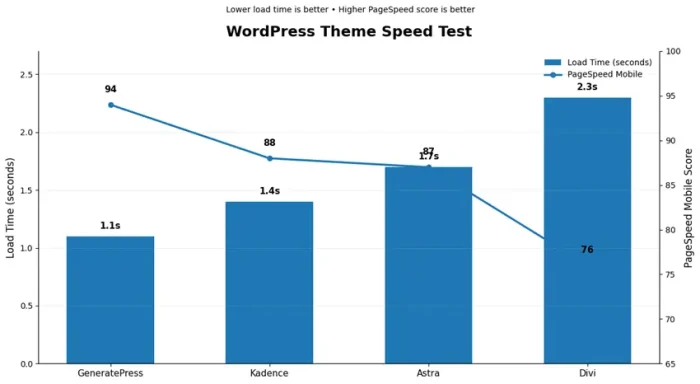
A 0.3 second gap is something you’ll measure, not something your visitors will feel, and Kadence gave us a lot more design control for that small cost.
Against Divi, Kadence was 0.9 seconds faster on the same layout.
Why the gap with Divi? Kadence Blocks only loads the CSS for blocks that are on the page, and the theme adds very little JavaScript. Divi loads its own builder framework on top of WordPress, and that weight shows up in the numbers.
If speed is your top concern, our list of the fastest WordPress themes has more options.
Making Kadence Even Faster
Those numbers were with no optimization. With a few changes, Kadence pages dropped under one second in our tests:
- Add a caching plugin. This made the biggest difference. We usually run WP Rocket or FlyingPress; see our WP Rocket vs FlyingPress comparison to pick one, or our roundup of the best WordPress caching plugins for free options.
- Compress images. ShortPixel or Imagify, set to convert to WebP. On image-heavy portfolio pages, this mattered more than anything else.
- Turn on Kadence’s performance settings. Load Google Fonts locally, preload fonts, and only load the block CSS you use. These added 5 to 10 points to our PageSpeed scores.
- Use decent hosting. No theme fixes a slow server. Our guide to the fastest web hosting providers covers hosts we’ve tested.
For a full checklist, read our tips to speed up your WordPress site.
Other Kadence Features Worth Knowing
Header and Footer Builder
This comes free, and it’s one of the best we’ve used. Drag elements (logo, menu, search, button, social icons, HTML) into rows and columns, and set a separate layout for mobile.
Kadence Pro adds sticky and transparent headers per page, conditional headers, and extra elements like a second button or a WooCommerce cart.
Hooked Elements (Pro)
Hooked Elements lets you place content anywhere in your theme, like an email signup box after every post or a banner above the header, and show it only on certain pages.
Affiliate bloggers will find this handy for placing disclosure boxes and CTAs without editing every post.
WooCommerce Support
The free theme already styles WooCommerce properly. Pro and the Shop Kit add things like an off-canvas cart, product gallery options and checkout tweaks. It handled our small handmade-products store fine.
For a large catalogue, you’ll want strong hosting more than a different theme; see our list of the best WooCommerce hosting providers and our guide on how to build an online store.
Forms and Conversions
Kadence Blocks includes a basic form block that’s fine for a contact page. For anything more involved (surveys, payments, conditional logic), a dedicated plugin is still better.
We compared the options in our best WordPress form builder plugins post. The Elite plan adds popups, sale banners and A/B testing if you’d rather keep it all in one place.
Accessibility
Kadence is tagged accessibility-ready on WordPress.org. Menus work with a keyboard, and the default colour contrast is reasonable.
It’s a small detail, but plenty of popular themes skip it.
Who Kadence Is Good For
Bloggers. Clean post layouts, fast load times, and you write in the same editor you build pages in. If you’re just starting, Kadence is a solid choice for the setup in our how to start a blog guide.
Service businesses. Our plumbing client’s site used the Info Box, Testimonials, and Row Layout blocks almost entirely. He now updates his own service pages because it feels like editing a blog post.
Portfolios. We built a photographer’s site with the Advanced Gallery block in masonry layout. It handled 60+ images per page without the slowdown we’d expect from a builder theme.
Small online stores. Fine for a few dozen to a few hundred products.
Agencies. Global styles and starter templates make it quick to spin up client sites with consistent branding. The Elite plan adds white labelling and a client portal.
Who should skip it? If you want pixel-perfect, free-form design where you drag anything anywhere, Divi or Elementor will feel less restrictive. If you only care about the lightest possible theme, go with GeneratePress.
Kadence vs GeneratePress vs Astra vs Divi
Kadence vs GeneratePress
GeneratePress is faster and cheaper ($59/year for up to 500 sites). It’s also more minimal. You get a solid foundation, and you build the design yourself, often with GenerateBlocks.
Kadence gives you more out of the box: a better header builder, more blocks, more templates. Developers and speed purists lean toward GeneratePress.
Most bloggers and designers will get to a finished site faster with Kadence. Our GeneratePress review goes deeper.
Kadence vs Astra
These two are closer than people think. Both are fast, both have big template libraries, and both start around $99/year for paid plans.
Astra‘s templates are more numerous, and it leans on Elementor or Spectra. Kadence feels more consistent because the theme and blocks are designed together.
If you’re torn between Astra and GeneratePress instead, read our GeneratePress vs Astra comparison. Our full Astra theme review is here too.
Kadence vs Divi
Divi gives you more visual freedom and is good value at $89/year or $249 lifetime for unlimited sites. But it was 0.9 seconds slower in our test, and Divi layouts don’t carry over cleanly if you ever switch themes.
Users coming from Divi sometimes find Kadence limiting on very complex layouts. Everyone else usually finds it faster and calmer to work in. See our Divi review for the other side.
Kadence Pricing in 2026
Kadence moved to Liquid Web’s software plans. Here’s the current lineup:
| Plan | Price | What You Get |
|---|---|---|
| Free | $0 | Kadence theme, Kadence Blocks, Starter Templates, header/footer builder |
| Essentials | $99/year | Kadence Blocks Pro, premium themes and templates, child theme builder, custom fonts and icons, mega menus, dynamic content, advanced forms |
| Pro | $299/year | Everything in Essentials plus Shop Kit for WooCommerce, memberships and content restriction, security firewall and 2FA, daily backups |
| Elite | $499/year | Everything in Pro plus A/B testing, popups and banners, white labelling, client portal, multi-site management, built-in email sending |
Prices from the official Kadence/Liquid Web pricing page. Check site limits at checkout before you buy.
Which plan should you buy? Start with the free version. Upgrade to Essentials when you need Blocks Pro, Hooked Elements or the premium templates.
Pro only makes sense if you run a WooCommerce store or membership site and want backups and security bundled in. Elite is for agencies.
Compared with the others, Essentials costs more than GeneratePress Premium ($59) and Divi ($89), and the same as Astra’s first year ($99, renewing at $149). Since the free version is so capable, many bloggers will never need to pay at all.
Watch for Kadence’s Black Friday sale if you’re not in a rush. We track theme discounts in our Black Friday WordPress deals roundup.
Free vs Paid: Is Kadence Pro Worth It?
The free theme plus free Kadence Blocks is enough for a real, good-looking blog or business site. That’s not true of every “freemium” theme.
Pay when you hit one of these:
- You want Hooked Elements to place CTAs or ads across many posts at once.
- You need conditional or transparent headers on specific pages.
- You want the Pro blocks (post carousel, advanced slider, dynamic content).
- You want access to the premium starter templates.
If none of those applies, stay on free and spend the money on better hosting.
Support and Documentation
Kadence’s docs cover each block and setting with screenshots, and there are video walkthroughs on YouTube for most common tasks.
Paid users get ticket support. In our experience, replies came within 12 to 24 hours, and they solved our issue every time we asked.
The Kadence Facebook group is active and friendly, and searching it often answers questions faster than a support ticket.
Security and Stability
Over eighteen months, Kadence updates never broke a client site. We ran it alongside 40+ popular plugins without a real conflict. The few styling clashes we saw were fixed from Kadence’s own settings.
Kadence Blocks, like most popular block plugins, has had a few security issues reported over the years. They were patched quickly.
Keep the theme and plugin updated, and follow the basics in our guide to protecting your WordPress site.
Kadence Pros and Cons
What We Like
- Fast for a theme with this much design control (1.4s, 88 PageSpeed untuned)
- The free version is good enough to launch on
- Excellent free header and footer builder
- Global colours and fonts update the whole site in one place
- Uses the standard WordPress editor, so no builder lock-in
- Starter Templates look professional, not generic
What We Don’t Like
- Slower than GeneratePress
- Paid plans now cost more than GeneratePress and Divi
- Less free-form than Divi or Elementor for complex layouts
- The form block is basic compared with dedicated form plugins
- Spacing consistency across a large site takes some manual care
Real Projects We Built With Kadence
A plumbing company site. The owner wanted service pages and customer reviews. We used a starter template, swapped in his photos, and built the rest with Info Box and Testimonials blocks. A year later, he still edits it himself.
A photographer’s portfolio. Image-heavy pages are where builder themes usually struggle. With the Advanced Gallery block, WebP images and caching, the gallery pages stayed under 1.5 seconds.
A small handmade-goods store. We started it with a small catalogue, and it has grown since. Speed has stayed steady, and the free WooCommerce styling covered most of what the store needed.
FAQs Related to Kadence WP Review
Is Kadence WP good for beginners?
Yes, if you’ve used the WordPress block editor before. Kadence adds to it rather than replacing it. Complete beginners will need an afternoon to get comfortable, which is still less than most page builders.
Is Kadence really free?
Yes. The Kadence theme and Kadence Blocks are free on WordPress.org, and you can build a complete site with them. Paid plans add Pro blocks, Hooked Elements, premium templates and extras like Shop Kit.
Is Kadence faster than Divi?
In our test, yes, by 0.9 seconds on the same layout (1.4s vs 2.3s). Divi’s builder adds weight that Kadence avoids by using the WordPress editor.
Kadence or GeneratePress: which should I choose?
GeneratePress if you want the lightest theme and don’t mind building the design yourself. Kadence if you want more ready-made design tools with only a small speed trade-off. See our GeneratePress review for details.
How does Kadence compare to Astra?
They’re similar in speed and paid pricing. Astra has more templates; Kadence feels more consistent because its theme and blocks are built as one system. Try both free versions and see which editor you prefer.
Can I use Kadence with Elementor?
Yes. The Kadence theme supports Elementor and Beaver Builder. You’ll lose some of the speed advantage that comes from using Kadence Blocks instead.
Can I move a Divi site to Kadence?
Your posts, pages and media will move over, but Divi layouts won’t convert into Kadence blocks. Plan to rebuild your key pages.
Does Kadence work with WooCommerce?
Yes. The free theme styles WooCommerce well, and the Pro plan adds Shop Kit for cart, checkout and product page upgrades.
Can I build client sites with Kadence?
Yes. Plenty of agencies standardise on it. The Elite plan adds white labelling and a client portal.
Is Kadence good for SEO?
It’s fast, uses clean markup and supports schema plugins like Rank Math and Yoast. That covers what a theme can do. Content and links still do the heavy lifting.
Final Verdict: Should You Use Kadence?
Kadence is the theme we recommend most often to bloggers and small businesses in 2026. It’s not the fastest (GeneratePress is), and it’s not the most flexible (Divi is). It gets close enough to both that most people won’t miss either.
The free version is strong enough to build on, so there’s no risk in trying it. If you outgrow it, the Essentials plan adds the Pro blocks and Hooked Elements that make running a content site easier.
- Choose Kadence if you want design control, good speed and the standard WordPress editor.
- Choose GeneratePress if speed and minimalism come first.
- Choose Divi if you want maximum visual freedom and can accept a slower site.
- Choose Astra if you want the biggest template library.
Still not sure? Our guide on how to choose a WordPress theme walks through the decision step by step.
Kadence WP Review: Is It the Best Theme for Speed & Design?
- Features
- Value
- Ease of Use
- Support
- Pricing
Summary
Kadence is the theme we recommend most often to bloggers and small businesses. Try Kadence Today!