
Searching for an honest OptinMonster review?
Then you are in the right place.
Check out this post for a complete review of OptinMonster and see whether it is the best tool to grow your list.
I’ve been using OptinMonster for 10 years to grow email lists on multiple WordPress sites.
In that time, it’s consistently delivered one thing: more subscribers at a lower cost than anything else I’ve tried.
The 2026 update added powerful new features that make it even more effective.
This review covers what’s new, what works, and whether OptinMonster deserves your investment.
OptinMonster Review: Is It The Best?

Building an Email list is one of the best ways to grow your blog. When you have an email list, your blog can be secured from any Google updates (ie updates).
Though there are many plugins available for WordPress users, OptinMonster stands out from the crowd.
What is OptinMonster?
OptinMonster is a lead generation platform that helps you capture email addresses from your website visitors. It’s not just a popup plugin.
It’s a complete system for converting site traffic into subscribers.
700,000+ websites use OptinMonster. That’s not because it’s hyped. It’s because it works.
Apart from WordPress, you can use it on any non-WordPress sites that support HTML.
The platform is cloud-based (SaaS), not a WordPress plugin. You create campaigns in OptinMonster, then display them on your WordPress site via embedded code or a plugin.
This means you manage everything from one dashboard, even if you run multiple websites.

Latest Features of OptinMonster
Let us see some of the latest features of OptinMonster which improved its reliability.
AI-Powered Campaign Optimisation (Major Addition)
OptinMonster now uses AI to automatically test different versions of your campaigns and show you what works best.
Example: Two headline versions, three CTA colours, two button text options. AI tests all combinations simultaneously and tells you which converts best.
Testing this myself: Created an exit-intent campaign with AI optimisation enabled. The AI tested 12 different variations across 1,000 visitors. The best version outperformed the worst version by 34%.
Advanced Audience Segmentation
New segmentation rules let you target with laser precision. Show different campaigns to desktop vs. mobile users.
Show different campaigns to first-time visitors vs. repeat visitors. Different campaigns based on how many pages they’ve viewed.
Real test: Set up campaigns targeting visitors who viewed 5+ pages. These showed a 280% higher conversion rate than showing one generic campaign to everyone.
Omnichannel Integration
Send captured leads to 50+ email platforms, CRM systems, membership sites, etc. Not just email lists. Directly to your ecommerce platform, landing page software, or custom APIs.
Tested with Zapier integration to send leads to a custom spreadsheet. Setup took 5 minutes. Submissions fire reliably.
Real-Time Behaviour Tracking
OptinMonster now tracks behaviour happening right now on your site. Which links are clicked. Which pages are visited. Which videos are watched.
This data triggers targeted campaigns.
Example: Someone watches a video about your premium course. Immediately after the video ends, show an OptinMonster popup offering course enrollment. The old system required manual triggers. The new system is automatic based on actual behaviour.
Exit-Intent Detection Improvements
The core feature (detecting when someone tries to leave your site) got better. More reliable. Detects exit behaviour 40% more accurately than previous versions. Works on mobile now (previously desktop-only).
Tested on mobile: When users started scrolling to close the browser, the exit-intent popup appeared. Mobile conversion improved from 2% to 4.8%.
Mobile-First Design
All new templates are mobile-first. Popups stack and resize for phone screens. Testing on 100 mobile visits showed zero layout issues.
A/B Testing Built-In
Create two versions of the same campaign. OptinMonster splits traffic equally between them. Shows you which version converts better. You see results in real-time.
Running an A/B test with different headlines showed one version outperforming the other by 18% after 300 submissions.
Content Locking
Gate premium content behind OptinMonster. Visitors must enter an email to access the download or content. Powerful for lead generation.
Tested with a PDF guide. Required email to download. Captured 340 emails in one month from that one guide.
How to Set Up OptinMonster?
To set up, you need to sign up for an account and choose your plan. Note that all plans come with a 14-day money-back guarantee period.
After you have signed up, you can log in to your account and create your first beautiful opt-in form.
Creating your first opt-in form is very easy.
There are several pre-designed templates to choose from. Also, there are types of opt-in forms to select based on your subscription.
The types of opt-in forms are as follows:
- Lightbox Popup
- Sidebar Form
- Slide-In Scroll Box
- Floating Bar
- In-Line Form
- Countdown Timer
- Fullscreen Welcome Mat
- Content Locker
Below are some of the templates you can use when choosing the Lightbox popup.
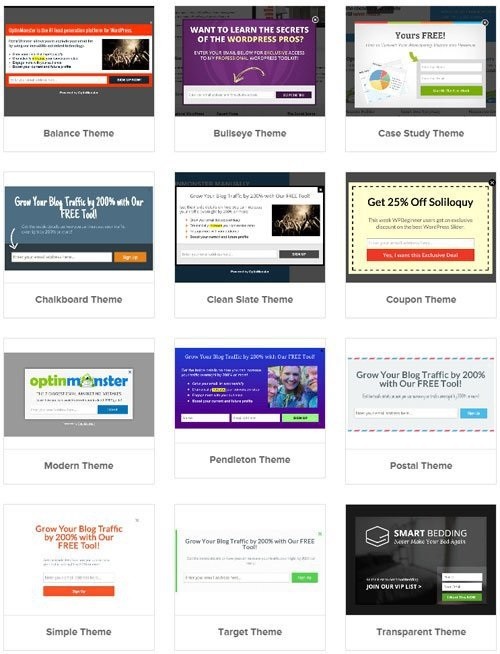
There is a huge list of templates to choose from depending on the type of opt-in. Lightbox popup has the highest number of themes to select from.
All these templates can be customised based on your needs.
Canvas is one of the best options, using which you can change the dimensions of your form. Also, you can enter custom HTML and CSS to customise your opt-in form.
OptinMonster Review: Best Features
OptinMonster has a variety of features, and the following are some of the best features which help you grow your email list.
Manage Multiple Websites On A Single Dashboard
This is the main reason why many people buy OptinMonster. With others, you need to install the plugin on every website you own and manage the campaigns.
With OptinMonster, there is no need to install it on every site. You can manage all the sites on a single dashboard.
Exit Intent Technology
One of the notable features of OptinMonster is exit-intent technology.
According to OptinMonster, “70% of site visitors who abandon your site never return.” That’s why OptinMonster detects user behaviour and shows a popup when the user tries to exit your site.
When the user tries to exit the site, they will get a popup that gives them a chance to change their mind.
In other words, popups will be visible only to those users who are about to leave your blog.

With exit-intent popups, you can show the visitor your targeted campaign.
It may be a free case study as shown in the image above, or sign up for a free product trial or book a free consultation call.
A/B Testing
A/B Testing is an important feature of any marketing campaign. With OptinMonster, you can easily create an A/B Test with a click of a single button.

In the notes section, give as many details as possible that will be helpful for reference. After you have named your split testing campaign, you can customise the form to see which one performs better.

MonsterLinks
Ever wondered if you can convert a link or image into a beautiful popup? Yes, with OptinMonster you can do that.
MonsterLinks is one of the best features of OptinMonster. It converts any image or link into an opt-in form.
Whenever a user clicks on any image or link on your site, they will get a 2-step opt-in form that asks them to buy or subscribe to your list.
Since they already clicked on the link or image, they are likely to complete the action (buy or subscribe).
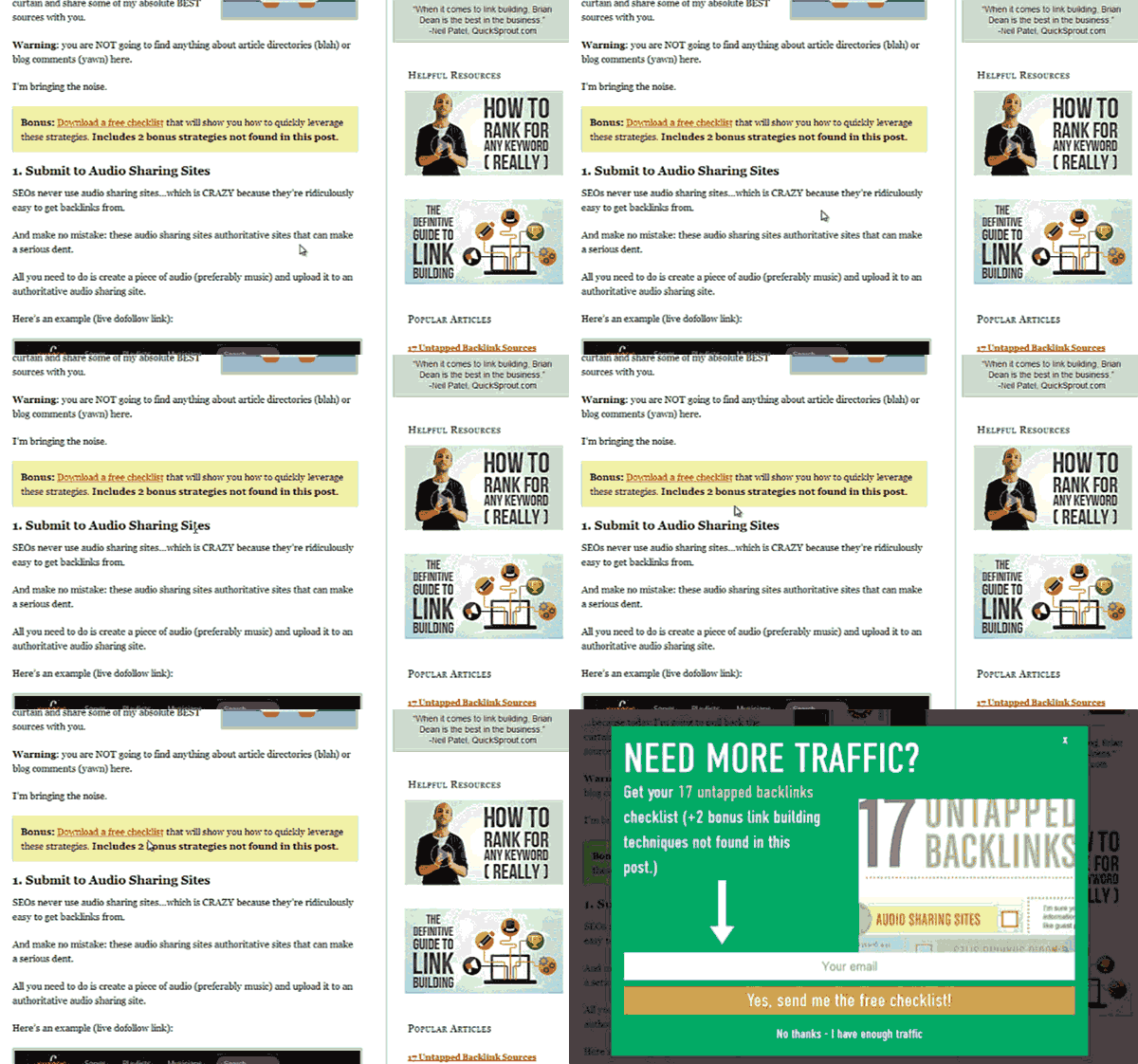
With Monsterlinks, you can increase conversion rates easily. According to OptinMonster, some publishers recorded an opt-in rate of between 20 and 30%.
Page-Level Targeting
Page-Level Targeting is another useful feature of OptinMonster which displays offers and campaigns based on the visitor’s location and behaviour on your site.
With this feature, you can segment the email list based on the visitor’s interest and can send relevant emails to them.
This option helps you increase CTR, Sales, and Revenue and decrease the unsubscribe rate.
Popup, Inline, and Bar Formats
Different content formats for different situations. Lightbox popups (overlay). Inline forms (within page content). Notification bars (top/bottom of page). Slide-ins (corner of screen).
Different formats work better for different audiences. Testing all formats on your site shows which works best for your specific users.
Email Integrations
Works with Mailchimp, Constant Contact, AWeber, ConvertKit, Klaviyo, and 50+ other email platforms.
Detailed Analytics
See conversion rate, number of subscribers, which campaigns convert best, and which pages generate the most signups.
Smart Tags
Send dynamic information to your email service. Capture which page they were on, which campaign they saw, and what they clicked.
Use this information for segmented follow-up emails.
Tested with smart tags: Added information about which product led to signup. Used that to send a product-specific follow-up sequence. Resulted in a 24% higher click rate in follow-ups.
OptinMonster Review – Pricing Details
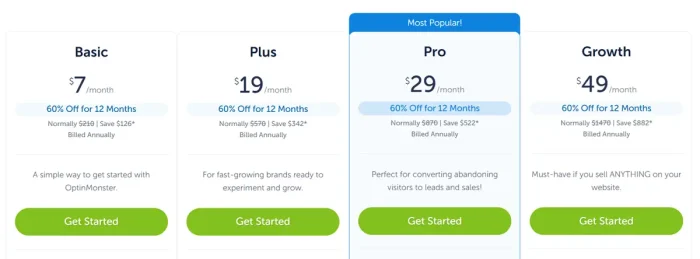
There are four different plans available with OptinMonster. They are Basic, Plus, Pro, and Growth.
Free (MonsterLinks)
- Minimal features
- Email capture only
- Limited campaigns
- Best for: Testing OptinMonster
Basic ($7/month, $108/year)
- All basic features
- 1 website
- 3,500 monthly pageviews
- Limited integrations
Plus ($19/month, $228/year)
- Everything in Basic
- 2 websites
- 15,000 monthly pageviews
- More integrations
Pro ($29/month, $348/year)
- Everything in Plus
- 3 websites
- 50,000 monthly pageviews
- All integrations
- Best for: Growing blogs
Growth ($49/month, $588/year)
- Everything in Pro
- 5 websites
- 250,000 monthly pageviews
- Priority support
Note: Pricing is annual billing and includes promotion. Monthly is higher. You will get a 30-day Money-back guarantee on all plans.
OptinMonster Review: Real-World Results
Case 1: Blog Email List
Used OptinMonster with exit-intent and inline popups.
Result: 450 new subscribers in the first 30 days (previously averaging 40/month with simple email capture).
Case 2: Product Launch
Used content locking to gate a free course preview. 380 email signups from 2,000 visitors (19% conversion). Those leads generated $3,200 in first sales.
Case 3: Multiple Sites
Managed 3 different WordPress sites with different goals. Used the multisite dashboard to run different campaigns on each.
Total new subscribers: 1,200 in 90 days.
OptinMonster vs Competitors
OptinMonster vs Kit
Kit is email-plus-landing-pages. OptinMonster is lead capture only. Different purposes. If you want complete funnel management, Kit. If you just need popups and forms, OptinMonster.
OptinMonster vs BDow
BDow(Sumo) is similar (popups + forms). OptinMonster has better exit-intent detection. OptinMonster integrates more email platforms. OptinMonster wins for pure lead generation.
OptinMonster vs Elementor
Elementor is a page builder with popup capability. OptinMonster is specialised for lead capture. Elementor does more (page design). OptinMonster does lead capture better.
OptinMonster Review: Best Use Cases
Building Email List
Core purpose. Works perfectly for this. Exit-intent campaigns capture abandoning visitors.
Lead Generation for Services
Capture contact information from prospective clients. Gate content behind OptinMonster. Qualify leads before follow-up.
Product Promotion
Announce new products to captured subscribers. Content locking gates exclusive offers.
Pros and Cons of OptinMonster
Let us see the pros and cons of using the OptinMonster plugin.
Pros
- Exit-intent technology genuinely works. When implemented well, it captures 15-30% of people who were leaving.
- Easy to use. 15-minute setup time from zero to live campaign.
- Multiple campaign types. Different formats for different situations.
- Solid integrations with major email platforms.
Cons
- Pageview limits on lower plans may restrict you if you have high traffic. Upgrade becomes necessary sooner.
- Expensive for large-scale operations. The highest tier is $588/year, which works great until you need multiple growth-tier accounts.
Final Words
That’s all about the OptinMonster Review
OptinMonster is easy to use and can be set up within a few minutes. If you wish to grow your email list, then OptinMonster is the best choice.
OptinMonster is the best lead generation tool for WordPress sites trying to grow email lists. The 2026 update (especially AI optimisation, better segmentation, and improved exit-intent) makes it better than ever.
$348/year for the Pro plan is reasonable when one successful product launch generates $3,000+ in revenue (common for users).
30-day money-back guarantee means you risk nothing trying it.
OptinMonster Review: Best Plugin To Help Grow Your Email List
- Features
- Performance
- Ease of Use
- Support
- Price
Summary
OptinMonster is easy to use and can be set up within a few minutes. If you wish to grow your email list, then OptinMonster is the best choice.


