In this GeneratePress review, we look at whether the theme bloggers have trusted for years is still worth paying for in 2026. GeneratePress has never been the flashiest theme. It doesn’t come with a giant template library or a drag-and-drop builder. What it does is load fast, stay out of your way, and keep working after every WordPress update.
The free version runs on more than 500,000 sites, and it holds a 4.9-star rating from over 1,400 reviews on WordPress.org. That’s a rare combination for a theme this popular.
The paid side looks different than it did a couple of years ago. GP Premium is still $59 a year. GP One now bundles it with GenerateBlocks Pro and GenerateCloud for $149 a year. Below, we cover what you get at each level, how it did in our speed test, and when another theme makes more sense.
Quick Answer: GeneratePress is the fastest theme we’ve tested and the one we’d pick for most blogs and affiliate sites. The free theme adds under 10 KB (gzipped) to a page, according to the developer, and it’s enough for a simple blog. GP Premium costs $59/year and adds Elements, more design controls and 60+ starter sites. GP One costs $149/year and adds GenerateBlocks Pro and GenerateCloud. Both cover up to 500 sites and come with a 30-day refund. Skip it if you want a huge template library or a WooCommerce store with every feature built in. Astra or Kadence will suit you better there.
GeneratePress Review: Still the Best
GeneratePress at a Glance
| Details | |
|---|---|
| Developer | Tom Usborne (GeneratePress) |
| Free version | Yes, on WordPress.org |
| Active installs (free) | 500,000+ |
| WordPress.org rating | 4.9/5 (1,400+ reviews) |
| Page weight | Under 10 KB gzipped on a fresh install (developer claim) |
| Our speed test | 1.1s load time, 94 PageSpeed (mobile) |
| GP Premium | $59/year, up to 500 sites |
| GP One | $149/year (GP Premium + GenerateBlocks Pro + GenerateCloud), up to 500 sites |
| Starter sites | 60+ (GP Premium), 80+ (GP One) |
| Refund | 30 days |
Prices and stats checked on generatepress.com and WordPress.org.
How We Tested GeneratePress
We’ve used GeneratePress on our own blogs and on client sites, and we tested it side by side with Kadence, Astra and Divi for this review.
For the speed test, we built the same homepage (hero, three-column features row, testimonials, blog grid, footer) on each theme, on the same hosting, with caching turned off.
Pricing and plan details come from the GeneratePress pricing page. The install count, rating and page-weight claim come from the WordPress.org listing. Feature details come from the GeneratePress and GenerateBlocks docs.
What Is GeneratePress?
GeneratePress is a WordPress theme built for speed, stability and accessibility.
The free theme gives you a clean starting point: container and sidebar layouts, typography and colour controls, several navigation positions, and solid support for page builders.
It doesn’t load jQuery for its own features, and developers can change almost anything with a child theme or hooks.
The same team makes GenerateBlocks, a small set of blocks for the WordPress editor: Container, Grid, Headline, Button, Image and Query Loop. There are only a handful, but you can build nearly any layout with them.
Pair the two, and you get a full site built in the block editor, without the weight of a page builder like Elementor.
That’s the GeneratePress approach in one line. It gives you a fast base and good building tools, and you do the design.
GeneratePress Free vs Premium vs GP One
The Free Theme
The free version covers more than most people expect:
- Layout, sidebar and container width controls
- Typography and colour settings
- Navigation positions and a mobile menu
- Accessibility-friendly markup
- Support for Elementor, Beaver Builder and the block editor
For a simple blog, this is enough. We’d tell a brand-new blogger to start here and only upgrade when they hit a wall.
GP Premium ($59/year)
GP Premium is a plugin that adds modules to the theme. You turn on only the modules you need, and the ones you leave off don’t load any code.
- Elements: custom headers, hooks, layouts and block-based templates (site header, single post, archive) with display rules
- Site Library: 60+ starter sites you can import
- More design controls: extra typography, colours, spacing and background options
- Blog module: masonry and column layouts, featured image positions, infinite scroll
- WooCommerce module: shop columns, sticky add-to-cart, product layout options
- Menu Plus: sticky and off-canvas navigation
- Extras: copyright editor, secondary navigation and a few more
Elements is the reason to buy. More on that below.
GP One ($149/year)
GP One puts three products under one license key:
- GP Premium (everything above)
- GenerateBlocks Pro: 300+ ready-made patterns, advanced block styling, global styles and dynamic content
- GenerateCloud: your own pattern libraries that you can reuse across all your sites
You also get 80+ starter sites and priority email support instead of the forum.
GenerateBlocks Pro ($99/year) and GenerateCloud ($99/year, needs GenerateBlocks Pro) are sold separately too. But if you want GP Premium plus either of them, GP One costs less than buying them one by one.
Which one should you buy? Start free. Get GP Premium when you need Elements or the starter sites. Go for GP One if you build a lot of sites or want GenerateBlocks Pro’s patterns to speed up page design.
Performance: Why People Choose GeneratePress
Speed is the main reason people pick GeneratePress, and it has earned that reputation.
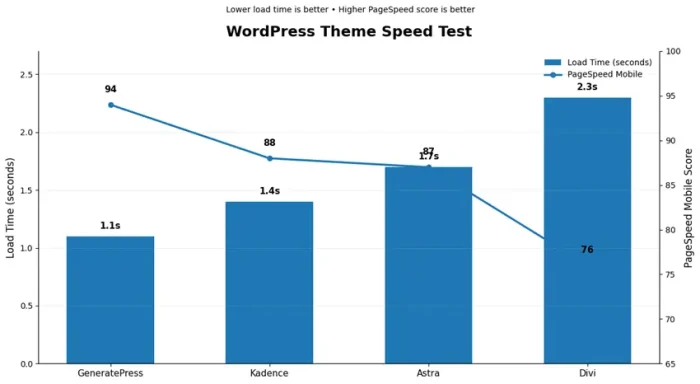
The developer says a fresh install adds under 10 KB gzipped to a page. In our homepage test, it was the fastest theme we tried:
| Theme | Load Time | PageSpeed (Mobile) |
|---|---|---|
| GeneratePress | 1.1s | 94 |
| Kadence | 1.4s | 88 |
| Astra | 1.7s | 87 |
| Divi | 2.3s | 76 |
Kadence came close and gives you more design tools for that 0.3 second gap. Our Kadence review covers that trade-off. Divi was more than a second slower on the same layout.
One thing to keep in mind is that using a light theme is only the starting point. If you build every page with Elementor, your page weight will look like an Elementor site on any theme.
Build with GenerateBlocks or core blocks, and the whole setup stays light.
To keep a GeneratePress site fast:
- Build with GenerateBlocks or core blocks instead of a heavy page builder.
- Turn off any Premium modules you don’t use.
- Host your fonts locally.
- Add a good caching plugin. Our WP Rocket vs FlyingPress comparison helps you pick one, and our list of the best WordPress caching plugins includes free options.
- Choose fast hosting. See our tested list of the fastest web hosting providers.
Our guide with more tips to speed up your WordPress site goes further. If you want to compare GeneratePress with other light themes, see our list of the fastest WordPress themes.
Design and Customization
The Customizer handles the basics well: colours, fonts, layout widths, header and navigation settings. You can get a clean, professional blog without touching anything else.
Elements is where GeneratePress gets interesting. With it, you can:
- Replace the site header with your own block-built header
- Insert content at any hook, like after the first paragraph or before the footer
- Build block templates for single posts and archives
- Control where each element shows using display rules (by post type, category, page and more)
For affiliate sites, this is a big time saver. You can add a disclosure box or a comparison table to every post in a category without editing posts one by one.
We use hooks to place affiliate disclosures across our review posts, and it took a few minutes to set up. If you run affiliate links, our list of the best affiliate link cloaking plugins pairs well with this setup.
The trade-off is the learning curve. GeneratePress doesn’t hand you a finished design with dozens of toggles the way Astra does.
You design with blocks, and that takes some practice if you’ve only used page builders before.
WooCommerce
GP Premium’s WooCommerce module controls shop columns, product page layouts, sticky add-to-cart and a few related settings. That’s enough for a small store.
If you need quick view, slide-out filters, variation swatches or a two-step checkout, you’ll have to add plugins or use Astra Pro, which includes those features.
Our Astra theme review covers its store features. For bigger stores, hosting matters more than the theme; see the best WooCommerce hosting providers and our guide on how to build an online store.
Support and Updates
GeneratePress support runs through its forum. Tom and his team answer most threads themselves, and the old threads are a good knowledge base. Search before you post, and you’ll often find the answer already there.
GP One adds priority email support.
The theme gets regular updates and has a long record of not breaking sites. That matters more than it sounds when you run several blogs and don’t want to check each one after every update.
GeneratePress Pricing in 2026
| Plan | Price | What You Get | Sites |
|---|---|---|---|
| Free | $0 | GeneratePress theme | Unlimited |
| GP Premium | $59/year | All Premium modules, 60+ starter sites, updates and forum support | Up to 500 |
| GenerateBlocks Pro | $99/year | 300+ patterns, advanced block features | Up to 500 |
| GenerateCloud | $99/year | Your own pattern libraries (needs GenerateBlocks Pro) | Up to 500 |
| GP One | $149/year | GP Premium + GenerateBlocks Pro + GenerateCloud, 80+ starter sites, priority email support | Up to 500 |
All plans renew yearly, and you can cancel any time. There’s a 30-day money-back guarantee. You can use your license on client sites you build and manage, but you can’t resell or share it.
There’s no lifetime plan on the pricing page right now. The good news is GP Premium doesn’t do the “cheap first year, expensive renewal” trick. You pay $59 every year.
Want it cheaper? GeneratePress usually runs a Black Friday sale. Check our GeneratePress Black Friday discount page for the latest offer.
GeneratePress Pros and Cons
What We Like
- Very light base (under 10 KB gzipped, per the developer)
- Fastest theme in our test (1.1s, 94 PageSpeed)
- GP Premium is $59/year with no renewal price jump
- Every paid plan covers up to 500 sites
- Elements and hooks make site-wide changes easy
- Clean, accessible markup
- Works with any page builder
- 30-day refund
What We Don’t Like
- Smaller starter-site library than Astra or Kadence
- Designing with blocks takes time to learn
- WooCommerce features are basic without extra plugins
- No lifetime plan
- Support is forum-based unless you buy GP One
GeneratePress vs Astra vs Kadence vs Divi
| Theme | Free Version | Paid From | Best For |
|---|---|---|---|
| GeneratePress | Yes | $59/year (GP Premium) | Fast blogs, affiliate sites, block builders |
| Astra | Yes | $99 first year, $149 renewal (3 sites) | Templates, WooCommerce, Elementor users |
| Kadence | Yes | $99/year (Essentials) | Block users who want more built-in design tools |
| Divi | No | $89/year or $249 lifetime (unlimited sites) | Designers who want visual drag-and-drop |
GeneratePress vs Astra
GeneratePress is lighter and cheaper to renew. Astra has more templates and more WooCommerce features built in. Speed-focused bloggers usually prefer GeneratePress.
Beginners who want a ready-made look often prefer Astra. We go deep on this in our GeneratePress vs Astra comparison.
GeneratePress vs Kadence
Kadence was only 0.3 seconds slower in our test and gives you more design tools out of the box: a better header builder, more blocks, more templates. GeneratePress is cheaper and leaner.
Developers and speed purists lean toward GeneratePress; most designers will finish faster with Kadence. See our Kadence review.
GeneratePress vs Divi
Divi gives you full visual drag-and-drop design and a lifetime option. GeneratePress is more than a second faster on the same layout and doesn’t lock your content into a proprietary builder.
Read our Divi review for the full picture.
Who Should Use GeneratePress?
Good fit:
- Bloggers and affiliate marketers who care about speed and Core Web Vitals
- Agencies that build with blocks (one license covers 500 sites)
- Developers who like hooks and clean code
- Anyone who wants low, predictable yearly pricing
Not the best fit:
- Beginners who want a finished template with lots of toggles
- Stores that need advanced WooCommerce features built in
- People who want to design visually with drag and drop
If you’re still weighing options, our guide on how to choose a WordPress theme walks you through the decision.
FAQs Related to GeneratePress Review
Is GeneratePress free?
Yes. The theme is free on WordPress.org. GP Premium and GP One are paid add-ons.
How much is GeneratePress Premium?
GP Premium is $59/year. GP One, which adds GenerateBlocks Pro and GenerateCloud, is $149/year. Both cover up to 500 sites.
What’s the difference between GP Premium and GP One?
GP One includes GP Premium plus GenerateBlocks Pro and GenerateCloud. It also adds more starter sites (80+ vs 60+) and priority email support.
Is GeneratePress good for SEO?
Yes. It outputs clean, fast HTML and works with Rank Math, Yoast and every other SEO plugin. A fast theme helps, but content and links still decide rankings. Our guide on how to find profitable keywords is a good next step.
Does GeneratePress work with Elementor?
Yes. It works with Elementor and Beaver Builder, though GenerateBlocks will give you a lighter page.
Is GeneratePress good for WooCommerce?
For small stores, yes. Bigger stores that need quick view, filters or swatches will need extra plugins or a theme like Astra Pro.
Does GeneratePress have a lifetime license?
Not at the moment. The pricing page only lists yearly plans.
Can I use GeneratePress on client sites?
Yes, on sites you build and manage, up to 500. You can’t resell or share the license.
Is GeneratePress better than Astra?
For speed and renewal price, usually yes. For templates and WooCommerce features, Astra offers more. See GeneratePress vs Astra.
Does GeneratePress offer refunds?
Yes. There’s a 30-day money-back guarantee on all paid plans
Final Verdict: Is GeneratePress Worth It?
GeneratePress is still our first pick for blogs and affiliate sites. The free theme is fast and stable. GP Premium is fairly priced at $59 a year, and Elements alone makes it worth the money if you run a content site.
GP One is great value if you build many sites with blocks.
It isn’t for everyone. If you want a big template library or a store with every feature built in, look at Astra or Kadence. If you want full drag-and-drop design, Divi is the better match.
But if you want a fast, clean base you won’t outgrow, GeneratePress is hard to beat.
GeneratePress Review: Still the Best Lightweight Theme?
- Performance
- Features
- Value for Money
- Support
Summary
GeneratePress is still our first pick for blogs and affiliate sites. The free theme is fast and stable.