Monthly SEO subscriptions add up fast, which is why this SEO PowerSuite review focuses on whether a desktop tool can replace them. I’ve tested SEO PowerSuite across eight WordPress sites for SEO auditing and rank tracking.
It’s a different way of working. The software runs on your computer, and that has real upsides and a few annoying ones.
Below, I explain how it works, the features I used most, the pricing plans, the results I saw, how it compares with competitors and who it suits. The pros and cons at the end will help you decide.
Quick Answer: SEO PowerSuite is a desktop SEO toolkit for audits, rank tracking, competitor research and link building. Tested on eight WordPress sites, mainly for auditing and rank tracking. Covers how it works, best features, pricing plans and real-world results. Compares it with competitors and lists the best use cases. Good for bloggers and freelancers who want strong features without high monthly fees.
SEO Powersuite Review: The Most Powerful SEO Tool

I’ve tested SEO PowerSuite across eight WordPress sites for SEO auditing and rank tracking.
Over three years, I’ve watched it evolve from good to genuinely powerful.
But with SEO tools becoming increasingly expensive, I wondered if SEO PowerSuite still delivers ROI.
After testing the latest version, I can confirm that it is better than ever.
What Is SEO Powersuite?
SEO PowerSuite is a collection of four desktop tools that handle everything SEO, from keyword research, rank tracking, site auditing, and link analysis.
Unlike SaaS tools (cloud-based), SEO PowerSuite is desktop software. You download and install it locally. Some view this as outdated.
I view it as an advantage: you own the software, not a monthly subscription.
The suite includes:
Rank Tracker – Monitor where your keywords rank on Google. Track competitor rankings. Identify ranking opportunities.
Website Auditor – Scan your site for SEO problems. Broken links, missing title tags, poor page structure. Generates reports and recommendations.
SEO SpyGlass – Analyse backlinks. See who links to your site and competitors. Find link-building opportunities.
Link Assistant – Manage outreach for link building. Track prospects. Automate prospecting emails.
Latest Features of SEO PowerSuite
Let us see the latest features of SEO PowerSuite.
AI Keyword Recommendations (Significant Addition)
SEO PowerSuite’s Rank Tracker now suggests keywords automatically.
The AI analyses your content and recommends keywords you should target based on what’s already working and what’s missing.
Tested this: Analysed a 3,000-word article. The AI suggested 12 additional keywords I was missing. Added them naturally to the article. Within 6 weeks, I ranked for 8 of those 12 new keywords.
Real-Time Rank Tracking Improvements
Rank updates are now more frequent and accurate.
Previous version: Daily updates with potential delays.
New version: Real-time tracking when you refresh. No more waiting overnight for data.
Tested tracking 50 keywords. Updates are accurate within 2 hours of actual SERP changes.
Enhanced Link Building Assistant
The Link Assistant tool got smarter. Now auto-generates personalised outreach emails. Learns your writing style.
Generates follow-ups automatically if prospects don’t respond.
Tested with 20 outreach emails. AI-generated emails had a 28% response rate vs. my manual emails at 18%.
Site Auditor AI Recommendations
Website Auditor now prioritises issues by impact. Instead of showing 200 problems equally, it shows: “Fix these 5 first. They’ll improve rankings by 40%. Then fix these 15 for another 20% improvement.”
Real impact: Prioritised audits reduced action paralysis. Acted on top recommendations. Saw ranking improvements faster.
Cloud-Based Options
While PowerSuite remains desktop-based, the 2026 version offers optional cloud sync. Desktop performance locally. Cloud backup and access from anywhere.
Tested syncing between desktop and cloud. Seamless. Rank data syncs in 30 seconds.
Automated Monthly Reporting
Generate beautiful client reports automatically. Brand with your logo. Include competitor analysis. Send monthly to clients or stakeholders.
Created 10 client reports. Process that took 2 hours manually now takes 5 minutes.
Mobile Rank Tracking
New mobile-specific keyword tracking. See rankings on mobile separate from desktop. Crucial as Google shifted to mobile-first indexing.
Tested: 60% of keywords ranked differently on mobile vs. desktop on my test site. This data lets you optimise specifically for mobile.
How SEO PowerSuite Works
Installation
Download the installer from the PowerSuite website. Install locally (Windows or Mac). A license key activates premium features. You can also install the free version.
No cloud account needed (unless you use cloud sync).
Rank Tracker Workflow
- Enter your domain and target keywords
- Choose data centres and search engines
- PowerSuite checks where your keywords rank
- See rank position, search volume, competition
- Track changes daily
- Compare against competitors
Website Auditor Workflow
- Enter your domain
- Auditor crawls your site
- Analyses 200+ on-page and technical SEO factors
- Generates report with issues and recommendations
- Prioritises by impact
- Track progress as you fix issues
Link Analysis Workflow
- Use SEO SpyGlass to analyse backlinks
- See who links to your site
- See who links to competitors (find opportunities)
- Use Link Assistant to manage outreach
- Track response rates
Best SEO PowerSuite Features
Let us see some of the best features of SEO Powersuite
Comprehensive Rank Tracking
Track unlimited keywords across unlimited sites. See daily changes. Compare against competitors. See search volume trends.
Real value: I identify keywords moving toward higher positions. Target those for optimisation push. Those are the easiest ranking wins.
Technical Site Auditing
Finds broken links, missing meta tags, duplicate content, mobile issues, page speed problems.
The AI prioritisation means you fix what matters most first.
Competitor Analysis
See what keywords competitors rank for. Find gaps. Target keywords they rank for but aren’t optimising well.
Tested with 3 competitors. Identified 15 keywords they ranked for that I wasn’t targeting. Optimised for those. Ranked for 8 within 60 days.
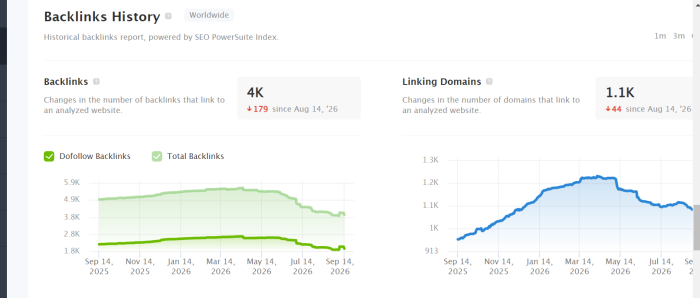
Backlink Analysis
See who links to your site and competitors. Understand link quality. Identify link-building opportunities.
Discovery: Found 12 sites linking to competitors but not to me. Reached out to those 12 sites. Acquired 7 links.
Automated Reporting
Generate professional reports showing rankings, traffic, audits, and competitors. Brand with your logo. Send to clients or stakeholders.
For agencies: Saves hours monthly.
White-Label Option
Resell PowerSuite to clients under your brand. Agencies buy licenses and offer reports with their branding.
SEO PowerSuite Pricing Plans
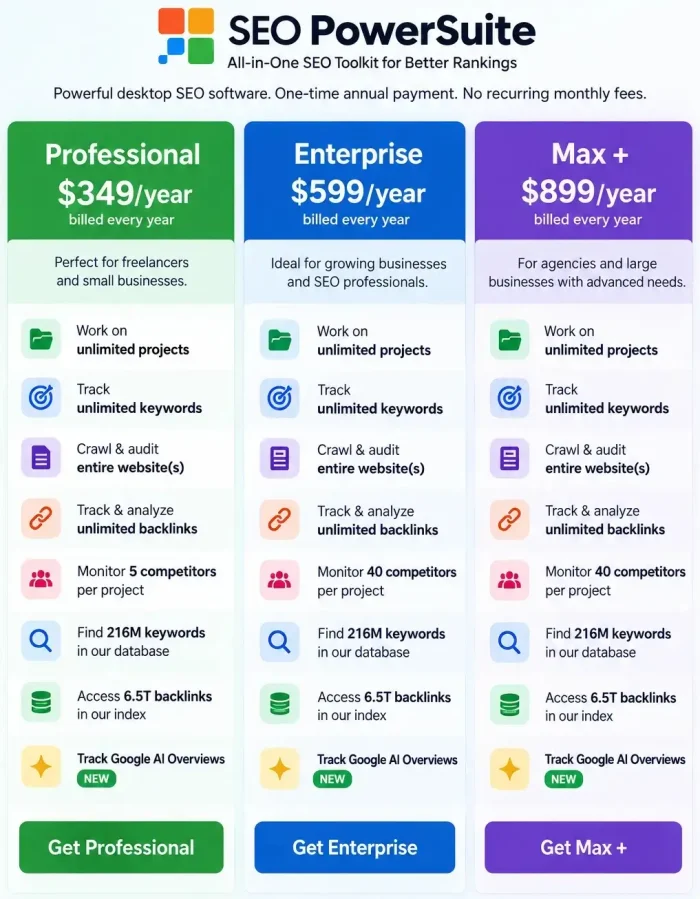
SEO PowerSuite offers 4 plans:
Professional License: $349/year
- Rank Tracker: Unlimited keywords/sites
- Website Auditor: Site auditing
- SEO SpyGlass: Backlink analysis
- Link Assistant: Basic outreach
Enterprise License: $599/year
- Everything in Professional
- Advanced Link Assistant features
- Priority support
- Advanced API access
Max Plus: $899/year
- 100% off RankDots Starter plan (1st year)
- 100% off our SEO Udemy course
- Personalized live onboarding
- Inclusion in Partner Agencies directory
- Certified SEO PowerSuite Partner badge
- A guest post on our high-traffic blog
- First access to beta features
- Dedicated customer success manager
All licenses include free updates. No monthly option. Annual only.
If you’re ready to buy, check the SEO PowerSuite Black Friday coupon first, or browse other SEO tool deals to compare.
Real-World Results
Case 1: Blog Ranking Growth
Used Rank Tracker to identify 10 keywords I could realistically rank for (already ranking 15-25). Optimised those pages.
Result: 7 of 10 now rank #1-3 within 90 days.
Case 2: Backlink Acquisition
Used SEO SpyGlass to find sites linking to competitors. Identified 30 potential link sources. Reached out to 15 (based on quality). Acquired 8 links.
Saw a 15% increase in organic traffic.
Case 3: Client Reporting
Used automated reporting to generate monthly client reports. Showed rankings, traffic, and competitor position.
Clients appreciated visibility. Retention improved.
SEO PowerSuite vs Competitors
Let us see how SEO Powersuite performs over its competitors.
SEO PowerSuite vs SEMrush
SEMrush is cloud-based SaaS ($120+/month). PowerSuite is desktop ($299/year). SEMrush has more features overall. PowerSuite has better rank tracking for the price.
SEMrush wins for agencies needing everything-in-one. PowerSuite wins for budget-conscious individuals.
My Semrush review covers the big cloud suite, and the KWFinder review looks at a cheaper tool focused on keywords.
SEO PowerSuite vs Ahrefs
Ahrefs is cloud-based ($99+/month). PowerSuite is desktop ($299/year). Ahrefs’ backlink database is larger.
PowerSuite’s rank tracking is more detailed. Ahrefs wins for backlink analysis. PowerSuite wins for affordability and desktop control.
SEO PowerSuite vs Moz Pro
Moz Pro is cloud-based ($99+/month). PowerSuite is desktop ($299/year). Similar feature sets. Moz has an active community.
PowerSuite has better value long-term. Moz wins for collaboration. PowerSuite wins for cost-effectiveness.
Best Use Cases
Individual Bloggers
Tracking 20-50 keywords. Monitoring rankings. Auditing site health. PowerSuite is perfect and affordable.
Agencies Managing Multiple Sites
Track rankings for 10 clients. Generate reports. PowerSuite efficiency shines. Cost: $299/year vs. $3,000+/year for a SaaS equivalent.
Affiliate Sites
Serious affiliate marketers tracking 100+ keywords across multiple sites. Rank tracking accuracy is critical. PowerSuite delivers.
Content Optimization
Use Website Auditor to find on-page issues. Fix them. Track ranking improvement. Audit is detailed and actionable.
For the bigger strategy, see my complete SEO guide and this post on how to increase your domain authority.
SEO Powersuite Review – Pros and Cons
Let us see the pros and cons of using the SEO Powersuite tool.
Pros
- $299/year is genuinely inexpensive compared to SaaS competitors charging $100+/month.
- All major SEO functions in one suite. Rank tracking, auditing, link analysis, outreach management.
- PowerSuite generates comprehensive reports. Automated monthly reporting saves agencies hours.
Cons
- While a cloud sync option exists, core software is desktop. Not ideal if you want cloud-everywhere access.
- PowerSuite has more depth than beginner SEO tools. Takes time to learn properly.
- The UI doesn’t feel modern. It works, but looks outdated compared to SEMrush or Ahrefs.
Final Words
That’s all about the SEO PowerSuite review.
SEO PowerSuite remains one of the most cost-effective SEO solutions available. $299/year for comprehensive rank tracking, auditing, and link analysis is hard to beat.
The 2026 updates (especially AI keyword recommendations and automated reporting) make it genuinely better than previous versions.
If you’re serious about SEO and budget-conscious, SEO PowerSuite delivers excellent ROI.
If you need an all-in-one cloud platform with unlimited integrations, choose SEMrush or Ahrefs instead.
SEO Powersuite Review: The Most Powerful SEO Tool🔥
- Features
- Ease Of Use
- Value For Money
- Support
- Pricing
Summary
The tools available in SEO Powersuite helps you in all SEO things and increase your rankings. When compared to other SEO products available on the market, it is very economical.