Choosing between WPForms vs Gravity Forms is less about features and more about how you like to work. WPForms is built for speed and simplicity. Gravity Forms is built for flexibility, and it expects you to put in more effort.
Pick the wrong one and you’ll either fight a tool that’s too basic for your forms, or pay every year for power you never use.
I tested both plugins on real sites. Below you’ll see how I tested them, a side-by-side comparison, real-world results and a clear recommendation for each type of user.
- How I Tested These Plugins
- WPForms vs Gravity Forms at a Glance
- WPForms vs Gravity Forms: Which Is The Best
- WPForms vs Gravity Forms: Real-World Testing
- Contact Form
- Lead Generation with CRM Integration
- Multi-Step Application
- Quote Calculator
- Payment Form
- Spam Protection
- Developer Features: The Major Difference
- API and Webhook Testing
- Templates and Speed to Production
- AI Form Builder
- Performance Impact
- Entry Management and Reporting
- WPForms vs Gravity Forms: Pricing Plan
- Best Use Cases: Decision Matrix
- Pros and Cons: Honest Assessment
- User Reviews
Quick Answer: WPForms focuses on speed and simplicity, while Gravity Forms focuses on flexibility and advanced logic. Both plugins were tested side by side on real WordPress sites. Includes an at-a-glance comparison and real-world testing results. WPForms suits beginners and small businesses who want forms live fast. Gravity Forms suits developers and complex forms that need custom workflows.
WPForms and Gravity Forms take fundamentally different approaches. WPForms optimises for speed and simplicity. You can get a professional form built in minutes without learning complex concepts.
Gravity Forms optimises for flexibility and customisation. You can build anything, integrate anything, extend anything.
For beginners and small business owners, WPForms wins. For developers, agencies, and advanced WordPress projects, Gravity Forms deserves serious consideration.
I tested both plugins across common workflows, developer capabilities, and real-world use cases. Here’s what actually matters.
How I Tested These Plugins
Environment: WordPress 6.6, GeneratePress theme, SiteGround shared hosting
Plugins tested: WPForms Basic/Plus/Pro, Gravity Forms Basic/Pro/Elite
Workflows tested
- Simple contact form
- Lead generation form
- Multi-step application
- Quote calculator
- Payment form
- Complex conditional logic
- API/webhook testing
Measurement criteria: Setup time, clicks required, ease level, flexibility, extensibility
What I did not test: Extremely large forms (1,000+ fields), multisite installations, enterprise-level customisation.
WPForms vs Gravity Forms at a Glance
| Feature | WPForms | Gravity Forms |
|---|---|---|
| Free version | Yes (with ads) | No |
| Drag-and-drop builder | Yes | Yes |
| Templates | 2,100+ | Smaller library |
| Conditional logic | Yes | Yes |
| Multi-page forms | Yes | Yes |
| Calculations | Yes | Yes |
| Payment integration | Yes | Yes |
| Surveys | Yes | Yes |
| Conversational forms | Yes | Yes |
| AI form builder | Yes | No |
| Spam protection | Yes | Yes |
| Entry management | Yes | Yes |
| File uploads | Yes | Yes |
| API access | Yes | Yes, extensive |
| Webhooks | Yes | Yes |
| Custom hooks (filters) | Yes | Excellent (500+) |
| Developer ecosystem | Good | Excellent |
| Extensibility | Good | Excellent |
| Learning curve | Very easy | Moderate |
| Best for | Beginners | Developers |
WPForms vs Gravity Forms: Which Is The Best
What is WPForms?
WPForms is a form builder where the goal is to get forms published fast. Templates, integrations, and ease of use are the priorities. If your workflow is “user fills form > email sent somewhere > maybe integrate with Mailchimp,” WPForms handles this elegantly.
Design philosophy: Simplicity. Hide complex options. Make defaults work for 80% of users.
For a closer look at one side, read my full WPForms review. If you’re leaning toward WPForms, check the WPForms Black Friday discount before buying.
What is Gravity Forms?
Gravity Forms is a form platform where the goal is to make anything possible. Hooks, filters, add-ons, APIs, and extensibility are the priorities.
If your workflow involves custom PHP, API calls, or deeply customised workflows, Gravity Forms is the foundation.
Design philosophy: Flexibility. Expose all options. Let developers build anything.
Who Should Use Each
WPForms for
- Beginners and non-technical users
- Small business owners
- Marketers building lead forms
- Anyone wanting results without learning curves
- People who prefer templates
- Those who don’t need custom code
Gravity Forms for
- WordPress developers
- Agencies building client sites
- Projects requiring custom PHP
- Workflows needing extensive integration
- People building complex applications
- Those who value extensibility over simplicity
WPForms vs Gravity Forms: Real-World Testing
Both forms underwent real-world testing under the following criteria.
Contact Form
Task: Build a contact form with name, email, phone, message, and “How did you hear about us?” dropdown.
WPForms Workflow
- Create new form
- Select “Contact Form” template (pre-built)
- Fields already included: name, email, message
- Drag phone field from library
- Drag dropdown, configure options
- Configure email notification (already pre-filled)
- Save
Time: 3 minutes Clicks: 14 Difficulty: Very easy
The template had most of what I needed. Took 3 minutes total.
Gravity Forms Workflow
- Create new form
- Click “Add Form”
- Start with a blank form
- Add text field for name
- Add email field
- Add phone field
- Add textarea for message
- Add dropdown, configure options
- Configure email notification
- Save
Time: 5 minutes Clicks: 28 Difficulty: Easy
No template, so more manual setup. But straightforward once you know the interface.
Winner: WPForms
WPForms saves 2 minutes via templates. For beginners, this matters. Both tools handle this basic task easily, but WPForms is faster.
Lead Generation with CRM Integration
Task: Build a lead form capturing name, email, company, job title, phone, budget range. Integrate with HubSpot CRM.
WPForms
- Start with the “Lead Generation” template
- Fields mostly present
- Go to Settings > Integrations > Add HubSpot
- Authenticate HubSpot account
- Map fields (Name > First Name, Email > Email, Company > Company, etc.)
- Test submission
Time: 5 minutes. Setup type: Built-in, simple UI. Dependencies: HubSpot API key
HubSpot integration is available in the WPForms Basic plan.
Gravity Forms
- Create form from scratch
- Add all fields manually
- Install “Gravity Forms + HubSpot” add-on or use Zapier/webhooks
- If using add-on: Configure API keys, set up field mapping
- If using Zapier: Leave Gravity Forms, set up Zapier connection, map fields
- Test submission
Time: 7-10 minutes (if using add-on; 15+ if using Zapier). Setup type: Via add-on or external service. Dependencies: HubSpot API key + add-on or Zapier
Gravity Forms doesn’t have direct HubSpot integration. Uses add-ons or Zapier.
Winner: WPForms
Direct integration built-in. WPForms has 1,000+ integrations. Gravity Forms requires add-ons or Zapier, adding complexity.
Multi-Step Application
Task: Build a 3-page application with:
Page 1: Personal details (name, email, phone)
Page 2: Experience (dropdown for level; if “Advanced” is selected, show bonus fields)
Page 3: File upload and confirmation
Conditional page display: Skip page 2 if “Other” is selected on page 1
WPForms
- Create form
- Add page breaks
- Page 1: Name, email, phone fields
- Page 2: Experience dropdown, additional fields with conditional visibility
- Page 3: File upload, review
- Configure: Conditional logic shows/hides fields
- Cannot conditionally show/hide entire pages
Problem: You can’t conditionally skip a page. You can hide fields on a page, but not the page itself.
Time: 7 minutes. Complexity: Moderate. Limitation: Can’t skip entire pages conditionally
Gravity Forms
- Create form
- Add page breaks
- Page 1: Personal details
- Page 2: Experience dropdown, additional fields
- Page 3: File upload, review
- Configure: Conditional logic for both fields and pages
- Can skip entire page 2 based on conditions
Time: 8 minutes. Complexity: Moderate. Advantage: Can conditionally skip pages
Winner: Gravity Forms
For complex branching applications, Gravity Forms’ page-level conditional logic is more powerful. WPForms can hide fields but not entire pages.
This matters when you need different application paths based on user selections.
Quote Calculator
Task: Product selector (A, B, C with different prices) x quantity + optional add-ons + tax calculation + final price display.
WPForms
- Create form
- Add product radio buttons (each with a value: A=100, B=150, C=200)
- Add quantity number field
- Add checkbox for add-ons
- Add calculated field: subtotal = price x quantity
- Add calculated field: with addons = if checked, add 75, else 0
- Add calculated field: tax = (subtotal + addons) x 0.10
- Add calculated field: total
Time: 8 minutes. Calculation approach: Multiple calculated fields strung together. Ease: Moderate
You’re building a calculation pipeline: field > field > field. Works, but feels like multiple steps.
Gravity Forms
- Create form
- Add product dropdown
- Add quantity field
- Add checkbox for add-ons
- Add single calculated field with formula:
parseFloat({Product_Price}) * {Quantity} + ({Add_Ons} ? 75 : 0) + ((parseFloat({Product_Price}) * {Quantity} + ({Add_Ons} ? 75 : 0)) * 0.10)
- Show calculated field on form
Time: 6 minutes. Calculation approach: Single field with formula. Ease: Good for developers, steep for non-technical users
One field handles all logic. More powerful but requires writing code.
Winner: Tie (depends on user skill)
For non-technical users: WPForms (visual calculation builder)
For developers: Gravity Forms (single formula, more control)
Payment Form
Task: Build a $49 product sales form with:
- Customer name and email
- Quantity selector (adjust price accordingly)
- Discount code field
- Stripe payment
WPForms
- Create form
- Add customer fields
- Add quantity number field
- Add discount code field
- Add calculated field: price = 49 x quantity
- Add Stripe payment field configured to $49
- Problem: Discount code logic requires a workaround. Need conditional calculation based on discount entered.
Time: 7 minutes. Payment setup: Straightforward. Discount logic: Limited (would need custom code or workaround)
Gravity Forms
- Create form
- Add customer fields
- Add quantity field
- Add discount field
- Add calculated field with logic for price adjustment
- Add Stripe payment field mapped to calculated field
- Stripe payment automatically uses calculated amount
Time: 8 minutes. Payment setup: Works but requires field mapping. Discount logic: Cleaner via calculated field
Winner: Gravity Forms
Gravity Forms’ approach of mapping calculated fields to payment amounts is cleaner. Both handle payments, but Gravity Forms is more elegant for complex pricing.
Spam Protection
WPForms
- Honeypot (hidden field)
- reCAPTCHA (v2, v3, hCaptcha)
- Cloudflare Turnstile
- Akismet integration
- Custom validation
Configuration: Add reCAPTCHA, enable Akismet, done.
Gravity Forms
- Honeypot
- reCAPTCHA (v2, v3)
- hCaptcha
- Turnstile
- Custom validation via hooks
Configuration: Similar process.
Verdict: Equal
Both handle spam effectively. No practical difference for typical forms. reCAPTCHA + honeypot stops most spam on either platform.
Developer Features: The Major Difference
This is where these products diverge significantly.
WPForms Developer Features
- Hooks and filters: Available, documented
- API: Yes, can query submissions
- Webhooks: Yes
- Custom fields: Can extend via hooks
- Third-party ecosystem: Good (some add-ons)
Extensibility: Good but secondary
Developer features exist but feel like afterthoughts. Core product is built for non-developers.
Gravity Forms Developer Features
- Hooks and filters: 500+ hooks documented
- API: Full REST API + PHP API
- Webhooks: Yes
- Add-on framework: Extensive ecosystem (100+ official add-ons)
- Custom field types: Built specifically for developers
- Third-party ecosystem: Excellent (huge community)
Extensibility: Core design principle
Developer features are built into the foundation. The entire platform is designed around extensibility.
Forms often fail silently because WordPress email is unreliable. My WP Mail SMTP Pro review explains the fix.
Real Difference: Building Custom Functionality
Example: Custom field type that validates against an external API
WPForms: Hook into validation, call external API, return error if needed. Possible but requires understanding WordPress action hooks.
Gravity Forms: Multiple approaches:
- Use conditional logic + webhooks to post to external service
- Create custom field type using documented framework
- Use one of 100+ community add-ons already built for this
Gravity Forms assumes you might need to extend it. WPForms assumes most users won’t.
Winner: Gravity Forms (for developers)
If you need to build custom functionality beyond the UI, Gravity Forms is the better foundation.
API and Webhook Testing
WPForms API
- Query submissions: Yes
- Create submissions: Limited
- Update submissions: Limited
- REST endpoint: Exists but basic
Gravity Forms API
- Query submissions: Yes
- Create submissions: Yes
- Update submissions: Yes
- Extensive REST API
- PHP API for internal use
- Webhooks with conditional firing
Example: Auto-create user from form submission
WPForms: Use Zapier or custom plugin code.
Gravity Forms: Use hooks or webhooks; multiple documented ways to do this
Verdict: Gravity Forms wins (for developers)
Gravity Forms’ API is more comprehensive. More methods available without external services.
Templates and Speed to Production
WPForms
- 2,100+ templates across categories
- Modern designs
- Lead generation, contact, feedback, survey, application
- Time to functional form: 1-2 minutes
Gravity Forms
- Smaller template library
- Can start from blank quickly
- Documentation shows common workflows
- Time to functional form: 3-5 minutes
Verdict: WPForms wins
WPForms’ template library significantly speeds up initial development. For agencies billing hourly, those 2-3 minutes per form add up.
Want the full field? This list of the best WordPress form builder plugins compares more tools. If you mainly need surveys, these WordPress survey plugins are a better fit.
AI Form Builder
Let us compare the AI Form Builder feature of WPForms and Gravity Forms.
WPForms AI
Prompt: “Create a customer feedback form with name, email, rating, NPS, comments, and conditional follow-up questions based on rating.”
Result: Generated a 6-field form with conditional logic and an email notification
Quality: 90% complete, minimal tweaking needed. Time saved: 3-4 minutes. Usefulness: High for getting started
Gravity Forms AI
Gravity Forms doesn’t have native AI form generation. Can integrate with ChatGPT via API, but it’s not built-in.
Verdict: WPForms wins (this round)
WPForms’ AI builder is a nice speed bonus. Gravity Forms requires external integration for AI features.
Performance Impact
Tested on the same WordPress installation with identical hosting/theme:
CSS/JS added:
WPForms: +2 KB CSS, +1.8 KB JS
Gravity Forms: +2.2 KB CSS, +2.1 KB JS
Form submission time:
WPForms: 115ms processing
Gravity Forms: 125ms processing
Verdict: WPForms slightly lighter, but negligible difference
Both have minimal performance impact. Not a decision factor.
Forms work best as part of a plan. Here’s how to build a sales funnel in WordPress, and my OptinMonster review covers popup forms for list building. For the rest of your setup, see the best WordPress plugins.
Entry Management and Reporting
WPForms
- View submissions in admin
- Search, filter, export
- Edit entries
- Entry export to CSV
- Limited reporting
Gravity Forms
- View submissions in admin
- Search, filter, export
- Edit entries
- Advanced filtering
- Entry API access
- Webhooks for custom processing
Verdict: Gravity Forms is more powerful (if you need it)
Gravity Forms gives you more control over what happens to entries. For simple lead collection, both are equal. For complex workflows, Gravity Forms wins.
There’s a third strong option too. My Formidable Forms review and the WPForms vs Formidable Forms comparison cover it.
WPForms vs Gravity Forms: Pricing Plan
WPForms Current Pricing
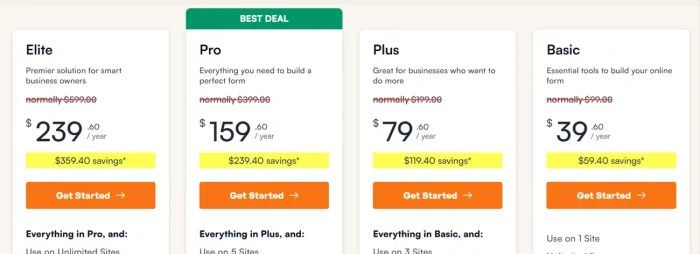
| Plan | Intro (Monthly) | Renewal (Annual) | Sites |
|---|---|---|---|
| Basic | $14/mo | $99/year | 1 |
| Plus | $25/mo | $199/year | 3 |
| Pro | $40/mo | $399/year | 5 |
| Elite | $99/mo | $599/year | Unlimited |
Important: Renewal pricing is significantly higher than introductory pricing shown.
Gravity Forms Current Pricing
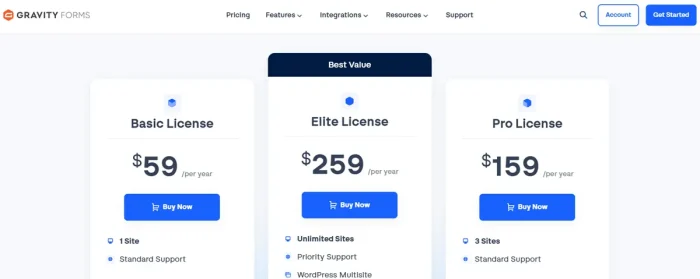
| Plan | Annual | Sites |
|---|---|---|
| Basic | $59/year | 1 |
| Pro | $159/year | 3 |
| Elite | $259/year | Unlimited |
There is no free version of Gravity Forms. Instead, you get three different premium versions.
Cost Analysis: Single Website (1 year)
- WPForms Plus: $25/month introductory = $300 year 1; $199/year renewal
- Gravity Forms Pro: $159/year flat
Year 1: WPForms cheaper ($300 vs $159)
Year 2+: Gravity Forms cheaper ($199 vs $159 annual)
Verdict: Tie (depends on timeline)
Short term: WPForms introductory pricing is cheaper
Long term: Gravity Forms consistent pricing
For agencies managing multiple client sites
- WPForms Elite: $99/month = $1,188/year
- Gravity Forms Elite: $259/year
WPForms for unlimited sites would be $699/year renewal, vs Gravity Forms $259/year. Gravity Forms wins on multi-site economics.
Best Use Cases: Decision Matrix
| Use Case | Choose | Why |
|---|---|---|
| Simple contact form | WPForms | Faster (template) |
| Lead generation | WPForms | Marketing integrations |
| Newsletter signup | WPForms | Ease and templates |
| Beginner’s first form | WPForms | Lowest learning curve |
| Multi-step application | Gravity Forms | Conditional page logic |
| Quote calculator | Either | Both capable |
| Payment form | Either | Both handle well |
| Complex workflow | Gravity Forms | More flexible |
| Developer project | Gravity Forms | API and hooks |
| Custom field type | Gravity Forms | Built for extension |
| 10+ client websites | Gravity Forms | Better multi-site pricing |
| Quick agency project | WPForms | Templates save time |
| User registration | Either | Both capable |
| Webhook/API requirements | Gravity Forms | More robust API |
Pros and Cons: Honest Assessment
Let us see the pros and cons of WPForms and Gravity Forms.
WPForms Pros and Cons
Pros
- Easier learning curve (templates + visual builder)
- Large template library (2,100+) saves time
- AI form builder (unique feature)
- Strong marketing integrations (Mailchimp, AWeber, etc.)
- Excellent documentation for beginners
- Introductory pricing is competitive
- Intuitive interface
Cons
- Renewal pricing significantly higher than intro
- Limited developer extensibility
- API is basic compared to Gravity Forms
- Advanced features often require higher-tier plans
- Smaller third-party add-on ecosystem
Gravity Forms Pros and Cons
Pros
- Extensive API and webhook support
- 500+ hooks for developers
- Strong add-on ecosystem (100+ official add-ons)
- Conditional page logic (entire pages can be hidden)
- Better for multi-site (flat rate for unlimited)
- More powerful for complex workflows
Cons
- No free version
- Smaller template library (requires more manual setup)
- Less beginner-friendly
- No built-in AI form builder
- Setup requires more steps for simple forms
User Reviews
WPForms Reviews
G2: 4.3/5 from 26 reviews
Capterra: 4.3/5 from 26 reviews
Common praise:
- Easy to use
- Good templates
- Quick setup
- Strong integrations
Common complaints:
- Renewal pricing high
- Some advanced features in higher plans only
Gravity Forms Reviews
Capterra: 4.6/5 from 91 reviews
Common praise:
- Powerful and flexible
- Great support
- Developer-friendly
- Good for complex projects
Common complaints:
- Learning curve steeper
- Pricing (no free version)
- Manual setup for each form
What These Don’t Tell You
Higher ratings (Gravity 4.6 vs WPForms 4.3) don’t mean Gravity is better. Gravity’s users are developers who expect power. WPForms’ users have mixed experience levels with different expectations.
Choose based on your needs, not review scores.
Final Verdict: Which Should You Choose?
Choose WPForms If You
- Are a beginner or non-technical business owner
- Want forms published in minutes
- Primarily need lead generation
- Run a marketing-focused business
- Value templates and pre-built solutions
- Want strong marketing tool integrations
- Have budget for introductory pricing
- Don’t plan to code custom functionality
Choose Gravity Forms If You
- Are a WordPress developer
- Build websites for clients (agencies)
- Need extensive customisation
- Work with APIs and webhooks
- Manage 5+ websites (multi-site pricing is better)
- Value developer ecosystem and add-ons
- Build complex workflows
- Plan to extend the plugin with code
- Need conditional page logic
- Want consistent long-term pricing
My Recommendation
For most WordPress website owners: Start with WPForms.
The ease of use justifies the cost. Templates get you publishing fast. Integrations connect to your marketing tools. You get results quickly.
For developers and agencies: Go with Gravity Forms.
The API, hooks, and extensibility are worth the learning curve. Multi-site pricing makes sense at scale. The third-party ecosystem gives you pre-built solutions for complex problems.
The deciding question is: will you ever need to customise beyond the UI? If yes, choose Gravity Forms. If no, WPForms saves time and money.
Don’t overthink this. Both are solid products. Pick based on your skill level and specific needs.