
Forms are an important part of a website, as it helps to create interaction between the website owner and the visitors. In this post, we have compared WPForms and Formidable Forms. Check out this WPForms vs Formidable Forms comparison post and decide which is the best one for you.
- How I Tested These Plugins
- WPForms vs Formidable Forms at a Glance
- Overview: WPForms vs Formidable Forms
- WPForms vs Formidable Forms: Real-World Testing
- Best Use Cases Decision Matrix
- WPForms vs Formidable Forms: Pros and Cons
- User Reviews: What Actually Matters
- Final Verdict: Which One Should You Choose?
WPForms and Formidable Forms are solving different problems.
WPForms is built for speed and simplicity: collect leads, send notifications, integrate with marketing tools.
Formidable Forms is built for complexity: calculate quotes, display submitted data as directories, build application-like workflows.
If your primary goal is building forms quickly without complexity, WPForms wins.
If your forms need to do more than collect information (calculate, process, display, transform data), Formidable Forms becomes the stronger choice.
I tested both plugins across real workflows, including contact forms, lead generation, calculations, payments, and data display. Here’s what I found.
How I Tested These Plugins
Before diving into features, here’s what I actually tested:
Environment: WordPress 6.6, GeneratePress theme, SiteGround hosting
Plugins tested: WPForms Basic/Plus/Pro, Formidable Forms Free/Professional/Elite
Workflows: Contact form, lead generation form, quote calculator, payment form, multi-step application, data display/directory
Measurement criteria: Setup time, number of clicks, ease of understanding, performance, output quality
What I did not test: Multisite installations, extreme scale (10,000+ entries), advanced developer hooks
WPForms vs Formidable Forms at a Glance
| Feature | WPForms | Formidable Forms |
|---|---|---|
| Free version | Yes (with ads) | Yes (full-featured) |
| Drag-and-drop builder | Yes | Yes |
| Templates | 2,100+ | 325+ on Elite |
| Conditional logic | Yes | Yes |
| Multi-page forms | Yes | Yes |
| Calculations | Yes | Yes |
| Surveys and polls | Yes | Yes |
| Conversational forms | Yes | Yes |
| AI form builder | Yes | Yes |
| Entry management | Yes | Yes |
| Front-end data display | Limited | Excellent |
| Directories/applications | No | Yes |
| Payment forms | Yes | Yes |
| User registration | Yes | Yes |
| Digital signatures | Yes | Yes |
| Developer hooks | Yes | Advanced |
| Best for | Ease and speed | Advanced workflows |
Overview: WPForms vs Formidable Forms

Before we jump into the head-to-head comparison of the forms, it is important to know what these are and how they work.
WPForms
WPForms is a visual form builder focused on getting forms published quickly. It emphasises templates, integrations, and ease of use.
If your workflow is “user fills out form, email gets sent somewhere“, WPForms handles that well.
Think of WPForms as the form builder for marketers, business owners, and bloggers who want results without learning curves.
Formidable Forms
Formidable Forms is a form builder that also doubles as an application builder.
It emphasises what happens to the data after submission. Forms can calculate values, transform data, display results to users, and build searchable directories.
Think of Formidable as the form builder for people who need submitted data to become something else (a quote, a listing, a user profile, a directory entry).
Quick Decision Matrix
Choose WPForms if
- You want the easiest builder
- You’re primarily collecting leads
- You want lots of templates to start quickly
- You need strong marketing integrations
- You’re a beginner
- You value getting started in minutes
Choose Formidable if
- You need advanced calculations
- You want to display submitted data
- You’re building directories or listings
- You need application-like functionality
- You’re creating complex workflows
- You need more control over what happens to submitted data
WPForms vs Formidable Forms: Real-World Testing
Both forms underwent real-world testing under the following criteria.
Contact Form
Both plugins claim to handle contact forms. But how do they actually compare?
Task: Build a contact form with name, email, message, phone, and a conditional follow-up field (show “How did you hear about us?” only if they select “Other“).
WPForms Workflow
- Create new form
- Select “Contact Form” template (pre-built)
- Fields already in place: name, email, message
- Add phone field (drag from field list)
- Add conditional logic to phone field (if message contains “Other“, show follow-up)
- Configure email notification
- Set redirect page
- Time: 4 minutes
- Clicks: 18
- Difficulty: Very easy
The template started me off with 80% of what I needed. Customisation required minimal configuration.
Formidable Forms Workflow
- Create new form
- Blank form (no contact template pre-built)
- Add text field for name
- Add email field
- Add textarea for message
- Add phone field
- Add dropdown for source
- Add a second field with conditional logic (if source = Other, show follow-up)
- Configure email notification
- Set redirect
- Time: 6 minutes
- Clicks: 28
- Difficulty: Easy
Formidable requires more clicks because it doesn’t start with pre-built templates. Once you know where things are, it’s straightforward.
Winner: WPForms
WPForms saves 2 minutes through templates. For beginners, this matters. For experienced users, both take similar effort once muscle memory develops.
Lead Generation Form
Task: Build a lead form with name, email, company, job title, budget dropdown, and CRM integration (HubSpot).
WPForms Workflow
- “Lead Generation” template selected
- Fields mostly present
- Configure HubSpot integration (settings > integrations > add HubSpot)
- Map fields (name > first name, email > email, company > company, etc.)
- Test submission
- Form ready
- Time: 5 minutes
- Integration setup: Built-in
- Field mapping: Straightforward
HubSpot integration is available in the WPForms Basic plan ($14/month introductory).
Formidable Forms Workflow
- Build form from scratch (no template)
- Add fields manually
- Configure integration (via Zapier or direct API)
- If using Zapier: leave Formidable, open a Zapier account, create a HubSpot connection, map fields, return to Formidable.
- Test
- Time: 8 minutes
- Integration setup: Via Zapier (not direct)
- Field mapping: Requires leaving Formidable
Formidable doesn’t have direct HubSpot integration. It uses Zapier.
Winner: WPForms
Direct integrations save time. WPForms has 1,000+ integrations built-in. Formidable uses Zapier/webhooks, which is more flexible but requires extra setup.
Quote Calculator
Task: Build a calculator form where:
- User selects product (Product A, B, or C)
- Each product has a different base price
- User selects quantity
- Calculate subtotal (price x quantity)
- Add optional service (+$50 if selected)
- Calculate tax (10%)
- Show final price
This is where the products diverge significantly.
WPForms Workflow
- Create form
- Add radio buttons for product (each option has a pre-defined value: Product A=$100, etc.)
- Add a number field for quantity
- Add a checkbox for optional service
- Add a calculated field
- Configuration: subtotal = product price x quantity
- Add another calculated field: with service = if service is checked, add 50, else add 0
- Add calculated field: tax = subtotal x 0.10
- Add calculated field: total = subtotal + service fee + tax
- Setup: 8 minutes
- Calculation complexity: Moderate
- Final price display: Shows in form, can be emailed
WPForms calculations work but feel like bolt-ons. You’re creating multiple calculated fields and stringing them together.
Formidable Forms Workflow
- Create form
- Add dropdown for product
- Add number field for quantity
- Add checkbox for service
- Add a single “calculation” field
- Configuration: Write formula directly
- [product_price] * [quantity] + ([service_selected] ? 50 : 0) + (([product_price] * [quantity] + ([service_selected] ? 50 : 0)) * 0.10)
- Result displays
- Setup: 5 minutes
- Calculation complexity: Single formula (more powerful)
- Final price display: Shows in form, calculates in real-time
Formidable’s calculation system is designed for exactly this. One field handles all the logic.
Winner: Formidable Forms
For anything beyond simple multiplication, Formidable is easier. The calculation system is purpose-built for complex math. WPForms’ calculation features feel secondary.
This is a major differentiator. If you’re building quotes, pricing calculators, or cost estimators, Formidable is the better choice.
Payment Form
Task: Build a form selling a $49 product with:
- Customer details
- Quantity selection
- Discount code option
- Stripe payment processing
WPForms Workflow
- Create form
- Add fields: name, email, quantity, discount code
- Add Stripe payment field
- Configure: set price to $49
- Set quantity field to multiply cost
- Set discount code to reduce total
- Configure notifications
- Test payment
Setup: 6 minutes. Payment integration: Built-in Stripe. Discount handling: Yes, supported
WPForms handles basic payments well. The Stripe integration is straightforward.
Formidable Forms Workflow
- Create form
- Add customer fields
- Add quantity field
- Add discount field
- Add calculation field (Price = 49 * quantity – discount)
- Add payment field configured to use calculation
- Connect to Stripe
- Test payment
Setup: 7 minutes. Payment integration: Via add-on or Stripe Connect. Discount handling: Via calculation field
Formidable’s approach is more flexible because it calculates the price dynamically. If you want conditional pricing or complex discount logic, Formidable is more powerful.
Winner: Tie
For straightforward $49 product sales, both work. For complex pricing (tiered discounts, conditional pricing, bundle deals), Formidable is more capable.
Multi-Step Application
Task: Build a 3-page application form with:
Page 1: Personal details
Page 2: Experience (show more fields if “Advanced” is selected)
Page 3: File upload and confirmation
WPForms Flow
- Create form
- Add page breaks
- Page 1: Name, email, phone
- Page 2: Experience level (radio), additional fields with conditional logic
- Page 3: File upload, review submission
- Configure: Allow save and resume
- Test
Setup: 8 minutes. Conditional pages: Not available (conditionals show/hide fields, not pages). Save and resume: Yes.
WPForms shows/hides fields based on conditions but doesn’t conditionally show entire pages. This limitation matters for complex applications.
We have already written an in-depth review post about WPForms. Check out the detailed WPForms review.
Formidable Forms Flow
- Create form
- Add page breaks
- Page 1: Personal details
- Page 2: Experience level, additional fields with conditional display
- Page 3: File upload, review
- Configure: Allow save and resume
- Set conditional page display (if experience = advanced, show expanded page 2)
- Test
Setup: 8 minutes. Conditional pages: Yes (can show/hide entire pages). Save and resume: Yes.
Formidable handles page-level conditionals. For applications with branching logic, this is more powerful.
Winner: Formidable Forms
For complex multi-step applications where entire pages appear/disappear based on answers, Formidable’s conditional page logic is superior.
Displaying Submitted Data
This is where Formidable shows a fundamental strength that WPForms doesn’t match.
Task: Create a form for people to submit project listings. Display all submitted listings on the site as a searchable directory.
WPForms Flow
Submitted data goes to email or a database entry log. To display data publicly, you would need to:
- Collect form entries
- Manually create posts from entries, or
- Use a third-party plugin to read entries
- Display entries as a directory
Workaround: Use Zapier to create WooCommerce products from form submissions, then display via WooCommerce. Possible but requires an extra tool.
Complexity: High (requires additional tools)
Formidable Forms Flow
- Create form for project submissions
- Create View (Formidable’s data display tool)
- Configure: Display all submitted entries
- Add filters and search
- Publish View on page
- Done
The submitted data becomes a directory automatically.
Complexity: Low (built-in feature)
Winner: Formidable Forms (significant advantage)
This is the most important difference between these products. Formidable’s Views turn form submissions into user-facing content. WPForms doesn’t have this feature at all.
If you’re building:
- Directory sites
- Classified listings
- User-generated content platforms
- Job boards
- Review collections
- Any site where form data becomes visible content
Use Formidable. WPForms simply isn’t built for this.
Check out: WPForms vs Gravity Forms
Spam Protection Comparison
WPForms
- Honeypot (hidden field trap)
- reCAPTCHA (v2, v3, hCaptcha)
- Cloudflare Turnstile
- Akismet integration
- Custom validation rules
Setup: Add reCAPTCHA keys, enable Akismet, done.
Formidable Forms
- Honeypot
- reCAPTCHA (v2, v3, hCaptcha)
- Turnstile
- Custom validation
- Rate limiting (Pro plan+)
Setup: Similar to WPForms.
Verdict: Equal
Both handle spam effectively. reCAPTCHA+honeypot stops most spam. Neither has a significant advantage.
Performance Impact
I tested both plugins on the same WordPress site running 12 other plugins.
Form load (homepage with embedded form):
- WPForms: +0.8 KB CSS, +1.2 KB JS = +2 KB total
- Formidable: +0.9 KB CSS, +1.4 KB JS = +2.3 KB total
Form submission (no file upload):
- WPForms: 120ms processing time
- Formidable: 130ms processing time
Verdict: Negligible difference. Both add minimal overhead.
Entry Management
WPForms
- View all submissions in admin
- Search by field value
- Filter by status
- Edit entries
- Export to CSV
- No front-end display (need additional tool)
Formidable Forms
- View all submissions in admin
- Search and filter
- Edit entries
- Export to CSV
- Display submitted entries to users via Views
- Front-end entry editing possible
Verdict: Formidable wins
Formidable’s Views feature transforms entry management from administrative only to user-facing. This matters for community-driven sites.
Templates
WPForms
- 2,100+ templates across categories
- Lead generation, contact, feedback, survey, application
- Templates are well-designed and modern
- Can start with a template and customise quickly
- Time to first form: 1-2 minutes
Formidable Forms
- 325+ templates on Elite plan
- Fewer templates overall
- Can start from blank quickly
- Good documentation for common workflows
Verdict: WPForms wins
WPForms’ template library is larger and saves time for beginners. This is a genuine advantage, especially for small business owners who want results fast.
AI Form Builder
Both plugins added AI form creation in 2026.
WPForms AI
Write description: “Create a customer feedback form with name, email, rating, NPS, comments and conditional follow-up questions.”
- Result: Generated form with 6 fields, basic conditional logic, email notification configured.
- Quality: Good. Saved 3-4 minutes of setup.
- Accuracy: 90% (minor tweaks needed)
- Setup time saved: 3-4 minutes
Formidable Forms AI
Same prompt.
- Result: Generated form with fields and some conditional logic.
- Quality: Good, similar to WPForms. Accuracy: 85% (slightly more tweaking needed)
- Setup time saved: 3-4 minutes
Verdict: Equal (WPForms slightly faster)
Both AI features save time. Neither is game-changing. Use them to get to 80% complete, then fine-tune manually.
Integrations
WPForms Built-In
- Email marketing: Mailchimp, AWeber, ActiveCampaign, ConvertKit, MailerLite, GetResponse, and 50+ more
- CRM: HubSpot, Salesforce, Zoho, Pipedrive
- Automation: Zapier, Make
- Google: Sheets, Drive, Calendar
- Payment: Stripe, PayPal
- Other: Slack, Discord, Webhooks
Formidable Forms
- Zapier (1,000+ apps via Zapier)
- Make (automation)
- Direct integrations: Salesforce, HubSpot (paid plans)
- Webhooks
- Google Sheets via API
Verdict: WPForms wins
WPForms has more direct integrations, particularly for email marketing and CRM. Formidable relies on Zapier for most integrations, which works but requires extra setup.
Pricing & Plans: WPForms Vs Formidable Forms
Both of these forms come head-to-head in most features. So, let us check the pricing, which will be the deciding factor.
WPForms
WPForms has a free Lite version. The paid plan starts at $39.50/year for the Basic plan to $299.50/year for the Elite plan. All these prices include the discount offered by WPForms.

Currently, WPForms is running a discount of 50%. Grab WPForms at a discount now.
Formidable Forms
When compared to WPForms, Formidable Forms is expensive.
Formidable Forms has three plans.
You can get the Basic plan for $79/year and the Elite plan for $599/year. With a discount, you can see the updated prices below.
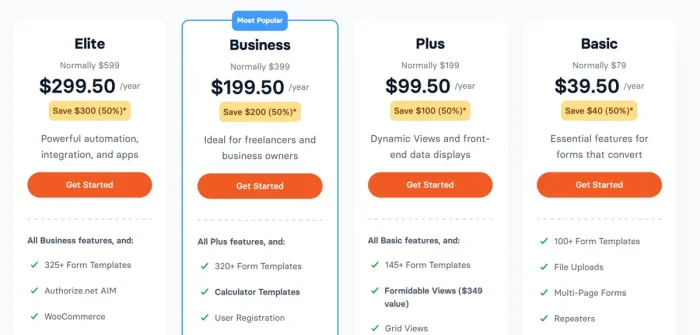
Formidable’s free plan is full-featured. WPForms’ free plan has ads. For a single site, Formidable Professional ($99/year) beats WPForms Plus ($25/month introductory, $199/year renewal).
Check out: Formidable Forms Black Friday Deals
Best Use Cases Decision Matrix
| Use Case | Choose | Why |
|---|---|---|
| Contact form | WPForms | Faster setup |
| Lead generation | WPForms | Marketing integrations |
| Newsletter signup | WPForms | Templates and integrations |
| Simple survey | WPForms | Easier workflow |
| Payment form | Either | Both capable |
| Quote calculator | Formidable | Purpose-built for calculations |
| Project directory | Formidable | Views feature |
| Classified listings | Formidable | Data display essential |
| Multi-step application | Formidable | Conditional page logic |
| User-generated content | Formidable | Entry display |
| Beginner first form | WPForms | Templates and ease |
| Complex workflow | Formidable | More flexible |
| Marketing agency | WPForms | Client wants “easy” |
| Developer project | Formidable | More customizable |
WPForms vs Formidable Forms: Pros and Cons
WPForms Pros and Cons
Let us see the pros and cons of WPForms.
Pros
- Easier to learn (templates jump-start setup)
- Larger template library (2,100+)
- More direct integrations (no Zapier dependency)
- Better for lead generation workflows
- AI form builder is helpful
- Strong email marketing integrations
- Excellent documentation
Cons
- No data display features (can’t show submitted data to users)
- Limited calculations (possible but clunky)
- No directories or listing features
- Renewal pricing significantly higher than intro
- Premium features locked behind higher plans
- Limited conditional page logic
Formidable Forms Pros and Cons
Let us see the pros and cons of using Formidable Forms.
Pros
- Full-featured free plan (no ads)
- Views (displays submitted data as directories)
- Purpose-built for calculations
- Conditional page logic
- More affordable (especially multi-site)
- Better for complex workflows
- Application-building capabilities
- Flexible data handling
Cons
- Fewer templates (requires more manual setup)
- Steeper learning curve than WPForms
- Relies on Zapier for many integrations
- Less beginner-friendly
- Documentation could be clearer
User Reviews: What Actually Matters
WPForms Reviews
G2 ratings: 4.3/5 from 26 reviews
Common praise:
- Easy to use
- Good templates
- Quick setup
- Strong support
Common complaints:
- Pricing on renewal
- Advanced features require paid plans
- Limited data handling
Formidable Forms Reviews
Capterra ratings: 4.8/5 from 115 reviews
Common praise:
- Powerful features
- Data display capability (Views)
- Good support
- Flexible and extensible
Common complaints:
- Learning curve steeper than alternatives
- Integration setup takes work
- Manual setup for each form
- What Reviews Don’t Tell You
A 4.8/5 rating doesn’t mean Formidable is objectively better. It means users who buy Formidable expecting advanced features are happier than users who buy WPForms expecting ease of use at higher price points.
Choose based on your actual needs, not review ratings.
Final Verdict: Which One Should You Choose?
Choose WPForms If You
- Want to build your first form in 2-3 minutes
- Primarily collect leads for marketing
- Don’t need to display submitted data
- Value templates and pre-built solutions
- Prefer simpler tools over more powerful ones
- Run a marketing-focused business
- Want direct integrations with marketing tools
- Have budget for introductory pricing
Choose Formidable Forms If You
- Need to display submitted data (directories, listings)
- Build quote calculators or pricing forms
- Create multi-step applications
- Want application-like functionality
- Don’t mind more setup time for more flexibility
- Build for other people (agencies)
- Need better pricing on renewals
- Prefer one powerful tool over multiple specialised ones
My Recommendation
WPForms is better for most WordPress business owners, marketers, and small business owners. The ease of use justifies the slightly higher cost. For lead generation, contact forms, and marketing workflows, WPForms’ templates and integrations save time.
Formidable Forms is better if your forms are more than lead collection. Directories, calculated quotes, displayed submissions, and data-driven applications require Formidable’s features.
If you’re still undecided and just need a contact form or lead generator, start with WPForms. If you know you need data display, directories, or complex calculations, go straight to Formidable.
Don’t overthink this. Pick the one that matches your primary use case. Both are solid plugins.


