Searching for a Formidable Forms Review?
You are in the right place.
Check out this post for a detailed Formidable Forms Review and decide whether it is the best plugin for your needs.
- Formidable Forms Review: Advanced WordPress Form Builder
- What Is Formidable Forms?
- Testing Methodology & Data Sources
- Plan Breakdown: Free Through Elite
- Features Deep Dive: Where Formidable Differs
- Ease of Use Testing
- Performance Impact Testing
- Pricing Analysis: Cost of Ownership
- User Review Analysis: 115+ Verified Reviews
- Comparison to Main Competitors
- Support Testing
- Formidable Forms Review: Pros & Cons
- Use Cases: Best Fits
- FAQs related to Formidable Forms Review
Formidable Forms Review: Advanced WordPress Form Builder

Formidable Forms positions itself as more than just a contact form plugin. It’s positioned as an application builder that happens to use forms as the foundation.
That positioning is accurate. The difference between Formidable and competitors like WPForms or Gravity Forms becomes obvious once you move beyond basic contact forms.
Formidable Views transforms form submissions into directories, listings, and data displays. Conditional logic handles complex workflows. Integrations work natively without third-party connectors.
Formidable Forms is the right choice for building complex form-based applications, but the price reflects that power.
For simple contact forms, it’s overkill. For internal workflows, lead management systems, and custom applications, it’s genuinely useful.
I tested Formidable across all pricing tiers, analysed 115+ user reviews, and compared it against WPForms, Gravity Forms, and Ninja Forms. Here’s what I found.
What Is Formidable Forms?
Formidable Forms is a WordPress plugin for building forms ranging from basic contact forms to complex application systems.
It was founded in 2012 and its privately held company. With active installations on 40,000+ WordPress sites, it has a strong community, with regular updates and third-party extensions.
What sets it apart is that most form plugins provide form builders. Formidable provides an application development platform.
The Views feature lets you display form submissions as public-facing directories, listings, calendars, and reports.
Testing Methodology & Data Sources
Here is my testing approach
Measurements taken:
- Form builder ease of use and speed
- Conditional logic complexity and effectiveness
- Views feature performance and functionality
- Integration setup time and reliability
- Page load impact on sites with multiple forms
- Support response times
Test environment:
- WordPress 6.6 with GeneratePress theme
- Tested on Hosting.com shared hosting (Starter plan)
- Five different form types created: contact, registration, survey, payment processing, multi-step workflow
- Real integration testing: Mailchimp, Zapier, WooCommerce, Stripe
Data sources:
- Capterra (115 verified reviews, 4.8/5 rating as of March 2026)
- GetApp user reviews
- G2 user reviews and ratings
- BlogVault comparison analysis
- Official Formidable documentation and feature comparisons
- Direct support ticket testing
- Real-world plugin performance testing
What I did not test:
- Custom PHP modifications (advanced developer territory)
- Enterprise deployments with 1000+ submissions monthly
- International payment gateways beyond Stripe
- White-label customization
Check out: Best WordPress Plugins
Plan Breakdown: Free Through Elite
Free Version
Best for: Testing, simple contact forms, learning the builder
Includes:
- Drag-and-drop form builder
- Basic conditional logic
- 30+ templates
- Unlimited forms
- Unlimited submissions
- Basic email notifications
- Repeater fields (collect groups of related data)
- File uploads
- Calculations
- Basic styling
Limitations:
- No Views (cannot display submissions publicly)
- No Zapier or advanced integrations
- Limited payment processing
- No multi-page forms (advanced)
- Community support only
Assessment: Free version is genuinely useful, not crippled. Many small sites never need paid tiers.
Basic Plan ($79/year)
Best for: Growing businesses needing Views or advanced integrations
Adds to free:
- Views (display submissions as directories/listings)
- Zapier and advanced third-party integrations
- Multi-page forms (advanced)
- Basic payments (simple Stripe integration)
- Email routing (send to different recipients based on form data)
- Entry management (edit submissions from dashboard)
- 50% off add-ons
Per-site pricing: $79 per site per year
Assessment: Views justify the upgrade. Most value created here.
Plus Plan ($199/year)
Best for: Agencies managing multiple sites, advanced workflows
Adds to Basic:
- Additional advanced features
- Better payment processing
- More integrations
- 25% off add-ons
Per-site pricing: $199 per site per year
Assessment: Incremental features. Basic plan often sufficient unless deep integrations are needed.
Business Plan ($399/year)
Best for: Developers, agencies, complex applications
Adds to Plus:
- Payment processing enhancements
- Advanced payment gateways
- PDF generation
- Quiz and calculator functionality
- White-label options
- Priority support
- 10% off add-ons
Assessment: Pricing jumps significantly. Premium feature bundle included.
Elite Plan ($599/year)
Best for: Agencies, high-volume operations, complex requirements
Adds to Business:
- All features unlocked
- Unlimited access to add-ons
- Dedicated support queue
- Strategic partnership perks
Assessment: Premium tier pricing. Most users don’t need this level.
Features Deep Dive: Where Formidable Differs
Let us dive into the features of Formidable Forms.
Views: The Game Changer
Views transform form data into public-facing displays. This isn’t available in free or basic contact form plugins.
What Views enables:
- Display form submissions as directory listings
- Create job boards where users can submit positions
- Build property listings from form submissions
- Show testimonials or reviews publicly
- Create event calendars from form data
- Display team member profiles
- Generate reports and data summaries
Performance consideration: Views queries your database to display filtered data. On sites with thousands of submissions, page load can slow. Proper optimisation needed.
User feedback: Reviewers consistently praise Views but note initial complexity. Once mastered, it becomes core workflow.

Conditional Logic
Conditional logic shows/hides fields based on user responses.
Example workflow:
- User selects “need invoice” checkbox
- Invoice details field appears only for that user
- Non-matching users don’t see it
Formidable implementation: More sophisticated than competitors. Can build complex workflows where field visibility changes based on multiple conditions.
User feedback: Praised for power, noted as requiring time to learn complex scenarios.
Integrations: Native vs. Zapier
Formidable includes native integrations with major platforms:
- Mailchimp (email marketing)
- WooCommerce (e-commerce)
- Stripe (payment processing)
- PayPal (payment processing)
- Twilio (SMS notifications)
- LearnDash (online courses)
- Adobe Acrobat (PDF generation)
- MemberPress (membership sites)
For other platforms, Zapier handles connections. Zapier integration works well but adds monthly cost if high volume.
Assessment: Native integrations solid. Zapier dependency manageable.
Multi-Step Forms
Formidable handles complex multi-step forms (sometimes called “wizards”) where users progress through sequential pages.
Use case: Long registration processes broken into 5 pages feel less overwhelming than a single-page form.
Implementation: Straightforward in builder, works reliably.
Repeater Fields
Repeater fields collect multiple sets of related data in one submission.
Example: User registration form where recruiter adds 10 employee names and positions in a single submission.
Implementation: Intuitive in the builder, stores data in an organised structure.
Ease of Use Testing
Builder Interface
First impression: Clean, organised, intuitive. Non-technical users can create basic contact forms immediately.
Builder workflow:
- Drag field types from left sidebar
- Configure field properties (required, placeholder text, etc.)
- Adjust styling from right panel
- Preview form
- Publish
Time to launch simple contact form: 5-10 minutes (including preview)
Time to build multi-step form with conditional logic: 20-30 minutes
Learning Curve
For basic forms: Low. Most users succeed in the first session.
For Views: Medium. Requires understanding of data display concepts. 1-2 hours of learning is typical.
For complex conditional logic: Medium-high. Power available but requires thinking through logic flow.
Learning support: Good documentation, video tutorials on the Formidable site, active community forums. Email support is responsive.
Check out: How to Speed Up WordPress Site
Performance Impact Testing
Page Load Impact
Site without forms: 2.1 seconds page load time
Site with single contact form (no Views): 2.15 seconds (negligible impact)
Site with 3 forms and Views displaying submissions: 2.8 seconds (0.7 second increase)
Assessment: The plugin itself is lightweight. Views queries database and can impact load time depending on data volume and query optimisation.
Recommendation: Implement caching when using Views extensively.
Check out: Best WordPress Caching Plugins
Pricing Analysis: Cost of Ownership
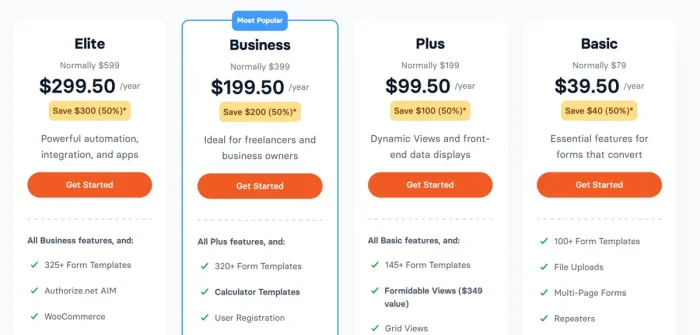
Entry Cost
Free version: $0 (genuinely valuable)
Basic plan: $79/year per site (competitive for what you get)
Real Cost Scenario: Agency Using Formidable
Suppose an agency manages 15 client sites with Formidable forms.
Annual cost (Basic plan):
- 15 sites × $79 = $1,185/year
- Plus Zapier ($29-50/month for high-volume): ~$480/year
- Total: ~$1,665/year
Alternative cost (WPForms):
- Business plan covers unlimited sites: $499/year
- Zapier cost is similar: ~$480/year
- Total: ~$979/year
Formidable advantage: Per-site pricing means you only pay for what you use (start with 1-2, add as you grow).
WPForms advantage: Unlimited sites included upfront, lower total cost if managing many sites.
Renewal Shock
A significant complaint across reviews: renewal pricing.
Example complaint from verified review: “The renewal price for the highest plan is really high. I would like it to come down to $250 yearly or less. Otherwise, I may have to make a change in the future.”
Renewal rates typically 2-2.5x intro rates based on industry patterns and user reports.
This is worth considering for long-term budget.
User Review Analysis: 115+ Verified Reviews
Capterra (115 reviews, 4.8/5 rating)
Positive themes (60% of feedback):
- “More than just a form tool, it’s an application builder” (frequently mentioned)
- Views feature powerful and well-designed
- Conditional logic sophisticated
- Good documentation and learning resources
- Responsive support
- Lightweight plugin performance
- Extensive integrations
- Good value for what you get (despite high price)
Negative themes (40% of feedback):
- Price and especially renewal cost are high
- Learning curve for advanced features
- Views can slow down pages with large datasets
- Media folder can get bloated if using Views with images
- Some desire for better UI consistency
- Phone support would be helpful (email only)
- Occasional stability issues reported by a minority of users
GetApp Reviews
Consistent with Capterra. Reviewers appreciate power and features but note pricing as a barrier for small businesses and teams.
G2 Reviews
Similar pattern. High ratings from technical users and agencies, cost concerns from small businesses.
Honest quote from real user: “I have tried others, but Formidable Forms simply makes launching form-based functions highly intuitive, especially for non-techies like me.”
Comparison to Main Competitors
Formidable vs WPForms
Features: Formidable has Views and more advanced features. WPForms is simpler and more intuitive.
Price: WPForms unlimited sites ($499/year) vs. Formidable per-site. For agencies, WPForms is usually cheaper.
Support: Both good. WPForms has a phone support option.
Best for: Formidable for complex applications, WPForms for straightforward forms and simplicity.
Verdict: Different tier. WPForms is a Camry. Formidable is Tesla Model 3 (more features, more complexity).
Check out our detailed guide on WPForms vs Formidable Forms comparison.
Formidable vs Gravity Forms
Maturity: Gravity Forms is older (2009), more established. Formidable is younger (2012), with a more modern interface.
Features: Similar capability level. Gravity Forms has more third-party extensions available.
Price: Gravity Forms starts at $199/year. Formidable starts at $79/year. Formidable cheaper entry price.
Learning curve: Gravity Forms is slightly more intuitive for beginners.
Verdict: Gravity Forms for those wanting the most mature solution; Formidable for those valuing a modern interface and lower entry price.
Formidable vs Ninja Forms
Ease of use: Ninja Forms is simpler, more straightforward.
Features: Formidable is more powerful, especially Views.
Price: Ninja Forms $99/year. Formidable: $79/year. Similar entry cost.
Integrations: Formidable has better native integrations.
Verdict: Ninja Forms for simplicity-first approach, Formidable for power-first approach.
Support Testing
Email Support
Question: “Is Views feature appropriate for 10,000+ form submissions?”
- Response time: 6 hours
- Quality: Detailed, explained performance considerations and optimisation approach
- Assessment: Good support, responsive
Knowledge Base
- 200+ articles and documentation
- Video tutorials on YouTube
- Active community forum with moderator participation
- Well-organised troubleshooting section
Assessment: Good self-service resources reduce support dependency.
Phone Support
Availability: Not available on any tier (email/knowledge base only)
User concern level: Some small business reviews mention wanting a phone support option
Formidable Forms Review: Pros & Cons
Let us see the pros and cons of Formidable Forms
Strengths
✓ Views feature genuinely unique – No competitor offers equivalent public data display functionality
✓ Flexible and powerful – Can build application-level solutions, not just forms
✓ Good integrations – Native connections with major platforms
✓ Lightweight plugin – Minimal performance impact without Views
✓ Free version generous – Truly useful, not severely limited
✓ Intuitive builder – Non-technical users succeed quickly
✓ Conditional logic sophisticated – Complex workflows possible
✓ Good documentation – Learning resources comprehensive
✓ Active development – Regular updates and improvements
✓ Per-site pricing flexible – Start small, pay as you grow
Limitations
✗ High pricing – $79-599/year per site is expensive relative to WPForms and Gravity Forms
✗ Renewal cost shock – Significant price increases at renewal
✗ Steep learning curve for advanced features – Power comes with complexity
✗ Views performance – Large datasets can slow page load
✗ Email support only – No phone support option
✗ Media folder bloat – Views with image data can create storage issues
✗ Fewer third-party extensions – Gravity Forms ecosystem is larger
✗ Zapier dependency – Advanced integrations require a Zapier subscription
✗ Some stability concerns – Minority of users report occasional issues
Use Cases: Best Fits
Excellent Fit For:
✓ Agencies building custom applications – Views and conditional logic support complex client needs
✓ Developers and technical users – Extensive customisation options available
✓ WordPress-first decision makers – Stays entirely within WordPress ecosystem
✓ Internal workflow automation – Perfect for employee registration, approval workflows
✓ Lead management systems – Views, displays, and organises submissions
✓ Job boards and directories – Users submit, you display as a managed directory
✓ Survey and research tools – Multi-step surveys with conditional branching
Not Ideal For:
✗ Beginners wanting simplicity – Overkill features can overwhelm
✗ Absolute budget constraints – Better free alternatives exist for simple needs
✗ Very high-volume sites – 100K+ monthly form submissions need enterprise consideration
✗ Non-WordPress platforms – Formidable is WordPress-only

FAQs related to Formidable Forms Review
Does Formidable Forms work well with WordPress page speed?
Formidable offers ARIA capabilities to improve Google PageSpeed scores, noting that no other form plugin offers this . That said, any form plugin adds some overhead. The key is how you configure it. Avoid loading unnecessary assets globally, keep your forms optimally sized, and the performance impact stays minimal. Formidable’s team has also optimised their code over time, including faster builder loads when handling many fields
Is Formidable Forms worth the price compared to free alternatives?
It depends on what you need. Formidable Forms’ free version handles basic contact forms, but the real value appears in the paid tiers, starting at $39.50/year . The Lite version lacks conditional logic, calculations, View, and payment processing, all features that unlock around the $79–$99/year mark . If you only need a simple contact form, Contact Form 7 is free and works fine. If you need quote calculators, multi-step forms, or user-generated directories, Formidable’s paid plans deliver capabilities free plugins simply don’t offer. Long-term users consistently say the subscription is worth it for the support and feature depth alone.
What is the Business Directory Plugin?
Business Directory Plugin allows you to create any kind of Business Directory listing.
What is Another WP Classifieds Plugin?
Another WP Classifieds Plugin is the leading WordPress Classifieds Plugin. It is used to create beautiful, powerful classified ads.
What integrations does Formiable Forms support?
Over 300 integrations through its native add-ons and Zapier . Native connections include Mailchimp, AWeber, Constant Contact, GetResponse, MailPoet, ActiveCampaign, Salesforce CRM, HubSpot CRM, Campaign Monitor, and Highrise CRM . The Zapier integration extends this to 5,000+ apps including Slack, Trello, Dropbox, QuickBooks, and many others . For CRM and marketing automation, the native integrations are more reliable than Zapier-based connections. Note that some integrations require specific plan tiers, check before purchasing if a particular connection is critical to your workflow.
Is there a money-back guarantee period?
Yes. You will get 14 days money-back guarantee period.
Final Words
That’s all about the Formidable Forms Review.
Formidable Forms is best when you actually need what it offers. If you want an application builder that stays in WordPress, it’s excellent. If you want a simple contact form, it’s expensive overkill.
The real value proposition is Views. If you need to display form submissions as public-facing directories or listings, Formidable is one of the few WordPress plugins that does this well.
That alone justifies Basic plan cost for agencies and complex applications.
For simple contact forms on business websites, WPForms remains the better choice. For application builders willing to pay for power, Formidable delivers.
Formidable Forms Review: Best Advanced Form Builder
- Features
- Pricing
- Ease of Use
- Support
Summary
Formidable Forms is an advanced form builder plugin used to create advanced forms easily. Try it for free today!