
WP Rocket vs FlyingPress is the caching plugin decision most serious WordPress site owners end up facing. WP Rocket has been the default premium caching plugin for years. FlyingPress is the newer challenger that a lot of speed-focused bloggers have switched to.
A common belief is that FlyingPress is free. It isn’t. Both are paid plugins, and they cost almost the same for a single site. So the real question is which one gets you faster pages, easier setup and better value as you add more sites.
We ran both on the same test site and tracked the numbers. Here’s what we found.
- WP Rocket vs FlyingPress: Which is Faster
- WP Rocket: The Proven All-Rounder
- FlyingPress: The Core Web Vitals Specialist
- Head-to-Head Comparison
- Which Plugin Fits Your Site?
- Your Theme Matters Too
- How to Switch From WP Rocket to FlyingPress
- FAQs Related to WP Rocket vs FlyingPress
- Final Verdict: WP Rocket or FlyingPress
Quick Answer: FlyingPress was slightly faster in our test (94 PageSpeed vs 93, 1.05s LCP vs 1.1s) and gives you more sites for the money on bigger plans. WP Rocket is the safer, better-known choice, with wider host support, more tutorials and handy extras like the Cloudflare add-on and free Rocket Insights monitoring. Both start at about $59/year for one site, and both have a 14-day free trial.
Pick FlyingPress if you want the best Core Web Vitals and run several sites. Pick WP Rocket if you want the most proven option with the biggest support community.
WP Rocket vs FlyingPress: Which is Faster
WP Rocket vs FlyingPress at a Glance
| WP Rocket | FlyingPress | |
|---|---|---|
| Price (1 site) | $59.95/year | $59/year |
| Free trial | 14 days | 14 days |
| Page cache + preload | Yes | Yes |
| Remove unused CSS | Yes | Yes |
| Delay JavaScript | Yes | Yes |
| Lazy load images, iframes, videos | Yes | Yes |
| Database cleanup | Yes, with scheduling | Yes, with scheduling |
| Built-in image optimization | No (separate Imagify plugin) | Yes |
| CDN | RocketCDN (free on 3 key pages) or any CDN | FlyingCDN ($10/month per site) or any CDN |
| Monitoring | Rocket Insights (free) | No |
| Our PageSpeed score | 93 | 94 |
| Our LCP | 1.1s | 1.05s |
| Best for | Proven, all-round optimization | Best Core Web Vitals, multiple sites |
Why Your Caching Plugin Matters
A caching plugin saves a ready-made HTML copy of each page, so your server doesn’t rebuild it with PHP and database queries on every visit.
Good plugins also clean up CSS and JavaScript, which is what moves your Core Web Vitals scores.
That matters for a few practical reasons:
- Rankings. Core Web Vitals (LCP, INP and CLS) are part of Google’s page experience signals. They won’t outrank great content, but they can tip close calls.
- Visitors. Slow pages lose people before they read a word, especially on mobile.
- Hosting. Serving cached pages uses less CPU, so a cheaper plan can handle more traffic.
- Earnings. If you run ads or affiliate links, more pages read means more clicks.
Picking the wrong plugin won’t break your site, but it can leave speed on the table or cost you more than it should.
How We Tested
We used a WordPress test site with 50 posts, 25 pages, 2 custom post types and 50+ active plugins to copy the plugin bloat most real blogs carry.
Each plugin ran for two weeks on the same Kinsta hosting plan, with the same theme and content.
We measured:
- TTFB (Time to First Byte): how fast the server responds
- FCP (First Contentful Paint): when the first thing appears
- LCP (Largest Contentful Paint): when the main content appears
- CLS (Cumulative Layout Shift): how much the page jumps around
- PageSpeed Insights mobile score
What Testing on Kinsta Means for These Results
Kinsta runs on Nginx and has its own server-level page cache. That changes how both plugins behave:
- WP Rocket switches off its own page caching on Kinsta. Kinsta’s cache serves the pages instead, and WP Rocket’s “Clear Cache” button clears Kinsta’s cache too.
- FlyingPress is tested by its developer on Kinsta and automatically clears Kinsta’s server cache when you update content.
So on our test site, Kinsta did most of the page caching work. The differences you see below come mainly from what each plugin does to CSS, JavaScript, images and fonts.
That’s also why the TTFB numbers are so close: server response time depends more on the host’s cache than on the plugin.
If you’re on shared hosting without a server cache, the plugin’s own page cache does much more of the work, and your before-and-after gains will likely be bigger than ours.
Speed Test Results
Here’s the same site with no optimization plugin, then with each plugin:
| Metric | No Plugin | WP Rocket | FlyingPress |
|---|---|---|---|
| TTFB | 1.8s | 0.65s | 0.61s |
| FCP | Not recorded | 0.72s | 0.68s |
| LCP | 2.4s | 1.1s | 1.05s |
| CLS | Not recorded | 0.05 | 0.04 |
| PageSpeed (mobile) | 68 | 93 | 94 |
Both plugins made a huge difference. WP Rocket cut LCP by 54% and FlyingPress by 56%. Both pushed PageSpeed from 68 into the 90s.
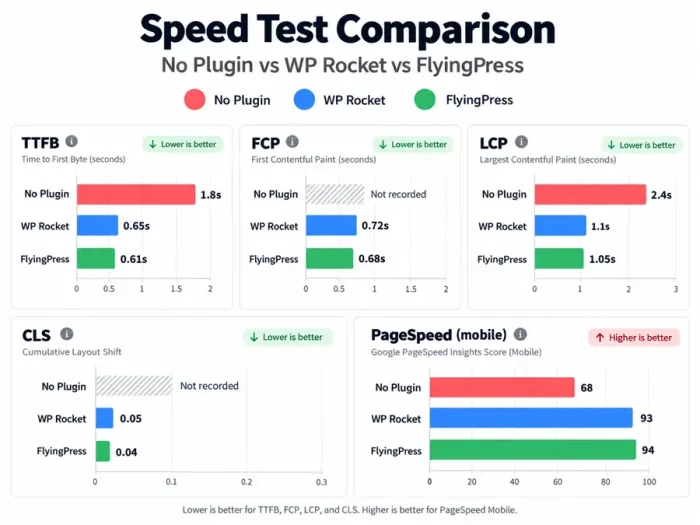
FlyingPress came out ahead on every metric, but only just. The LCP gap is 50 milliseconds. No visitor will notice that, and your rankings won’t change because of it. Treat it as a narrow win, not a knockout.
The bigger lesson: either plugin is a big upgrade over running nothing, even on a premium host like Kinsta. If you have no optimization plugin right now, that’s the real problem to fix.
WP Rocket: The Proven All-Rounder
WP Rocket has been around since 2013 and is the plugin most WordPress tutorials, hosts and theme developers test against. That reputation is its biggest advantage.
If something conflicts with your setup, someone has probably already written about the fix. Our full WP Rocket review covers it in depth.
WP Rocket Features
- Page caching and preloading. Builds the cache before visitors arrive, using your sitemap.
- CSS and JavaScript optimization. Minifies files, removes unused CSS, loads CSS asynchronously, defers JS and delays JS until a visitor interacts.
- Lazy loading for images, CSS background images, videos and iframes.
- Database cleanup for revisions, drafts, spam comments and transients, with scheduled cleanups.
- CDN support. Works with any CDN, and RocketCDN is free for 3 key pages with your license.
- Cloudflare add-on you can switch on in one click.
- Rocket Insights, a free dashboard that tracks performance on your key pages and suggests fixes.
- Heartbeat control to reduce background admin requests.
Setting Up WP Rocket
WP Rocket turns on page caching the moment you activate it, and the default settings are safe for most sites.
In our test, getting the full setup right (remove unused CSS, delay JS, lazy loading and exclusions) took about 20 to 30 minutes, mostly because we tested each option.
On Kinsta, we left cache preload off, as Kinsta recommends, since its server cache handles that job.
If you run WooCommerce, WP Rocket already excludes cart, checkout and account pages from the cache.
WP Rocket Pricing
| Plan | Price | Sites |
|---|---|---|
| Single | $59.95/year | 1 |
| Plus | $119.95/year | 3 |
| Multi | $299.95/year | 50 |
Prices from wp-rocket.me. Larger licenses (100 and 500 sites) are available on request.
Every plan comes with a 14-day free trial, and WP Rocket offers a full refund if you’re not happy with the results. WP Rocket usually runs a big Black Friday sale; check our WP Rocket Black Friday discount page.
WP Rocket Pros and Cons
What We Like
- Proven on a huge number of sites and hosts
- Safe defaults that work right after activation
- Clear docs and lots of third-party tutorials
- Built-in database cleanup and heartbeat control
- Free RocketCDN on key pages, plus a Cloudflare add-on
- Free Rocket Insights performance monitoring
What We Don’t Like
- Slightly slower than FlyingPress in our test
- Only 3 sites on Plus; the next plan jumps to $299.95
- No built-in image optimization (you need Imagify or similar)
- More settings to work through for the best results
FlyingPress: The Core Web Vitals Specialist
FlyingPress is made by FlyingWeb, founded by developer Gijo Varghese. It’s newer than WP Rocket and smaller, with 10,000+ customers according to the company.
What it’s known for is squeezing out the best possible Core Web Vitals scores with very little setup.
FlyingPress Features
- Page caching and preloading.
- Remove unused CSS and generate critical CSS for each page.
- Delay JavaScript until a visitor interacts, plus defer options.
- Lazy loading for images, iframes and background images, with lightweight YouTube placeholders.
- Self-hosted Google Fonts and font preloading.
- Database cleanup for revisions, auto-drafts, trashed posts, spam comments and expired transients, with daily, weekly or monthly auto-cleaning.
- Built-in image optimization.
- Redis object cache support (added in version 5.6).
- FlyingCDN, an optional CDN at $10/month per site with 100 GB of bandwidth.
Setting Up FlyingPress
FlyingPress turns on its main optimizations by default. In our test, we had it running in a few minutes. We changed almost nothing, and it still scored slightly better than our tuned WP Rocket setup.
That’s the biggest practical difference between the two: FlyingPress needs less tweaking to reach its best scores.
FlyingPress Pricing
| Plan | Price | Sites |
|---|---|---|
| Starter | $59/year | 1 |
| Pro | $109/year | 3 |
| Business | $229/year | 25 |
| Unlimited | $279/year | Unlimited |
Prices from flyingpress.com. Staging and development sites don’t count toward your limit.
There’s a 14-day free trial with full access, and you can cancel before it ends without paying. You can upgrade later and only pay the difference.
If you manage more than a handful of sites, FlyingPress is clearly cheaper. Its Unlimited plan costs less than WP Rocket’s 50-site Multi plan.
FlyingPress Pros and Cons
What We Like
- Best Core Web Vitals in our test
- Great results with very little setup
- Built-in image optimization and database cleanup
- Much better value for 4+ sites
- Staging sites don’t count toward your license
What We Don’t Like
- Smaller user base, so fewer third-party tutorials
- FlyingCDN costs extra ($10/month per site)
- No free monitoring dashboard like Rocket Insights
- Fewer hosts and themes mention it in their docs
Head-to-Head Comparison
| Feature | WP Rocket | FlyingPress |
|---|---|---|
| Starting price | $59.95/year (1 site) | $59/year (1 site) |
| 3 sites | $119.95/year | $109/year |
| Large plan | $299.95/year (50 sites) | $279/year (unlimited) |
| Free trial | 14 days | 14 days |
| Page cache + preload | Yes | Yes |
| Remove unused CSS | Yes | Yes |
| Critical CSS | Yes (load CSS asynchronously) | Yes |
| Delay JS | Yes | Yes |
| Lazy load | Images, backgrounds, videos, iframes | Images, backgrounds, iframes, YouTube placeholders |
| Database cleanup | Yes, scheduled | Yes, scheduled |
| Image optimization | Separate plugin (Imagify) | Built in |
| CDN | RocketCDN (free on 3 pages) + any CDN | FlyingCDN ($10/month) + any CDN |
| Cloudflare add-on | Yes | Works with Cloudflare |
| Performance monitoring | Rocket Insights (free) | No |
| Setup time (our test) | 20 to 30 minutes | A few minutes |
| PageSpeed (our test) | 93 | 94 |
Which Plugin Fits Your Site?
| Your Situation | Best Pick | Why |
|---|---|---|
| Small blog, one site | Either (slight edge to FlyingPress) | Same price; FlyingPress needs less setup |
| Affiliate or ad-supported site | FlyingPress | Best Core Web Vitals out of the box |
| WooCommerce store | Either | Both handle cart and checkout exclusions well |
| You manage 4+ sites | FlyingPress | 25 sites for $229 vs 3 sites for $119.95 |
| Agency with 50+ sites | FlyingPress Unlimited | Unlimited sites for less than WP Rocket’s 50-site plan |
| You want the most proven option | WP Rocket | Biggest user base, most guides and host support |
| You use Cloudflare heavily | WP Rocket | One-click Cloudflare add-on |
| Cheap shared hosting | Either | Both reduce server load a lot |
| Managed host with its own cache (Kinsta, WP Engine) | Either | The host caches pages; the plugin handles CSS, JS and images |
| Already happy with WP Rocket | Stay | A 50ms gain isn’t worth a migration |
A note on managed hosting: hosts like Kinsta and WP Engine run their own server-level page cache. On Kinsta, for example, WP Rocket turns off its own page cache automatically.
On those hosts, your plugin mostly handles CSS, JavaScript and images rather than page caching, which is exactly what our test measured.
Check your host’s docs before buying. Our WP Engine vs Kinsta comparison and our list of the best managed WordPress hosting providers cover this.
If you’re on a budget host, our list of cheap WordPress hosting providers shows which ones handle caching plugins well.
For stores, see the best WooCommerce hosting providers.
Your Theme Matters Too
A caching plugin can’t fully fix a heavy theme. In our theme tests, GeneratePress and Kadence gave either plugin a fast base to work from.
Builder themes like Divi benefit the most from FlyingPress’s unused CSS removal and JS delay, because they load more code to begin with.
Our list of the fastest WordPress themes has more options, and our GeneratePress vs Astra comparison helps if you’re choosing between the two most popular lightweight themes.
How to Switch From WP Rocket to FlyingPress
- Back up your site. Our guide to protecting your WordPress site covers backup options.
- Deactivate and delete WP Rocket. Never run two caching plugins at once; they conflict.
- Install and activate FlyingPress, then enter your license key.
- Check the default settings. Caching, CSS and JS optimization, and lazy loading are on by default.
- Add exclusions for any pages that shouldn’t be cached (member areas, custom forms).
- Preload the cache and clear your CDN cache if you use one.
- Test your key pages in PageSpeed Insights and click through them to check that nothing looks broken.
The same steps work in reverse if you’re moving from FlyingPress to WP Rocket.
FAQs Related to WP Rocket vs FlyingPress
Is WP Rocket still worth it in 2026?
Yes, if you value a long track record, broad host support and extras like Rocket Insights and the Cloudflare add-on. If you’re starting fresh and want top Core Web Vitals, FlyingPress is the better pick.
Is FlyingPress free?
No. FlyingPress is a paid plugin starting at $59/year for one site. It has a 14-day free trial.
Which is faster, WP Rocket or FlyingPress?
FlyingPress was slightly faster in our test: 1.05s LCP and 94 PageSpeed, vs 1.1s and 93 for WP Rocket. The gap is small enough that visitors won’t notice it.
Does WP Rocket have a free trial?
Yes. All WP Rocket plans come with a 14-day free trial.
Does FlyingPress clean up the database?
Yes. It removes revisions, auto-drafts, trashed posts, spam comments and expired transients, and it can run automatically on a schedule.
Can I use WP Rocket and FlyingPress together?
No. Running two caching plugins causes conflicts. Pick one.
Do I need a CDN with either plugin?
Not for most small sites. If your visitors are spread worldwide, a CDN helps. WP Rocket includes RocketCDN for 3 key pages, and FlyingPress offers FlyingCDN at $10/month per site. Both also work with Cloudflare.
Which is better for WooCommerce?
Both work well. They exclude cart, checkout and account pages from caching. Our guide on how to build an online store covers the rest of a fast store setup.
Which is cheaper for multiple sites?
FlyingPress. It’s $229/year for 25 sites or $279/year for unlimited, compared with WP Rocket’s $119.95 for 3 sites or $299.95 for 50
Are there free alternatives?
Yes. LiteSpeed Cache is free and very good if your host runs LiteSpeed servers. Our roundup of the best WordPress caching plugins covers free and paid options.
Final Verdict: WP Rocket or FlyingPress
Our Pick for Most New Sites: FlyingPress
Our Pick for the Most Proven Option: WP Rocket
Both plugins took our test site from a 68 PageSpeed score into the 90s. You won’t go wrong with either.
FlyingPress wins on raw Core Web Vitals, setup time and multi-site pricing. If you’re starting a new blog or affiliate site, or you run several sites, it’s our pick.
WP Rocket wins on track record and ecosystem. If it’s already working well on your site, there’s no reason to switch for a 50-millisecond gain.
And if you want the plugin that hosts and theme developers test against first, WP Rocket is still the safe choice.
Either way, a caching plugin is one piece of the speed puzzle. Pair it with a light theme and good hosting; our tips to speed up your WordPress site and list of the fastest web hosting providers cover the rest.




Really good and informative post. I want to buy a hosting package from hostgator on black friday. Your blog already bookmarked. Thanks
Hey bro,
This makes it easy to grab sales with Hostgator. The only issue is some of those sales get voided.
However, how is the promotion going?
Hi Bro,
Sales are going very good. I do aware that some of the sales will get voided. Hence, Marketing well. Made 19 sales so far.
Thanks for the coupon. It was useful to sign up. I have created the account. Will contact you when assistance is required.
Hello umapathy,
Thanks for this coupon. I will bookmark this page and use it later.
Ravi