This AAWP review is for Amazon affiliates who are tired of copying prices by hand, fixing broken product images and wondering if their pages break Amazon’s rules.
AAWP (Amazon Affiliate WordPress Plugin) pulls live product data from Amazon and turns it into product boxes, bestseller lists and comparison tables inside WordPress.
Below I cover what it does, what it costs, how the 2026 move from PA-API to Amazon’s Creators API affects you, and when a cheaper or different plugin makes more sense.
Quick answer: AAWP is a paid WordPress plugin that displays Amazon products (boxes, bestseller lists, new releases, comparison tables, text links and data fields) using official Amazon API data, so prices and images stay updated and compliant. Plans start at €79 per year for one site, with lifetime licenses from €299 and a 30-day refund. The catch: to use Amazon’s Creators API, your Associates account needs 10 qualified sales in the last 30 days. New sites without those sales can use AAWP’s separate paid AAWP API (from €7/month). AAWP is a strong pick if Amazon is your main affiliate program. If you promote many stores, look at a multi-network tool instead.
Why Amazon affiliates need a plugin like AAWP
Amazon’s Associates rules are strict about two things bloggers often get wrong. Product images must come from Amazon (through the API or SiteStripe), not from a screenshot you saved.
And if you show a price, it has to be current; the API license requires price data to be refreshed regularly and shown with a timestamp or disclaimer. Pasting “$49.99” into a post and leaving it for six months is a fast way to get a warning.
AAWP handles both. It fetches images and prices through Amazon’s API, caches them, refreshes them on a schedule, and adds the required disclaimer text. You stop worrying about stale data and spend your time writing.
If you’re new to affiliate work, start with our beginner’s guide to affiliate marketing.
AAWP Review: Is It The Best?

What is AAWP?
AAWP is a WordPress plugin specially designed for affiliate marketers that allows you to easily discover and embed Amazon-listed products on your website without any coding knowledge.
It has a variety of features for embedding products, one of which is a comparison table, much simpler and faster than other tools.
The AAWP Amazon Comparison table is a visual way of presenting the information. It displays the pros and cons of your product, service, or company in a way that helps your website visitors in their decision-making process.
Best of all, the plugin is beginner-friendly. So, anyone can access it and increase their sales in a short period.
Key AAWP Features
Let us see some of the best features of AAWP.
Product Boxes
The most used element. Enter an ASIN (or several) in a shortcode or block, and AAWP builds a box with the image, title, bullet points, star rating, price, Prime badge and a “Buy on Amazon” button.
You can change the template, button text and colors globally or per box.
Bestseller and New Release Lists
Give AAWP a keyword or browse node and it shows the current top sellers or newest products, updated automatically.
Good for “best X” posts where rankings change often.
Comparison Tables
This is the AAWP’s strongest feature for conversions. The built-in table builder lets you:
- Add products by ASIN.
- Pick rows: image, title, price, rating, Prime, a button, or your own custom text (for example “Best for small kitchens” or battery life).
- Highlight a winner column with a colored label.
- Embed the table with a shortcode or block.
Tables are responsive. On mobile they switch to a scrollable layout so readers can still compare.

Data Fields and Text Links
Data fields let you drop a single live value, such as the current price or a product image, inside your own text or a custom table.
Text links turn any phrase into a tracked Amazon link.
Geotargeting
AAWP can send visitors to their own country’s Amazon store (UK readers to amazon.co.uk, for example), so you don’t lose commissions on international traffic.
You need an Associates account in each store you want to earn from.
Click Tracking
You can track clicks on AAWP elements to see which boxes and tables get used.
For deeper link management, the included ClickWhale Pro license adds link cloaking and click stats. See our ClickWhale review and our roundup of affiliate link cloaking plugins.
How to Build an Amazon Comparison Table with AAWP
Here’s the short version of the setup.
Buy and install AAWP. Upload the zip under Plugins > Add New and activate your license.
Connect Amazon. Go to AAWP > Settings > API. Add your Creators API credentials (Credential ID, Secret and Version), your store and your tracking ID. If you don’t qualify for the Creators API yet, connect the AAWP API instead.

Open the table builder. Go to AAWP > Tables > Add New.

Add products. Paste the ASINs of the products you want to compare. Two to four products work best; more than that and readers stop reading.
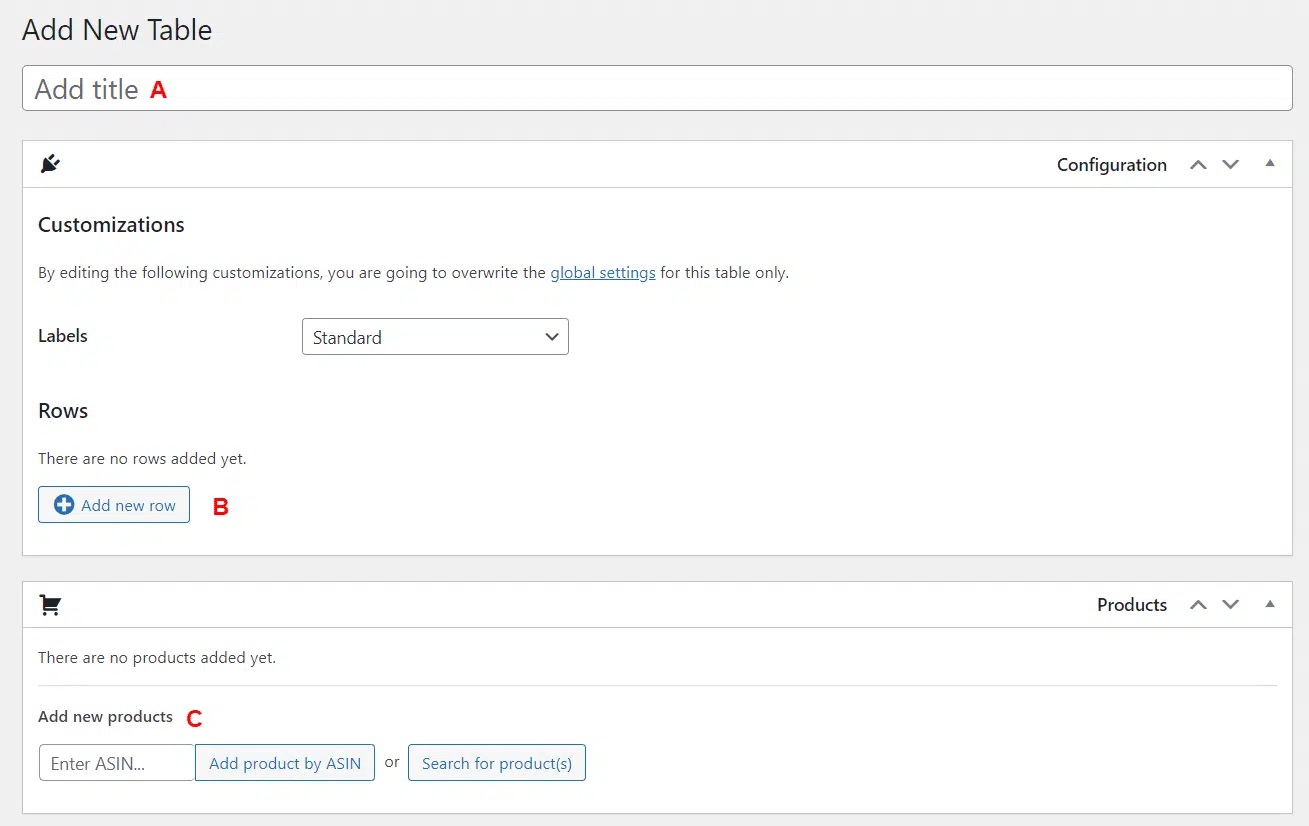
Choose rows. Keep only rows that help a decision: image, name, one or two key specs, rating, price and a button.
Highlight your pick. Add a label like “Best overall” to one column.

Embed it. Copy the shortcode (for example [aawp table="7623"]) into your post, or use the block.

Tips for Comparison Tables that Convert
- Put the table near the top of the post, right after the introduction. Many readers only want the answer.
- Use the same rows across every table on your site so readers learn the format.
- Add one custom row with your own verdict in a few words. That’s the part Amazon can’t give them.
- Keep button text clear. “Check price on Amazon” works better than “Buy now” because you can’t promise a price.
- Use color sparingly: one highlight color for your pick, nothing else.
Our guide on how to write list posts covers how to structure “best X” articles around tables like this.
The Amazon API Change in 2026 (Read This Before You Buy)
Amazon has deprecated Product Advertising API 5.0 and replaced it with the Creators API. AAWP supports the Creators API.
Setting it up means creating new credentials in Associates Central under Tools > Creators API and pasting them into AAWP.
The important part is eligibility. According to AAWP’s documentation, your Associates account needs at least 10 qualified sales in the last 30 days to use the Creators API.
If you go 30 days without a qualified sale, access is revoked, and it comes back within about two days after referred sales resume. Only the primary account owner can create the credentials.
This hurts new sites the most. You can’t show API data until you make sales, and it’s hard to make sales without good product displays.
The Workaround: AAWP API
AAWP sells its own data service, the AAWP API, for people without Amazon API access. It runs separately from your plugin license and is priced by monthly product quota:
| Monthly Products | Price |
|---|---|
| 150 | €7/month |
| 250 | €12/month |
| 500 | €24/month |
| 750 | €36/month |
| 1,000 | €48/month |
Annual billing gives two months free. Right now the AAWP API doesn’t support bestseller or new release lists, so you’re limited to boxes, tables, fields and links. It needs AAWP version 4.4.0 or newer.
For a new site, the practical path is: start on the AAWP API’s smallest plan, make your first 10 sales, then switch to the free Creators API.
AAWP Review – Pricing Plan
Prices are update from getaawp.com and are in euros; VAT may be added at checkout.
| Plan | Sites | Annual | Lifetime |
|---|---|---|---|
| Starter | 1 | €79/year | €299 |
| Advanced User | 3 | €129/year | €499 |
| Experienced User | 5 | €199/year | €699 |
| Professional User | 10 | €299/year | €899 |
Every plan includes all features. Annual plans include a year of updates and support and renew automatically unless you cancel.
Lifetime plans don’t renew. Multisite is allowed from the Advanced User plan up. There’s a 30-day full refund.
Watch for AAWP’s Black Friday sale if you’re not in a hurry.
Pros and Cons of AAWP
What we like
- Uses official Amazon data, which keeps you inside Amazon’s rules on prices and images
- Comparison table builder is quick and looks clean on mobile
- Geotargeting recovers commissions from international readers
- All features on every plan, plus a lifetime option
- Includes a year of ClickWhale Pro
- Works with any theme and page builder
What we don’t like
- No free version or free trial
- Creators API needs 10 sales a month, so brand-new sites pay extra for the AAWP API
- Amazon only. If you also promote Walmart, Target or brand programs, you’ll need another tool
- Templates look similar to every other AAWP site unless you add custom CSS
- Euro pricing plus VAT can surprise buyers outside the EU
AAWP Alternatives
| Plugin | Best for | Notes |
|---|---|---|
| Lasso | Affiliates who promote many programs | Product displays for Amazon and non-Amazon links, link health checks; subscription pricing is higher than AAWP |
| AmaLinks Pro | Amazon-only sites | Similar boxes and tables; check its current API requirements before buying |
| TablePress + manual links | Very small sites | Free, but no live prices or images, so you must stay careful with Amazon’s rules |
| ClickWhale | Link management only | Cloaking and tracking, no product boxes; free version available |
If Amazon pays most of your affiliate income, AAWP is the most focused option. If Amazon is one of several programs, a multi-network tool may cost more but save you from running two plugins.
Our post on how to choose a profitable affiliate program can help you decide where to focus.
Does AAWP Slow Down Your Site?
AAWP caches API data locally and loads one small stylesheet, so a few boxes on a page won’t hurt your speed much.
Pages with many tables and dozens of product images are heavier mainly because of the images. Lazy loading and a caching plugin handle most of that.
See our WordPress caching plugins list.
FAQs Related to AAWP Review
Is AAWP free?
No. AAWP is a premium plugin starting at €79 per year. There’s no free version, but there is a 30-day refund.
Do I need Amazon API access to use AAWP?
You need either Amazon Creators API access (10 qualified sales in the last 30 days) or a paid AAWP API subscription.
Can I use AAWP on WordPress.com?
Yes, on WordPress.com plans that allow plugin uploads. Self-hosted WordPress is the usual setup.
Is AAWP compliant with Amazon’s rules?
AAWP pulls images and prices from Amazon’s API and adds the required disclaimer, which covers the main compliance risks. You’re still responsible for your own disclosures and for following the Associates Operating Agreement.
What happens if my AAWP license expires?
The plugin keeps working, but you stop getting updates and support. Since Amazon changes its API from time to time, running an outdated version is risky.
Does AAWP work with Gutenberg and Elementor?
Yes. It does. Check out this post for AAWP Black Friday deals.
Conclusion
AAWP is still the plugin I’d pick for a site built around Amazon.
There are many ways to increase your Amazon Affiliate sales and earnings. One of them is to use an Amazon Product comparison table.
AAWP creates high-converting, fully customizable comparison charts to showcase the various features, information, strengths, and weaknesses of multiple products. This helps users choose the right product.
The 2026 Creators API requirement is the one real hurdle: if your site doesn’t make 10 Amazon sales a month yet, budget an extra €7 to €12 a month for the AAWP API until it does.
AAWP Review: Is It Still the Best Amazon Affiliate Plugin?
- Features
- Ease Of Use
- Pricing
- Support
Summary
AAWP is a paid WordPress plugin that displays Amazon products (boxes, bestseller lists, new releases, comparison tables, text links and data fields) using official Amazon API data.