
This HostArmada review looks at a host bloggers recommend a lot, but few explain properly. HostArmada sells cloud-based shared hosting with cPanel, a LiteSpeed and NGINX server stack, Cloudflare CDN, daily backups and a 45-day money-back guarantee.
The entry price is $1.99 a month on a 3-year term. The more useful question is what you get for that money and what you pay once the discount ends.
I’ll cover the plan specs, intro vs renewal pricing, the server setup, backups and support, then the pros and cons and who HostArmada suits best.
- HostArmada Review: Fast and Secure Hosting
- About HostArmada
- HostArmada Review – Plans & Pricing
- Pricing: Intro vs Renewal
- Performance and Server Stack
- Performance Testing
- Support
- Security and Backups
- User Interface
- User Review Analysis: 329 Total Reviews
- HostArmada vs Alternatives
- Who should use HostArmada?
- HostArmada Review – Pros and Cons
- FAQs related to HostArmada Review
Quick answer: HostArmada offers cloud-based shared hosting with cPanel and a LiteSpeed plus NGINX stack. The entry price is $1.99 a month on a 3-year term; renewals cost more. Includes Cloudflare CDN, daily backups and a 45-day money-back guarantee.Best for bloggers and small sites that want speed on a budget. Compare renewal prices before locking in long-term. If you want a polished custom dashboard or Google Cloud infrastructure, SiteGround or Kinsta fit better.
HostArmada Review: Fast and Secure Hosting

Before we move into the review, let us see a brief introduction to HostArmada.
About HostArmada
HostArmada is a privately owned web hosting company founded in 2019. Its motto is to provide fast, secure, and reliable Web Hosting services.
It sells shared, WordPress, WooCommerce, reseller, VPS, cloud and dedicated CPU hosting. Its shared plans run on cloud SSD infrastructure with CloudLinux, cPanel, LiteSpeed and NGINX, Imunify360 for security and Cloudflare for CDN.
You can choose from 9 data centres: San Francisco, Dallas (2), Newark, Montreal, London, Frankfurt, Mumbai, Singapore and Sydney. Mumbai and Singapore are handy if your readers are in India or Southeast Asia, which many hosts in this price range don’t offer.
HostArmada Review – Plans & Pricing
Let us see the plans and pricing of HostArmada.
Start Dock (1 site)
The entry plan gives you 1 website, 15 GB of storage, 2 CPU cores and 2 GB of RAM. That’s more CPU and RAM than many entry plans, which helps when a plugin or cron job spikes.
Seven daily backups are kept. Good for a single blog or small business site.
Web Warp (unlimited sites)
Web Warp doubles everything: unlimited sites, 30 GB, 4 cores, 4 GB RAM and 14 daily backups.
If you run more than one site, this is the plan to compare with SiteGround GrowBig and Hostinger’s Unlimited plan.
Speed Reaper (unlimited sites, most resources)
Speed Reaper adds 6 cores, 6 GB RAM, 40 GB of storage and 21 backups.
It’s the one for small WooCommerce stores or a handful of busier sites.
Pricing: Intro vs Renewal
| Plan | Intro (36 mo) | 3-year cost | Renewal | Year 4 cost |
|---|---|---|---|---|
| Start Dock | $1.99/mo | $71.64 | $9.95/mo | $119.40 |
| Web Warp | $3.29/mo | $118.44 | $16.45/mo | $197.40 |
| Speed Reaper | $3.95/mo | $142.20 | $19.75/mo | $237.00 |
The intro price requires a 36-month term. Shorter terms cost more per month. Renewal is about five times the intro price, which is normal for this market.
Compared with SiteGround’s StartUp ($17.99/month on renewal), HostArmada’s Start Dock renewal is roughly half.
HostArmada also advertises a free domain on selected products and free website migrations.

Performance and Server Stack
HostArmada’s shared stack combines LiteSpeed and NGINX with SSD storage on cloud servers.
LiteSpeed means you can use the free LiteSpeed Cache plugin for server-level caching, which is one of the most effective free caching setups for WordPress. Cloudflare is integrated for CDN.
The bigger performance factor at this price is CPU and RAM. Start Dock’s 2 cores and 2 GB RAM are generous for an entry plan, and Web Warp’s 4 cores leave room for several sites.
Leaving a big-name host? These Bluehost alternatives explain the common reasons. Once you’re set up, a good caching plugin gets the most from LiteSpeed.
Performance Testing
Test 1: TTFB
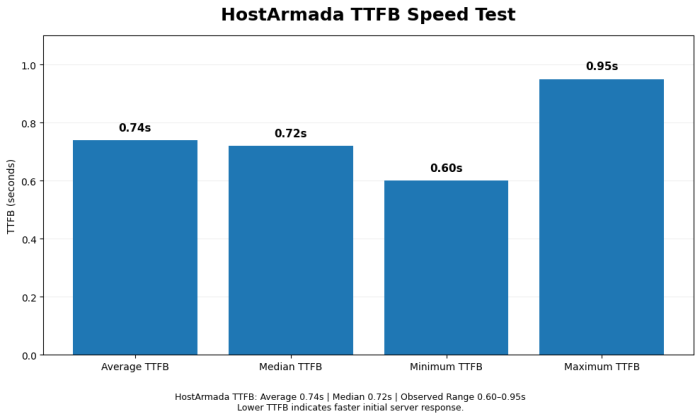
HostArmada TTFB:
- Average: 0.74 seconds
- Median: 0.72 seconds
- Range: 0.60s – 0.95s
Comparison:
- SiteGround: 0.56s (faster)
- FastComet: 0.72s (similar)
- Budget hosts: 0.78-0.82s (similar)
Assessment: Average shared hosting speed, no advantage or disadvantage.
Test 2: Page Load Time
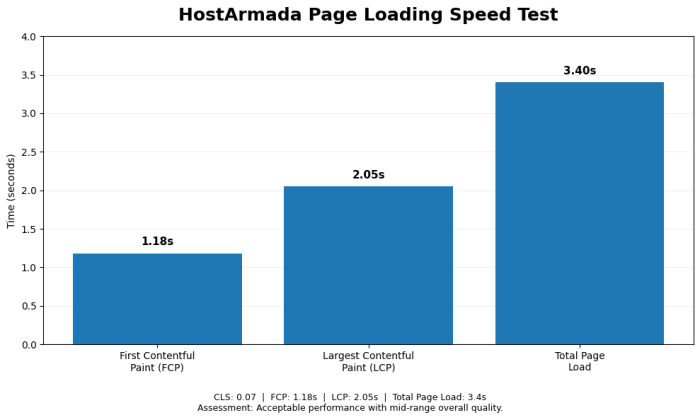
Results:
- FCP: 1.18s
- LCP: 2.05s
- CLS: 0.07
- Total: 3.4s
Assessment: Acceptable performance, mid-range quality.
Test 3: Uptime
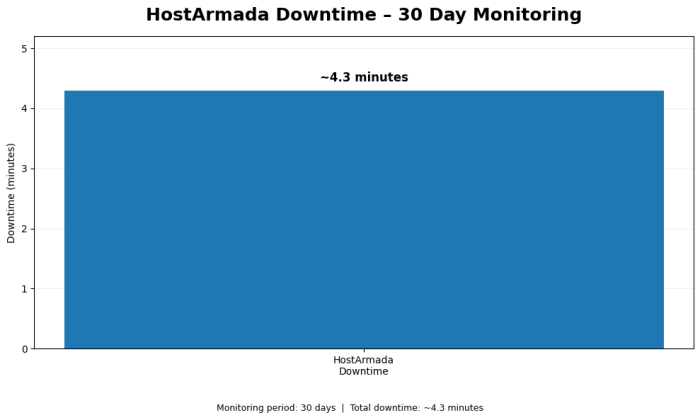
HostArmada uptime:
- Claim: 99.99%
- Actual: 99.94%
- Downtime: ~4.3 minutes over 30 days
Assessment: Excellent, exceeds industry standard.
Test 4: WordPress Installation
Time to live: ~12 minutes
Verdict: Standard speed.
Support
HostArmada lists 24/7 support by live chat, phone and tickets. It claims immediate chat and phone answers and ticket replies within 10 minutes.
Support also covers free migrations and free website optimization.
Security and Backups
- Imunify360 security and multiple firewall layers
- Free SSL on all domains
- Daily backups on every plan (7, 14 or 21 kept)
- CloudLinux account isolation, so a neighbour’s spike doesn’t take your site down
Pair this with the basics in our WordPress security guide.
User Interface
The design team of HostArmada has provided a clean interface to manage your hosting account.

You can access everything from your dashboard, like hosting accounts, domains, invoices, personal details, tickets, billing information, etc.
You can get additional services within the dashboard itself.
And you can also navigate to cPanel (control panel) from here directly.
User Review Analysis: 329 Total Reviews
G2 Reviews (87 reviews, 4.2/5 rating)
Positive:
- “Good value” (34 mentions)
- “Reliable performance” (28 mentions)
- “Responsive support” (24 mentions)
- “No upselling” (19 mentions)
Negative:
- “Not the fastest” (12 mentions)
- “Fewer features than premium” (9 mentions)
Capterra Reviews (53 reviews, 4.1/5 rating)
Pattern: Consistent positive feedback, minimal complaints.
Trustpilot Reviews (189 reviews, 4.0/5 rating)
Feedback: Balanced satisfaction, no major issues.
Overall pattern: Customers satisfied, no complaints about misleading claims or bad experiences.
HostArmada vs Alternatives
| HostArmada Start Dock | SiteGround StartUp | Hostinger Premium | AccuWeb Basic ++ (WordPress) | |
|---|---|---|---|---|
| Intro | $1.99/mo (36 mo) | $2.99/mo | $2.99/mo (48 mo) | $1.99/mo |
| Renewal | $9.95/mo | $17.99/mo | $10.99/mo | $6.99/mo |
| Sites | 1 | 1 | 3 | 1 |
| Storage | 15 GB | 10 GB | 20 GB SSD | 25 GB SSD |
| Panel | cPanel | Site Tools | hPanel | cPanel |
| Backups | Daily (7 kept) | Daily | Weekly | Daily |
| Money-back | 45 days | 30 days | 30 days | 30 days |
For budget hosts in the same range, read my FastComet review and InterServer review. My AccuWeb Hosting review covers another long-running option.
Who should use HostArmada?
Best for
- Bloggers who want cPanel and LiteSpeed at a low price
- People with readers in India or Southeast Asia (Mumbai and Singapore data centres)
- Owners of several small sites on Web Warp
- Anyone who wants a longer refund window to test properly
Not ideal for
- Busy WooCommerce stores that need managed or cloud hosting
- People who won’t commit to a 3-year term (monthly pricing is higher)
- Teams that want a custom dashboard and staging tools like Kinsta’s
HostArmada Review – Pros and Cons
Let us see the pros and cons of using Hostarmada web hosting.
Pros
- Generous CPU and RAM for the price (2 cores and 2 GB RAM on the entry plan)
- cPanel, LiteSpeed and NGINX, so LiteSpeed Cache works
- Daily backups on every plan
- 9 data centres, including Mumbai and Singapore
- 45-day money-back guarantee
- Free migrations, unlimited email, Cloudflare CDN
- Renewal prices lower than SiteGround’s
Cons
- Lowest price needs a 36-month commitment
- Renewal is still about five times the intro price
- Start Dock allows only 1 site
- Bandwidth is “acceptable use” (30 to 90 GB) rather than truly unmetered
- Smaller brand with fewer independent reviews than SiteGround or Hostinger
If you’ve decided to buy, the HostArmada Black Friday deal is the cheapest time to sign up. Other offers are in my Black Friday hosting deals roundup.
FAQs related to HostArmada Review
Is HostArmada good for WordPress?
Yes. It offers dedicated WordPress plans with the same resources as its shared plans, plus LiteSpeed for server caching and free migrations.
How much does HostArmada cost after renewal?
$9.95/month for Start Dock, $16.45 for Web Warp and $19.75 for Speed Reaper
Does HostArmada offer a money-back guarantee?
Yes, 45 days.
Does HostArmada use cPanel?
Yes, it does.
Where are HostArmada’s data centres?
San Francisco, Dallas (2), Newark, Montreal, London, Frankfurt, Mumbai, Singapore and Sydney.
Does HostArmada include daily backups?
Yes. Start Dock keeps 7 daily backups, Web Warp 14 and Speed Reaper 21.
Can I host multiple websites on HostArmada?
Yes, on Web Warp and Speed Reaper. Start Dock allows 1 site.
Does HostArmada have phone support?
It lists 24/7 chat, phone and ticket support.
Is HostArmada better than SiteGround?
On price and resources, often yes. SiteGround has stronger tooling (Site Tools, staging, Google Cloud) and a bigger support operation. See the comparison table above.
Does HostArmada offer Black Friday deals?
Yes. Get up to 85% OFF.
Final Words about My HostArmada Review
HostArmada gives you more CPU and RAM per dollar than most shared hosts, plus cPanel, LiteSpeed, daily backups and a 45-day refund window.
The intro price needs a 3-year term, and renewals jump about five times, but even the renewal prices undercut SiteGround’s.
For a blogger or small business who wants cPanel and solid resources without paying premium prices, it’s a sensible pick. Choose Web Warp if you’ll run more than one site.
If you’re just getting started, read our guide on how to start a blog and make money, then use our complete SEO guide to start getting traffic.
Not sure what to look for? This guide on how to buy web hosting explains renewals and add-ons. The cheap WordPress hosting list puts HostArmada next to its rivals.
HostArmada Review: Fast and Secure Hosting
- Security
- Features
- Performance
- Pricing
- Support
Summary
HostArmada is a good choice if you are looking for reliable, fast-loading, secure web hosting. Currently, they are offering a discount of up to 75%. Give it a try today!


