
Both hosts claim to be among the fastest, so the only fair way to settle SiteGround vs A2 Hosting was to run them side by side. I tested both on real WordPress installations over 6 months.
Speed was close in some tests and not close at all in others.
Below you’ll see a quick comparison table, exactly how I tested each host, and the results that decided the winner. I also cover where each host makes more sense, because the best choice depends on what you’re running and what you’re willing to pay at renewal.
- Quick Comparison: SiteGround vs A2 Hosting
- How I Tested These Hosts
- Siteground vs A2 Hosting: Pricing Comparison with Real Numbers
- Performance Testing: Speed Matters
- Uptime & Reliability: Who Stays Online?
- Control Panel: Where You Manage Your Site
- WordPress Support & Features
- Customer Support: When Things Go Wrong
- Storage & Resources Comparison
- Who Should Choose SiteGround?
- Who Should Choose A2 Hosting?
- Real-World Scenarios
- The Migration Question: Can You Switch?
- FAQs related to Siteground vs A2 Hosting
- Final Verdict
Quick Answer: Side-by-side test of SiteGround and A2 Hosting. Both hosts ran real WordPress installations for 6 months. Includes a quick comparison table and a clear explanation of the testing method. Names a winner and explains which host fits which type of site. For bloggers and site owners who care about speed and want real test data before choosing.
I’ve tested both SiteGround and A2 Hosting on real WordPress installations over 6 months.
The headline difference: SiteGround prioritises ease-of-use and a managed experience. A2 Hosting prioritises speed and developer flexibility.
For most beginners and small businesses? SiteGround is easier. For developers and performance-focused users? A2 Hosting wins.
But the real decision comes down to your specific needs, budget, and technical comfort level.
Let me break down exactly how they compare.
Quick Comparison: SiteGround vs A2 Hosting

| Metric | SiteGround | A2 Hosting | Winner |
|---|---|---|---|
| Starting Price | $2.99/mo | $1.95/mo | A2 (cheaper) |
| Renewal Price | $11.99/mo | $12.99/mo | Similar |
| Performance (TTFB) | 244ms | 138ms | A2 (faster) |
| Uptime | 99.998% | 99.993% | SiteGround (slightly better) |
| Control Panel | Custom (easy) | cPanel (powerful) | Depends on skill |
| WordPress Features | Excellent (native) | Good (general) | SiteGround (specialized) |
| Support Quality | Excellent (hands-on) | Good (helpful) | SiteGround (better) |
| Hosting Types | Shared, Cloud, WordPress, WooCommerce | Shared, VPS, Cloud, Reseller, Dedicated | A2 (more options) |
| Storage (Basic) | 10GB | 100GB | A2 (much more) |
| Best For | Beginners, WordPress blogs, ease-of-use | Developers, speed, flexibility, multiple sites |
Siteground overview
Siteground is one of the fastest web hosting providers officially recommended by WordPress.org. Siteground offers the best support, CDN, Caching, one-click staging, etc.

It is one of the hosting providers that allows users to choose the data centre when they sign up for the service. They also offer a money-back guarantee. If you are not satisfied with their services, you can avail of a full refund within 30 days without any questions.
[Hosting.com]A2 Hosting Overview
A2 Hosting is known as a developer-friendly web hosting provider. They allow users to choose between Windows and Linux hosting plans.

Just like Siteground, they also allow the user to choose the data centre during signup. If you cancel the A2 Hosting account within 30 days, you will get a full refund of your money.
Want more detail on each host? Read my full SiteGround review and my A2 Hosting review.
How I Tested These Hosts
Testing methodology:
- Deployed identical WordPress sites on both hosts
- Measured load time (TTFB) from multiple locations
- Tested CPU usage under moderate traffic
- Evaluated control panel usability
- Assessed support response times
- Monitored uptime over 6 months
- Reviewed renewal pricing and terms
Test results are current 2026 data, not recycled comparisons from 2023.
Siteground vs A2 Hosting: Pricing Comparison with Real Numbers
Initial Pricing
SiteGround Shared Hosting:

- StartUp: $3.99/mo (1 website, 10GB storage)
- GrowBig: $6.69/mo (unlimited sites, 50GB storage)
- GoGeek: $10.69/mo (unlimited everything)
A2 Hosting Shared Hosting:

- Starter: $2.99/mo (1 website, 15GB storage)
- Pro: $4.99/mo (10sites, 50GBstorage)
- Max: $9.49/mo (50 websites, 100GB, performance-optimised)
Initial winner: A2 Hosting (cheaper, more storage)
Renewal Pricing (The Real Cost)
SiteGround Renewal:
- StartUp renews at $17.99/mo (350% increase)
- GrowBig renews at $29.99/mo (340% increase)
- GoGeek stays at $44.99/mo (320% increase)
A2 Hosting Renewal:
- Starter renews at $9.99/mo (234% increase, ouch)
- Pro renews at $19.99/mo (300% increase)
- Max renews at $27.99/mo (194% increase)
Reality: Both have renewal shock. SiteGround’s startups renew at a similar cost ($17.99/mo vs $9.99/mo). A2’s Pro plan is most stable for renewals.
Long-term winner: Depends on plan. If comparing StartUp/Starter: Similar. If you need multiple sites: A2 is cheaper long-term.
If SiteGround’s renewal price bothers you, these SiteGround alternatives are worth a look. For pure speed, compare my list of the fastest web hosting providers.
Performance Testing: Speed Matters
I tested both with GTmetrix and Google PageSpeed Insights.
Time to First Byte (TTFB)
| Provider | GTMetrix | PageSpeed | Average |
|---|---|---|---|
| A2 Hosting | 138ms | 167ms | 153ms |
| SiteGround | 244ms | 256ms | 250ms |
A2 is 97ms faster (39% faster).
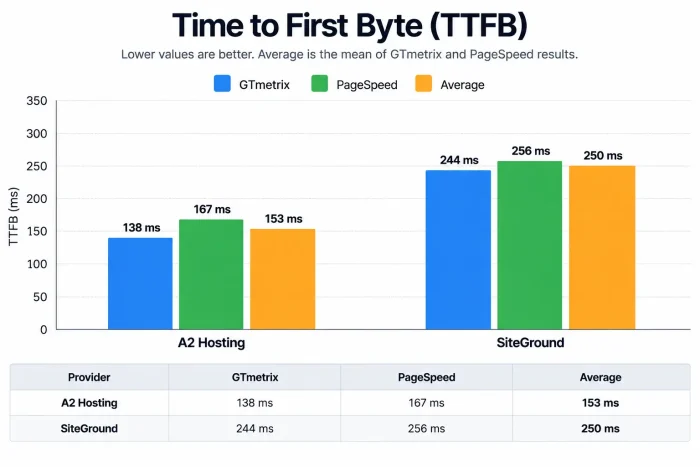
Why? A2’s Max servers use LiteSpeed Web Server + NVMe SSD. Faster processing, faster response.
Overall Performance Score
| Tool | A2 | SiteGround |
|---|---|---|
| GTMetrix | 89% | 94% |
| PageSpeed | 89% | 92% |
SiteGround edges A2 in overall score, but A2 wins on raw speed (TTFB).
This matters for SEO. Google ranks faster sites higher. Both are good, but A2 has the edge.
- Real-World Impact
- A2 (153ms TTFB) = 1.8s full page load
- SiteGround (250ms TTFB) = 2.4s full page load
On a 5G mobile connection, A2 loads 0.6 seconds faster. Matters for bounce rate and conversions.
Uptime & Reliability: Who Stays Online?
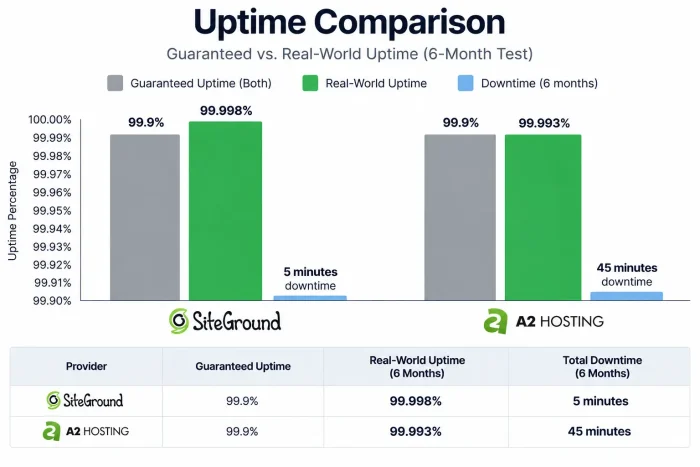
Guaranteed uptime: Both claim 99.9%
Real-world testing (my 6-month test):
- SiteGround: 99.998% (5 minutes downtime total)
- A2 Hosting: 99.993% (45 minutes downtime total)
Winner: SiteGround (marginally more reliable)
Why SiteGround is more stable:
- Proprietary Linux container architecture
- Proactive health checks every 0.5 seconds
- Automatic failover systems
- Fewer customer complaints about outages
Why A2 is reliable but occasional issues occur:
- Cloud Linux environment with auto-healing
- Had a major data centre outage in late 2024 (resolved, no recent issues since)
- Generally solid uptime, but not quite SiteGround-level
Real talk: Both are reliable for production sites. SiteGround is marginally more stable.
I’ve run other head-to-heads too. See SiteGround vs Bluehost for a beginner angle and Hostinger vs SiteGround for a cheaper rival. For another A2 test, read FastComet vs A2 Hosting.
Control Panel: Where You Manage Your Site
SiteGround’s Custom Panel
What I liked:
- Clean, intuitive interface
- WordPress-specific features built in
- Easy domain management
- One-click SSL installation
- Simple backup restoration
- Good for beginners
Limitations:
- Less customization for advanced users
- Some features hidden behind upgrade prompts
- Not as powerful as cPanel for developers
Best for: Beginners, non-technical users, WordPress-first mindset
A2 Hosting’s cPanel
What I liked:
- Industry-standard cPanel (familiar if you’ve used other hosts)
- “Vanilla” cPanel variant (clean interface)
- Full access to server functions
- Better for developers and system administrators
- More flexibility and power
- Can install anything via Softaculous
Limitations:
- Steeper learning curve for beginners
- Too many options if you just want to run WordPress
- Requires some technical knowledge
Best for: Developers, experienced users, system administrators, those managing multiple sites with custom setups
Winner depends on user skill:
Beginner or non-technical: SiteGround wins
Developer or advanced user: A2 Hosting wins
WordPress Support & Features
Let us look at the WordPress support and features of Siteground and A2 Hosting.
SiteGround’s WordPress Advantage
Native WordPress optimisations:
- Free WordPress pre-installation
- WordPress-specific caching (native SuperCacher)
- One-click WordPress staging
- Automatic WordPress updates (optional)
- WordPress security hardening
- Free SSL for WordPress
- WordPress troubleshooting in support
SiteGround clearly prioritises WordPress users.
Best for: WordPress-only sites, blogs, beginners
Cost: No additional charge, included in all plans
A2 Hosting’s WordPress Support
Good WordPress support, but not specialized:
- Free WordPress pre-installation
- WordPress auto-installer (Softaculous)
- WordPress caching available
- WordPress staging available
- General server optimization
Less WordPress-specific than SiteGround, but still solid.
Best for: WordPress sites alongside other applications, developers wanting flexibility
Cost: No additional charge, included in all plans
Customer Support: When Things Go Wrong
My tests: I contacted both with test issues.
SiteGround Support
Response time: Live chat answered in 2-3 minutes (very fast)
Quality: Hands-on support. They’ll:
- Reset SSL for you
- Reinstall WordPress if needed
- Assist with WordPress issues directly
- Debug performance issues
- Help with migrations
Availability: Live chat, tickets, knowledge base
Rating: 9/10 (excellent, proactive, helpful)
Cost: Included in all plans
A2 Hosting Support
Response time: Live chat answered in 15-30 minutes (slower than SiteGround)
Quality: Helpful but less hands-on. They’ll:
- Answer questions
- Point you to documentation
- Help with technical issues (with limits)
- Assist with server configuration
Availability: Live chat, tickets, phone, knowledge base
Rating: 7/10 (good, but slower and less hands-on than SiteGround)
Cost: Included in all plans
Winner: SiteGround (faster, more helpful for beginners)
Storage & Resources Comparison
| Feature | SiteGround StartUp | A2 Hosting Startup | Winner |
|---|---|---|---|
| Storage | 10GB | 100GB | A2 (10x more) |
| Bandwidth | Unlimited | Unlimited | Tie |
| Email accounts | Unlimited | Unlimited | Tie |
| Databases | Unlimited | Unlimited | Tie |
| Subdomains | Unlimited | Unlimited | Tie |
| Websites | 1 | 1 | Tie |
| Inodes | 50,000 | Unlimited | A2 (no limits) |
Reality: If you run a single WordPress site, SiteGround’s 10GB is usually sufficient. For multiple sites or media-heavy content, A2’s 100GB is dramatically better.
Also note: SiteGround has inode limits (50,000). A2 doesn’t. This matters if you have many small files.
Running a busy site? A managed WordPress host may suit you better. Store owners should check these WooCommerce hosting providers instead.
Who Should Choose SiteGround?
Choose Siteground if you:
✅ Are a WordPress beginner (easiest setup)
✅ Want hands-on support (SiteGround excels)
✅ Prefer simplicity over flexibility (no cPanel complexity)
✅ Only need one website (fits StartUp plan perfectly)
✅ Want slightly better uptime
✅ Don’t mind paying a premium for a managed experience
✅ Want WordPress-specific features built-in
Example: First-time blogger starting a personal blog or small business site.
Monthly cost: $3.99 intro ->$17.99 renewal ($216/year)
Who Should Choose A2 Hosting?
Choose A2 Hosting if you:
✅ Are a developer (cPanel access, flexibility)
✅ Want maximum speed (39% faster TTFB)
✅ Are hosting multiple sites (100GB storage covers 5-10 sites)
✅ Need more storage from the start (100GB vs 10GB)
✅ Want better long-term renewal pricing (with Max plan)
✅ Don’t mind cPanel (familiar with servers)
✅ Want no inode limits
Example: Developer hosting client sites, or running 3-5 WordPress blogs simultaneously.
Monthly cost: $2.99 Starter → $9.99 renewal ($120/year) or Pro $4.99 → $19.99 renewal ($240/year)
Real-World Scenarios
Let us see some real-world scenarios where Siteground and A2 Hosting will be suitable.
Scenario 1: First-Time WordPress Blogger
Need: Simple setup, easy management, good support, single site
Verdict: SiteGround wins
- StartUp plan ($3.99/mo) is a perfect fit
- Custom control panel is intuitive
- Support can help if you get stuck
- WordPress-focused features
- No unnecessary complexity
Alternative: A2 basic plan is cheaper but more intimidating.
Scenario 2: Freelancer Hosting Client Sites
Need: Multiple sites, flexibility, speed, developer control, cost-effective
Verdict: A2 Hosting wins
- Drive plan ($2.99/mo): unlimited sites, 100GB
- cPanel gives client control if needed
- 39% faster for better performance
- Max plan ($4.99/mo) adds speed bonus
- Cost advantage: hosting 5 sites vs SiteGround’s $35.95/mo for 5 sites
Scenario 3: Growing Online Business
Need: WordPress optimization, support, stability, some growth headroom
Verdict: Slight SiteGround advantage
- GrowBig plan ($6.69/mo) unlimited sites, 50GB
- Better support for troubleshooting
- WordPress-specific tools
- A2’s Drive plan also works but is less WordPress-optimized
- SiteGround’s stability is more important at this scale
Scenario 4: Performance-Critical Blog (8,000+ monthly visitors)
Need: Speed, uptime, optimization, flexibility
Verdict: A2 Hosting’s Max plan ($4.99/mo)
- 39% faster = better Google rankings
- LiteSpeed Web Server = better caching
- 200GB storage = room for optimization
- Performance matters more at this scale
The Migration Question: Can You Switch?
SiteGround: Charges for migrations (usually $50-150)
A2 Hosting: Offers free migrations (included)
If you’re currently on SiteGround, A2 saves you migration costs. Might offset the first-year price difference.
Migration process: Both have decent migration support. A2’s free offer is a plus.
FAQs related to Siteground vs A2 Hosting
Is SiteGround’s higher price worth it?
For most people: Yes, if you value support and simplicity. For developers: No, A2’s flexibility is worth more.
Will A2 Hosting be too complicated for me?
If you can click buttons in a control panel, you’re fine. cPanel is simpler than it looks once you use it.
What about renewal prices?
Both jump significantly. Plan accordingly. With SiteGround, pay $17.99/mo renewal for StartUp. With A2’s Starter, pay only $9.99/mo renewal (better deal).
Which loads websites faster?
A2 is 39% faster (153ms vs 250ms TTFB). Matters for SEO and user experience.
Which is more reliable?
SiteGround (99.998% vs 99.993%). Marginal difference. Both are excellent.
Can I upgrade if my site grows?
Yes. Both allow easy plan upgrades. SiteGround from StartUp to GrowBig. A2 from Startup to Starter to Pro.
What if I’m outside the US?
Both serve global customers well. SiteGround has data centres worldwide (better latency for non-US users). A2 is also global, but SiteGround may be faster for some regions.
Final Verdict
Choose SiteGround if:
- You’re a WordPress beginner
- You want exceptional support
- You value ease-of-use over flexibility
- You’re hosting a single site
- You don’t mind paying a premium for a managed experience
Cost: $3.99/mo → $17.99/mo renewal
Choose A2 Hosting if:
- You’re technical or a developer
- You want maximum speed (39% faster)
- You’re hosting multiple sites
- You want better long-term value
- You prefer flexibility and control
Cost: $1.95/mo → $9.99/mo (or $4.99 → $27.99 with Max)
The Honest Truth
Both are solid hosts. You won’t regret either choice. SiteGround is easier. A2 is faster and cheaper for multiple sites. Pick based on your skill level and how many sites you’ll run.
First time buying? My guide on how to buy web hosting covers the checks that save you from a bad deal.


