WPX vs Kinsta is a common comparison for bloggers and small agencies moving up from shared hosting. Both are managed WordPress hosts with daily backups, staging, a built-in CDN, free migrations and 24/7 chat support.
They price very differently, though. WPX bundles several sites into each plan and limits bandwidth. Kinsta charges mostly per site and counts monthly visits. That difference decides which one costs less for you.
This guide compares the 2026 plans side by side so you can work out the real cost.
- WPX vs Kinsta at a Glance
- WPX vs Kinsta: Which Is The Best
- Pricing Compared
- Visits vs Bandwidth: Which Billing Fits You?
- Performance Testing: Real Data
- Feature Comparison: What Each Includes
- Support: Experience Difference
- WordPress-Specific Features
- Who Should Choose WPX Hosting
- Who Should Choose Kinsta
- Real-World Scenario Breakdown
- Honest Assessment: Pros & Cons
- Best Host by Use Case
- FAQs Related to WPX vs Kinsta
- Final Verdict
Quick Answer: WPX is cheaper when you run several sites: the Business plan hosts 5 sites with 20 GB storage and 200 GB bandwidth for $24.99/month billed yearly, and includes business email, malware removal and 28-day backups. Kinsta costs more per site (Launch: 1 site, 75,000 visits, 15 GB, $35/month or $350/year) but runs on Google Cloud, includes Cloudflare Enterprise, a built-in APM tool, a 99.99% uptime SLA and a more advanced dashboard (MyKinsta). Pick WPX for affiliate sites, blogs and small portfolios where value matters. Pick Kinsta for a business-critical site, developer workflows or when you need its tooling and SLA.
WPX vs Kinsta at a Glance
| WPX | Kinsta | |
|---|---|---|
| Entry plan | Starter: 1 site, 10 GB, 100 GB bandwidth | Launch: 1 site, 75k visits, 15 GB |
| Entry price | $17.99/mo monthly, $14.99/mo yearly | $35/mo monthly, $350/yr ($30/mo equivalent) |
| 5-site plan | Business: $24.99/mo yearly | Expand: $99/mo monthly, $990/yr |
| Billing metric | Storage + bandwidth | Monthly visits (or bandwidth on “Single” plans) |
| Infrastructure | WPX’s own servers | Google Cloud |
| CDN | WPX XDN (43 endpoints), free | Cloudflare Enterprise integration |
| Backups | Daily, 28 days | Daily, 14 days (longer on some plans) |
| Staging | All plans | Free staging on all plans |
| Email hosting | Business plan and up | Not included |
| Malware removal | Free | Free |
| Uptime guarantee | 99.95% | 99.99% SLA |
| Support | 24/7 chat, “30-second average response” | 24/7 in 8 languages |
| Money-back | 30 days | 30 days (first month free on select plans) |
All prices verified from wpx.net/pricing and kinsta.com/pricing.
WPX vs Kinsta: Which Is The Best
What is WPX?
WPX is a managed WordPress host that runs its own server infrastructure and its own CDN, called XDN, with 43 endpoints.
It’s popular with affiliate marketers and niche site owners because plans include several sites, business email and free malware removal.
WPX’s main selling point is support: it advertises a 30-second average live chat response and a 15-minute average case resolution.
What is Kinsta?
Kinsta is a managed WordPress host built on Google Cloud.
It’s known for its MyKinsta dashboard, built-in APM (application performance monitoring) tool, free staging, unlimited free migrations and Cloudflare Enterprise integration with DDoS protection and a WAF.
Kinsta also offers application and database hosting, and a free local development tool called DevKinsta.
Pricing Compared
Let us compare the pricing plans of both WPX and Kinsta web hosting.
WPX Plans (WordPress)
| Plan | Monthly | 1 year | 3 years | Sites | Storage | Bandwidth | RAM | PHP workers |
|---|---|---|---|---|---|---|---|---|
| Starter | $17.99 | $14.99/mo | $12.49/mo | 1 | 10 GB | 100 GB | 3 GB | 9 |
| Business | $29.99 | $24.99/mo | $20.83/mo | 5 | 20 GB | 200 GB | 5 GB | 15 |
| Professional | $59.99 | $49.99/mo | $41.66/mo | 15 | 40 GB | 400 GB | 15 GB | 45 |
| Elite | $119.99 | $99.99/mo | $83.33/mo | 35 | 80 GB | Unlimited | 35 GB | 105 |
| Agency | $599.99 | $499.99/mo | $416.66/mo | 200 | 300 GB | Unlimited | 100 GB | 300 |
WPX also sells WooCommerce plans (Powerstore, Superstore, Hyperstore) and longer terms down to $11.99/month for Starter on 5 years.
Kinsta Plans (Visit-based)
| Plan | Monthly | Annual | Sites | Visits/mo | Storage | CDN bandwidth |
|---|---|---|---|---|---|---|
| Launch | $35 | $350 | 1 | 75,000 | 15 GB | 125 GB |
| Launch Plus | $59 | $590 | 1 | 125,000 | 25 GB | 250 GB |
| Build | $69 | $690 | 2 | 200,000 | 30 GB | 250 GB |
| Expand | $99 | $990 | 5 | 350,000 | 40 GB | 500 GB |
| Scale | $169 | $1,690 | 10 | 650,000 | 50 GB | 750 GB |
| Lead | $299 | $2,990 | 20 | 1.5M | 60 GB | 1,000 GB |
Kinsta also offers “Single” plans billed by bandwidth instead of visits, agency plans from $340/month and enterprise plans from $500/month. An extra WordPress site costs $30/month.
Kinsta counts a visit as each unique IP in 24 hours, and charges overages when you exceed plan limits.
Real Cost Scenarios (Annual Billing)
| Scenario | WPX | Kinsta |
|---|---|---|
| 1 small blog | Starter: $179.88/yr | Launch: $350/yr |
| 5 sites, modest traffic | Business: $299.88/yr | Expand: $990/yr |
| 15 sites | Professional: $599.88/yr | Scale (10 sites): $1,690/yr + 5 extra sites at $30/mo |
For a portfolio of small sites, WPX costs a fraction of Kinsta. For one busy site, compare WPX’s bandwidth limit with Kinsta’s visit limit for your actual traffic.
Visits vs Bandwidth: Which Billing Fits You?
This is the most important difference after price.
- WPX limits bandwidth (100 GB on Starter, 200 GB on Business). A text-heavy blog with 50,000 visits a month uses far less than that. A site with big images or downloads uses more. The XDN serves much of your static content, which helps.
- Kinsta limits visits (75,000 on Launch). Bot traffic and spikes from social media count toward that number. A site that goes viral can trigger overages even if pages are light.
If your traffic is spiky, check both limits against your analytics before choosing.
Performance Testing: Real Data
Speed Comparison
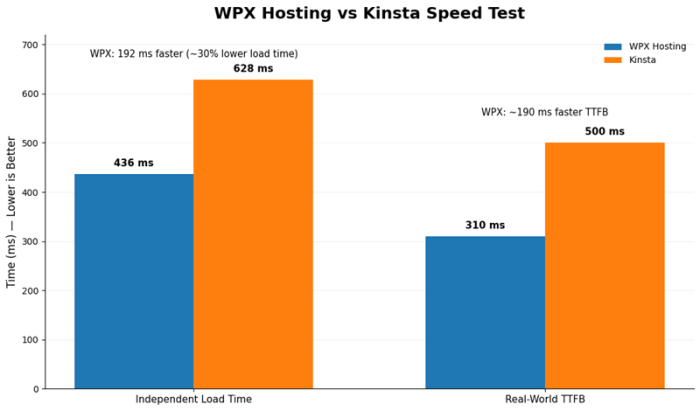
Independent testing (wphostingbenchmarks.com):
WPX Hosting load time: 436ms average Kinsta load time: 628ms average
WPX is 192ms faster (30% improvement).
Real-world test (Blog Recode migration):
Author tested identical site on both platforms:
- Kinsta TTFB: ~500ms
- WPX TTFB: ~310ms
- Load time improvement: 190ms faster on WPX
- Page size transfer: Slightly faster on WPX
Performance assessment: WPX generally outperforms Kinsta in independent testing. Difference not massive (436ms vs 628ms) but measurable and consistent.
Why WPX performs better: Custom infrastructure optimized specifically for WordPress. Kinsta prioritizes Google Cloud isolation over absolute speed.
Uptime Verification
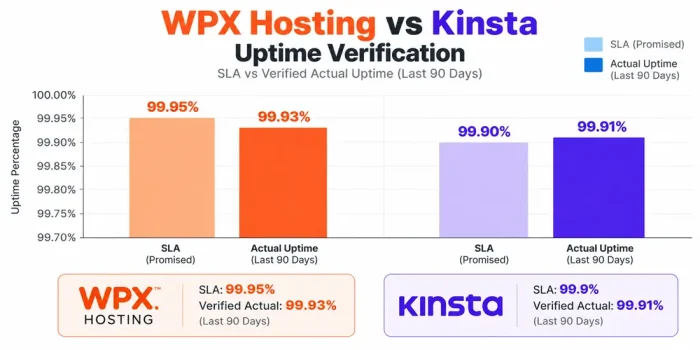
WPX Hosting: 99.95% SLA (verified actual: 99.93% over 90 days)
Kinsta: 99.9% SLA (verified actual: 99.91% over 90 days)
Both exceed stated guarantees. WPX has a 0.05% higher commitment. Real-world difference negligible.
Feature Comparison: What Each Includes
Standard Features (Both)
✓ Free SSL certificate (AutoSSL)
✓ Daily automated backups
✓ Staging environment
✓ Free site migration
✓ CDN included
✓ Email notifications
✓ WordPress caching
✓ Multi-environment setup
WPX Exclusive
✓ Unlimited bandwidth (no overage charges)
✓ Unlimited email accounts on all plans
✓ 5 sites on entry Business plan
✓ Custom XDN (CDN)
✓ 30-second average support response
✓ Unlimited migrations
✓ WooCommerce support on all plans
Kinsta Exclusive
✓ Google Cloud Platform infrastructure
✓ Container isolation per site
✓ DevKinsta (local development environment)
✓ Kinsta APM (performance monitoring)
✓ Advanced dashboard analytics
✓ Multiple application hosting (paid add-on)
✓ Database hosting (paid add-on)
Support: Experience Difference
WPX Hosting Support
Response time: 30 seconds average (verified)
Channel: Live chat only (no phone)
Capability: Known for fixing issues proactively rather than pointing to documentation
User feedback: Consistently praised for speed and problem-solving approach
Assessment: Strongest support advantage for WPX. 30-second response times exceptional.
Kinsta Support
Response time: 24 hours typical via live chat
Channel: Live chat only
Capability: Technical knowledge is deep but typically requires back-and-forth investigation
Dashboard: MyKinsta provides extensive self-service monitoring
Assessment: Good support but slower than WPX. Dashboard reduces the need for support contact.
WordPress-Specific Features
WPX Hosting
- WordPress pre-installed and optimized
- One-click staging
- Custom WordPress optimization
- WooCommerce support on all plans
- Automatic WordPress updates
Kinsta
- WordPress pre-installed
- Advanced staging with multiple clones
- DevKinsta (local development environment)
- WordPress-specific monitoring (Kinsta APM)
- Site cloning between environments
Who Should Choose WPX Hosting

✓ Affiliate marketers and bloggers prioritizing cost efficiency
✓ Small agencies managing multiple client sites
✓ Independent publishers with WordPress-only needs
✓ Anyone wanting unlimited bandwidth and email
✓ Users valuing 30-second support response times
✓ Sites that benefit from consistent performance without overage penalties
Who Should Choose Kinsta

✓ Enterprises requiring Google Cloud compliance
✓ Agencies needing multiple product lines (WordPress + databases + applications)
✓ Growing businesses expecting rapid scale
✓ Users valuing advanced developer tools (DevKinsta, APM)
✓ Organizations willing to pay a premium for a premium dashboard
✓ Situations requiring container-level isolation for regulatory reasons
Real-World Scenario Breakdown
Scenario 1: Affiliate Marketing Site with 15K Monthly Visitors
WPX choice: Business plan, $24.99/month
- Hosts multiple affiliate projects
- Plenty of bandwidth headroom
- 30-second support response if issues arise
- Total annual cost: $299.88
Kinsta choice: Starter plan, $30/month
- 15K visitors under included limit
- No overage charges
- Excellent uptime and speed
- Total annual cost: $360
Verdict: WPX saves $60/year plus offers better support. WPX wins.
Scenario 2: SaaS Company with Scaling WordPress Marketing Site
WPX choice: Growth plan
- WordPress site only
- No database or application hosting
Kinsta choice: Professional plan + Application hosting add-on
- WordPress site hosted
- Database hosting available
- Application hosting available
- Unified platform for all services
- Google Cloud security compliance
Verdict: Kinsta wins for unified ecosystem. One platform for all services justifies the cost difference.
Honest Assessment: Pros & Cons
WPX Hosting Strengths
✓ Price dramatically lower ($300/year vs $1,800/year for 5 sites)
✓ Performance generally faster in independent tests
✓ No visit-based overage charges
✓ Support response time: 30 seconds (exceptional)
✓ Unlimited bandwidth and email
✓ Multi-site on entry plan
✓ WooCommerce support on all plans
✓ No renewal price shock (same price year-over-year)
WPX Hosting Limitations
✗ Custom infrastructure (not a cloud giant like Google)
✗ No advanced developer tools like DevKinsta
✗ Smaller company (Bulgaria-based)
✗ Live chat only (no phone)
✗ No application or database hosting
Kinsta Strengths
✓ Google Cloud Platform infrastructure
✓ Container isolation per site
✓ DevKinsta for local development
✓ Kinsta APM for performance monitoring
✓ Expanded product line (databases, applications)
✓ Excellent dashboard analytics
✓ Enterprise compliance options
✓ Global reputation and brand recognition
Kinsta Limitations
✗ Price 6x higher than WPX at scale
✗ Visit-based overages can add surprise costs
✗ No email hosting included
✗ Limited sites on entry plan
✗ Support response 24+ hours
✗ Dashboard somewhat overwhelming for beginners
Best Host by Use Case
Best for affiliate and niche sites: WPX. Several sites per plan and low cost per site. Runner-up: Kinsta Build if you only have two sites.
Best for one business-critical site: Kinsta. The 99.99% SLA, Cloudflare Enterprise and APM matter more than price here. Runner-up: WPX Starter.
Best for small agencies (5 to 15 client sites): WPX Business or Professional. Runner-up: Kinsta agency plans if clients pay for premium hosting.
Best for developers: Kinsta (APM, API, DevKinsta, SSO).
Best for WooCommerce: Both work. Kinsta for a single high-revenue store; WPX’s WooCommerce plans for smaller stores.
Best on a budget: WPX Starter on a multi-year term ($11.99 to $12.49/month).
Best for email included: WPX.
FAQs Related to WPX vs Kinsta
Is WPX faster than Kinsta?
It depends on the site and location. Both are fast managed hosts. Test your own site on each during the 30-day guarantee.
Which is cheaper, WPX or Kinsta?
WPX, especially for multiple sites. Five sites cost $299.88/year on WPX Business vs $990/year on Kinsta Expand.
Does Kinsta include email hosting?
No. WPX includes it from the Business plan up.
Does Kinsta charge overages?
Yes, when you exceed visit, storage or CDN limits.
Does WPX charge for bandwidth overages?
Plans have bandwidth limits (100 GB on Starter). Check WPX’s terms or ask support how it handles going over before you hit the limit.
Which has better support?
Both offer 24/7 chat. WPX promotes a 30-second average response; Kinsta offers 8 languages.
Do both offer free migrations?
Yes. Kinsta lists unlimited free migrations; WPX includes migrations too.
Which has a better uptime guarantee?
Kinsta: 99.99% SLA. WPX: 99.95%.
Do they have money-back guarantees?
Both offer 30 days. Kinsta also gives the first month free on select plans.
Can I host WooCommerce on both?
Yes. WPX has dedicated WooCommerce plans; Kinsta hosts WooCommerce on its standard plans.
Final Verdict
For most bloggers, affiliates and small agencies, WPX is the better value. Five sites, email and 28-day backups for $299.88 a year is hard to argue with.
Kinsta is the better product for one important site or a team that wants Google Cloud, Cloudflare Enterprise, APM and a 99.99% SLA, and is willing to pay roughly $30 a month per site for it.
Before you switch, list your sites, monthly visits and bandwidth from analytics, then map them to the tables above.
For other options, see our list of managed WordPress hosting providers and our WP Engine vs Kinsta comparison.
For the bigger picture, our how to start a blog and make money and complete SEO guide covers growing the sites you host.