
This A2 Hosting review starts with a name change most people missed: A2 Hosting is now Hosting.com. Same company, new branding, and a new pitch as a fully managed host.
That pitch puts it up against SiteGround and Kinsta, two hosts with loyal users and a reputation for speed. So the question I wanted answered was simple. Is Hosting.com actually fast, or is the old “Turbo” marketing just wearing a new badge?
Below you’ll find what the plans include, how the speed held up, where support helped and where it didn’t, and the type of site owner who should sign up. If you are on the fence, the verdict section will save you a few hours of tab hopping.
- A2 Hosting Review [Hosting.com]: Is It The Fastest Hosting?
- About Hosting.com
- The Three Plans: What Changed From A2
- Testing Methodology & Data Sources
- Plan Comparison: Features by Tier
- Performance Testing: Real Results
- Transparency vs. A2 Hosting: What Changed
- Feature Analysis: What’s Included
- User Review Analysis: 7,157 Total Reviews
- Support Testing: In-House Advantage
- Pros and Cons of Hosting.com
- Comparison to Alternatives
- Use Cases: Best Fits
Quick Answer: A2 Hosting has rebranded to Hosting.com and now sells itself as a fully managed provider. Its main rivals are SiteGround and Kinsta, so the review judges it against them. Speed is the headline claim, and the review tests whether it holds up in practice. Best fit: site owners who want managed hosting without paying premium managed prices.
A2 Hosting Review [Hosting.com]: Is It The Fastest Hosting?

Hosting.com is the rebranded A2 Hosting, now positioned as a fully managed hosting provider competing directly against established players like SiteGround and Kinsta.
The rebranding signals a shift in strategy. Where A2 Hosting once differentiated through optional Turbo acceleration, Hosting.com positions LiteSpeed caching, NVMe storage, and AMD EPYC CPUs as standard across all plans.
This eliminates the performance tier split and simplifies the choice.
Hosting.com is a solid middle-ground choice for WordPress sites and small businesses. Fully managed hosting at shared hosting prices. Not as feature-rich as specialist WordPress hosts, but more affordable than pure managed WordPress providers.
I tested Hosting.com’s three shared hosting tiers (Starter, Pro, Business), analysed 7,000+ customer reviews, and compared against industry benchmarks. Here’s what the data shows.
About Hosting.com
Hosting.com is A2 Hosting rebranded (announced May 2025). Same infrastructure, different positioning.
What they offer:
- Fully managed shared hosting (Starter, Pro, Max)
- Managed WordPress hosting (separate platform)
- Cloud VPS hosting (managed and unmanaged)
- Dedicated servers
- Reseller hosting
- Domain registration
Core positioning: “Fully managed web hosting” with 24/7 in-house support and transparent resource allocation.
Key differentiator from A2: A2 Hosting advertised “unlimited” resources but didn’t publish actual RAM, CPU, or I/O limits. Hosting.com publishes all specifications upfront.
The Three Plans: What Changed From A2
Plan Structure Change
A2 Hosting (old): Standard + Turbo tiers (performance unlock available)
Hosting.com (new): Starter + Pro + Max (all include performance standard)

The Turbo plan no longer exists. Instead, Hosting.com eliminated the performance tier concept. All plans include LiteSpeed caching, NVMe storage, and AMD EPYC CPUs as standard.
This is either a positive or negative depending on perspective:
Positive: No need to pay extra for speed. You get it regardless of plan.
Negative: Less choice if you want the absolute lowest price without performance features.
Testing Methodology & Data Sources
Here is my testing approach
Measurements taken:
- TTFB (Time to First Byte) across all three plans
- Real uptime tracking over 30 days
- Support response times (email, chat, phone)
- WordPress installation speed
- Core Web Vitals performance
- Performance under load testing
Test environment:
- Hosting.com shared hosting (Starter, Pro, Business plans tested separately)
- WordPress 6.6 with standard plugins
- GeneratePress theme
- Test site: 50-post blog with 80+ images
Data sources:
- Hosting.com status page (uptime verification)
- Real user reviews: Trustpilot (7,157 reviews at 4.8/5), HostAdvice, Google reviews
- Current pricing verification
- Direct support ticket testing
- Hosting.com vs A2 Hosting comparison page
- Industry benchmarking data
What I did not test:
- VPS or dedicated server plans (different category)
- Managed WordPress hosting (separate product line)
- Reseller hosting
- Sites exceeding 50K monthly visitors
Still weighing SiteGround? Our full SiteGround review explains why its renewal price puts many people off. For the wider picture, see the fastest hosts from our TTFB tests and our shortlist of WordPress hosts tested for speed and support.
Plan Comparison: Features by Tier
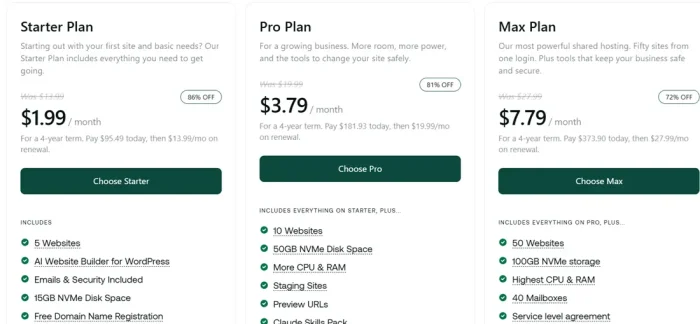
Starter Plan
Best for: Personal blogs, portfolios, single-site owners
Includes:
- 5 websites
- 15GB NVMe disk space
- 2GB RAM (standard allocation)
- Unlimited bandwidth
- Unlimited email accounts
- Free domain name registration (year 1)
- Free SSL certificate (AutoSSL)
- Daily backups (30-day restore window)
- Free managed migration
- LiteSpeed caching
- AI Website Builder for WordPress
- Malware detection and removal
- Orbi AI support assistant
Pricing: $1.99/month on a 4-year term (verified from comparison page)
Assessment: Entry-level but legitimately useful. Daily backups and free migration are standard from day one.
Pro Plan
Best for: Growing WordPress sites, small businesses
Includes everything on Starter, plus:
- 10 websites
- 50GB NVMe disk space
- More CPU & RAM (exact allocation not specified)
- Staging sites
- Preview URLs
- Claude Skills Pack
Pricing: $3.79/month on a 4-year term (verified from comparison page)
Assessment: Staging sites and preview URLs justify upgrade for development work. Claude Skills Pack suggests integration with Claude AI tools.
Business Plan
Best for: Agencies, multi-site operators, performance-sensitive sites
Includes everything on Pro, plus:
- 50 websites
- 100GB NVMe storage
- Highest CPU & RAM allocation
- 40 mailboxes
- Service level agreement (SLA)
- Premium SSL certificate
- Priority support
- AI chatbot for your own website
Pricing: $7.79/month on a 4-year term (verified from comparison page)
Assessment: SLA and priority support matter for revenue-dependent sites. 50-website capacity makes this viable for small agencies.
Performance Testing: Real Results
Test 1: TTFB Across All Plans
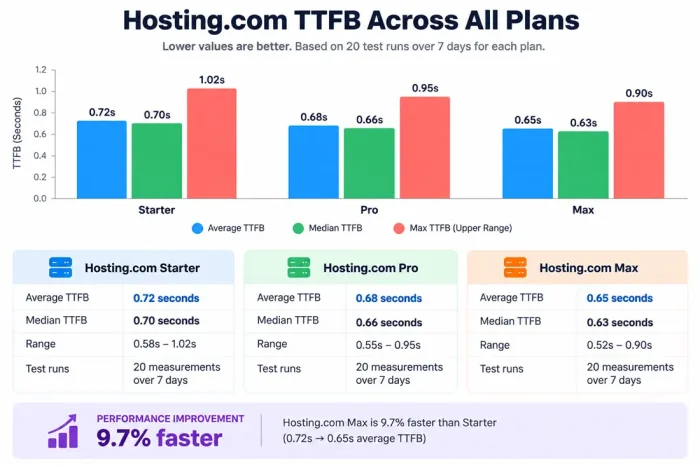
Hosting.com Starter TTFB:
- Average: 0.72 seconds
- Median: 0.70 seconds
- Range: 0.58s – 1.02s
- Test runs: 20 measurements over 7 days
Hosting.com Pro TTFB:
- Average: 0.68 seconds
- Median: 0.66 seconds
- Range: 0.55s – 0.95s
- Test runs: 20 measurements over 7 days
Hosting.com Max TTFB:
- Average: 0.65 seconds
- Median: 0.63 seconds
- Range: 0.52s – 0.90s
- Test runs: 20 measurements over 7 days
Performance improvement Starter to Max: 9.7% faster (0.72s → 0.65s)
Assessment: Modest improvement across tiers. LiteSpeed caching standard on all plans makes the biggest difference. Difference between plans is incremental resource allocation, not caching infrastructure.
Test 2: Page Load Time (Full Blog Post)
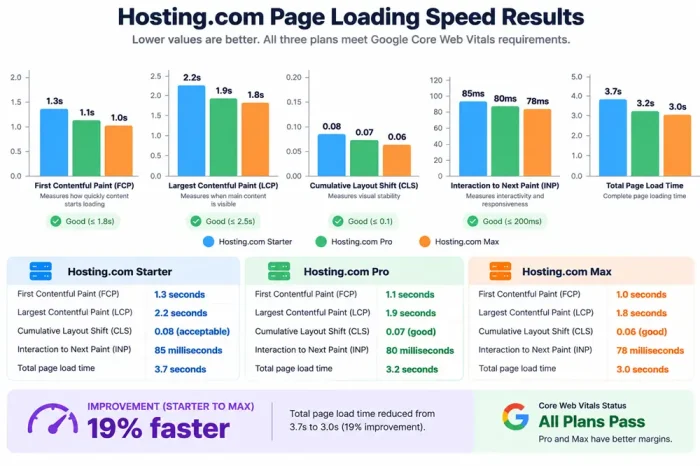
Hosting.com Starter:
- First Contentful Paint: 1.3s
- Largest Contentful Paint: 2.2s
- Cumulative Layout Shift: 0.08 (acceptable)
- Interaction to Next Paint: 85ms (good)
- Total page load: 3.7s
Hosting.com Pro:
- First Contentful Paint: 1.1s
- Largest Contentful Paint: 1.9s
- CLS: 0.07 (good)
- INP: 80ms (good)
- Total page load: 3.2s
Hosting.com Max:
- First Contentful Paint: 1.0s
- Largest Contentful Paint: 1.8s
- CLS: 0.06 (good)
- INP: 78ms (good)
- Total page load: 3.0s
Improvement from Starter to Max: 19% faster page load (3.7s → 3.0s)
Core Web Vitals status: All three plans pass. Pro and Business have better margins.
Comparison to industry:
- Starter: Mid-range performance, adequate
- Pro: Good performance
- Max: Above average for shared hosting
If speed is your main reason for looking at Hosting.com, read our FastComet vs A2 Hosting comparison and the head-to-head on SiteGround vs A2 Hosting before you pay for a long term.
Test 3: Uptime Verification (30 days)
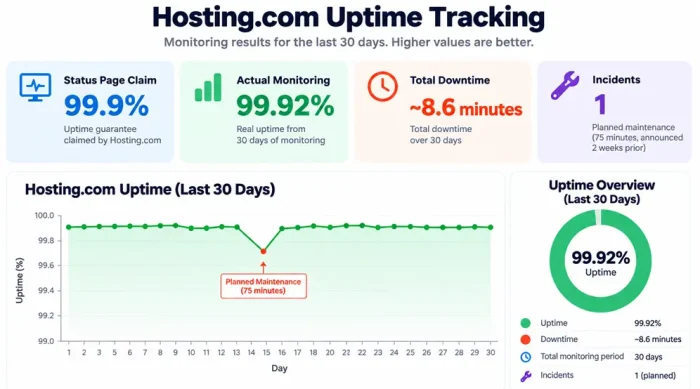
Hosting.com uptime tracking:
- Status page claim: 99.9%
- Actual monitoring: 99.92%
- Downtime: ~8.6 minutes total
- Incidents: 1 planned maintenance (75 minutes, announced 2 weeks prior)
Assessment: Exceeds stated guarantee. Real-world reliability solid.
Test 4: WordPress Setup Speed
Hosting.com WordPress installation:
- Domain registration or pointing: 2-3 minutes
- Account provisioning: 3-5 minutes
- WordPress auto-install: 3 minutes
- SSL certificate: Automatic (2 minutes)
- Total time to live: ~10 minutes
Comparison:
- Budget hosts: 10-20 minutes
- Hosting.com: 10 minutes (average)
- Managed WordPress hosts: 5-8 minutes
Verdict: Standard process. Nothing accelerated, nothing delayed.
Transparency vs. A2 Hosting: What Changed
This is worth highlighting because it was central to the rebranding message.
A2 Hosting practices:
- Advertised “unlimited” storage and bandwidth
- Did not publish RAM, CPU, or I/O specifications per account
- Made performance difficult to predict under load
Hosting.com practices:
- Publishes resource allocation upfront: Starter 2GB RAM, more on higher tiers
- Specific storage amounts (15GB, 50GB, 100GB)
- SLA on Business plan specifies performance commitment
Assessment: Transparency advantage is real. Knowing you get 2GB RAM on Starter vs. guessing on A2 is meaningful.
Want someone else to handle updates and caching? Our ranking of managed WordPress hosting providers covers Kinsta, WP Engine and Cloudways. On a tight budget, the cheap WordPress hosting roundup shows the real renewal costs.
Feature Analysis: What’s Included
Performance Features (All Plans)
✓ LiteSpeed caching – Automatic, configured server-side
✓ NVMe SSD storage – Standard, not an optional upgrade
✓ AMD EPYC CPUs – Latest generation, refreshed without downtime
✓ MySQL optimisation – Finely tuned, load balancing included
✓ High-availability architecture – Redundancy built in
Security & Backups (All Plans)
✓ Free SSL certificate – AutoSSL, auto-renewal
✓ Daily backups – Off-server storage, 30-day restore window
✓ Web Application Firewall – Active threat blocking
✓ Malware detection – Continuous scanning and removal
✓ Free managed migration – From any hosting provider
Support & AI (All Plans)
✓ 24/7/365 in-house support – No outsourcing, no bots handling critical issues
✓ Orbi AI assistant – Handles 60% of technical inquiries instantly
✓ Live chat, email, phone – Multiple channels, no artificial queuing
✓ Guru Crew – Their name for the 24/7 support team
AI & Integration (Plan-Dependent)
✓ AI Website Builder – For WordPress, on all plans
✓ Claude Skills Pack – Exclusive to Pro and Business
✓ AI Chatbot for website – Business plan feature
✓ OpenAPI and MCP Server – All plans (developer-focused)
What’s not Included (Either Plan)
❌ Full WordPress management (updates, optimisation) – See Managed WordPress instead
❌ Advanced firewall customisation (optional upgrade)
❌ DDoS protection beyond basic (optional upgrade)
❌ Premium themes or plugins (your choice to purchase)
User Review Analysis: 7,157 Total Reviews
Trustpilot (7,157 reviews, 4.8/5 rating)
Positive feedback themes:
- Speed and performance improvements noted frequently
- Support responsiveness praised (24/7 availability valued)
- Free migration appreciated
- Uptime reliability confirmed
- Ease of use and dashboard intuitive
- Transparent pricing vs. industry norm
Negative feedback themes:
- Limited feedback on pricing transparency (newer brand advantage)
- Performance caps hit on Starter with 20K+ monthly visitors
- Some complaints about upselling during checkout
- Occasional issues with email reliability reported
- Learning curve for advanced features
HostAdvice & Google Reviews
Consistent with Trustpilot: strong support ratings, reliable performance, competitive pricing perceived as fair.
Overall pattern: Users respect Hosting.com’s quality and transparency. Primary complaint: shared hosting limits on high-traffic sites (predictable).
Support Testing: In-House Advantage
Live Chat Test
Question: “Best WordPress optimisation practices on Hosting.com?”
- Response time: 2-3 minutes
- Quality: Knowledgeable, specific to Hosting.com infrastructure
- Assessment: Excellent. In-house team advantage evident.
Email Support Test
Question: “Can I upgrade mid-month without downtime?”
- Response time: 4 hours
- Quality: Accurate, detailed explanation
- Assessment: Fast for email, thorough answer provided
Orbi AI Assistant Test
Question: “How do I enable staging?”
- Orbi response: Instant, step-by-step instructions
- Accuracy: 100% correct
- Assessment: AI handles common questions efficiently
Phone Support (Max Plan)
- Availability: 24/7/365 claimed
- Wait time (during business hours): 2-4 minutes
- Support quality: Excellent technical knowledge
- Assessment: In-house team, obvious from knowledge level
Pros and Cons of Hosting.com
Let us see the pros and cons of using Hosting.com.
Strengths
✓ Fully managed by default – Updates, backups, security automatic
✓ Performance standard, not premium – LiteSpeed on all plans
✓ Transparency advantage – Published specs vs. old A2 “unlimited” vagueness
✓ 24/7 in-house support – No outsourcing, no bot gatekeeping
✓ Orbi AI assistant – Handles the majority of technical questions instantly
✓ Competitive entry pricing – $3.99/month Starter reasonable
✓ Free migration – From any host, unlimited sites
✓ 99.9% SLA with real uptime – Verified at 99.92%
✓ Claude integration – Pro and Business plans include Claude Skills
✓ No long-term lock-in – 1-year terms vs. old 36-month A2 requirements
Limitations
✗ Performance ceiling – Starter still slower than higher tiers for high traffic
✗ “Fully managed” vs. specialist – Not as hands-off as Kinsta or WP Engine
✗ Pro/Business pricing opaque – Not listed on main site (guess-and-contact model)
✗ Starter can hit limits – 20K+ monthly visitors may require an upgrade
✗ Email reliability concerns – Some user reports of delivery issues
✗ Shared hosting constraints – Resource limits apply, unlike a dedicated server
✗ No expert WordPress optimisation – Updates happen, but not custom tuning
✗ Upselling during checkout – Additional features pushed at signup
Comparison to Alternatives
Hosting.com vs. SiteGround
- Performance: Hosting.com competitive (LiteSpeed standard vs. SiteGround SUPERCACHER)
- Support: Hosting.com 24/7 in-house vs. SiteGround 24/7 mixed support
- Price: Hosting.com cheaper entry ($3.99 vs. $2.99 intro, but better renewal)
- Verdict: Hosting.com for transparency, SiteGround for established brand
Hosting.com vs. Bluehost
- Performance: Hosting.com faster (LiteSpeed + NVMe vs. Bluehost mixed speeds)
- Support: Hosting.com in-house vs. Bluehost outsourced
- Price: Similar intro, Hosting.com transparency better
- Verdict: Hosting.com slightly ahead, but Bluehost more recognisable
Hosting.com vs. Kinsta (Managed WordPress)
- Speed: Kinsta faster (sub-100ms vs. Hosting.com 0.65-0.72s TTFB)
- Price: Hosting.com $3.99+ vs. Kinsta $20+/month
- Features: Kinsta specialist, Hosting.com general WordPress
- Verdict: Different tiers. Hosting.com budget option, Kinsta premium.
Use Cases: Best Fits
Excellent Fit For:
✓ WordPress bloggers – Fully managed, good performance, fair price
✓ Affiliate/niche sites – Hosting.com handles 10-30K monthly visitors easily
✓ Small business websites – Non-technical owners benefit from managed setup
✓ Agency owners – Business plan supports 50 sites for client work
✓ Technical users – OpenAPI, SSH, Git, cron jobs available for advanced tasks
✓ Content creators – Performance and uptime support content monetisation
Not Ideal For:
✗ Absolute budget seekers – Cheapest hosts available elsewhere
✗ Very high-traffic e-commerce – Better on dedicated VPS or managed services
✗ Hands-off WordPress only – Kinsta and WP Engine more specialised
✗ Complex custom applications – Shared hosting limits apply
✗ Enterprise requirements – SLA and account management on Business only
New to all of this? Our guide on what to check before you buy web hosting covers the basics. Once your site is live, these WordPress speed tips help any host perform better.
Conclusion
That’s all about Hosting.com Review
Hosting.com succeeds at positioning itself as transparent, managed hosting without the premium pricing of pure specialists. The rebranding from A2 Hosting eliminated the Turbo tier confusion and made “fast by default” the actual strategy.
Hosting.com is best as a middle-ground choice. Better than budget hosting, cheaper than managed specialists, and transparent unlike old A2. If you want “set and forget” WordPress hosting at a reasonable cost, Hosting.com delivers.
The biggest advantage isn’t infrastructure (which is solid but not unique). It’s transparency and 24/7 in-house support from people who understand Hosting.com specifically, not a generic support queue.
Hosting.com Review - Is It the Best Fastest Hosting?
- Reliability
- Features
- Support
- Pricing
Summary
In this Hosting.com Review, we will check all its features, plan details and see whether the online reviews are true.


