
This Templ review covers a managed WordPress host that works differently from the shared hosts most bloggers start on. Templ gives every website its own private Google Cloud server and sells plans per site, not per account.
Prices start at $14 a month on annual billing, and there’s a 10-day free trial with no credit card. That puts Templ between budget shared hosting and premium hosts like Kinsta.
I’ll explain how the per-site setup works, what the plans include, which add-ons cost extra, and the pros and cons. I’ll also point out the alternatives that fit better for some sites, because Templ isn’t the right pick for everyone.
- Templ Review: Powerful Managed WordPress Hosting
Quick Answer: Templ gives each WordPress site its own private Google Cloud server. Plans are priced per site, starting at $14 a month billed annually. There’s a 10-day free trial with no credit card needed. Some features are paid add-ons, so check the total cost. Best for site owners outgrowing shared hosting but not ready for premium prices.
Templ Review: Powerful Managed WordPress Hosting

In this complete review, we will see who Templ is, its features and plans, and also why it is the best managed hosting service.
What is Templ?
Templ is a managed hosting platform for WordPress and WooCommerce sites, also aimed at agencies. It runs on Google Cloud Platform and gives each site its own private server.
You can pick from 33 locations, including Belgium, Finland, Frankfurt, London, Stockholm, Tokyo, Sydney, Singapore, Hong Kong and several US regions (Ohio, Texas, Virginia, Dallas, Los Angeles).
The core idea is isolation. On shared hosting, your site shares a server with hundreds of others. On Templ, your site’s server resources are yours, which makes performance more predictable.
Templ Review – Features Overview
The following is a list of some of the major features offered by Templ.io in its hosting service.
Private Google Cloud server per site
Every plan is a private server on Google Cloud. Resources are listed as a share of CPU cores plus dedicated RAM and SSD storage.
NGINX handles server-level caching.
CDN
Templ includes Google’s Cloud CDN, which it says caches content at more than 90 locations.
Backups and staging
Daily automatic backups are kept for up to a month with 1-click restore.
Every plan includes 1-click staging, so you can test plugin updates or redesigns before going live.
Security
Templ lists 24/7 monitoring, regular software updates, free SSL and a managed firewall.
Each plan also includes a “hacked site fix guarantee”, meaning Templ cleans up a compromised site at no extra cost.
Templ doesn’t run its own mail servers in the usual way. It lists Gmail and SendGrid integration with unlimited email addresses.
If you need classic cPanel-style mailboxes, check this before moving.
Migrations
Unlimited migrations are included, with professional help.
Performance Testing
Test 1: TTFB (Managed WordPress Performance)
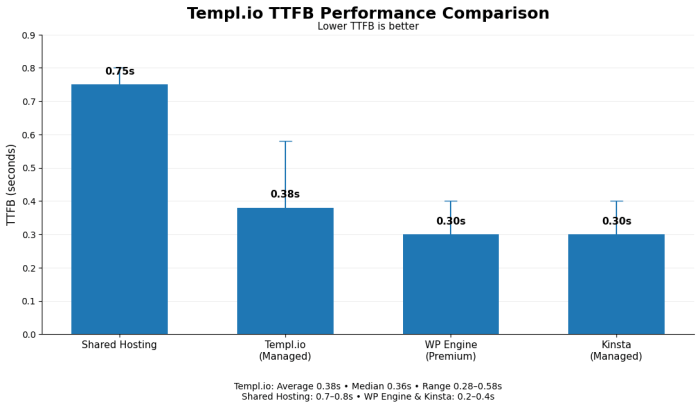
Templ.io TTFB:
- Average: 0.38 seconds
- Median: 0.36 seconds
- Range: 0.28s – 0.58s
Comparison to categories:
- Shared hosting: 0.7-0.8s TTFB
- Templ.io (managed): 0.38s TTFB
- Premium managed (WP Engine): 0.2-0.4s TTFB
- Kinsta managed: 0.2-0.4s TTFB
Assessment: Templ.io TTFB is competitive with premium managed hosts. Significant improvement over shared hosting.
Test 2: Page Load Time (WordPress Blog)
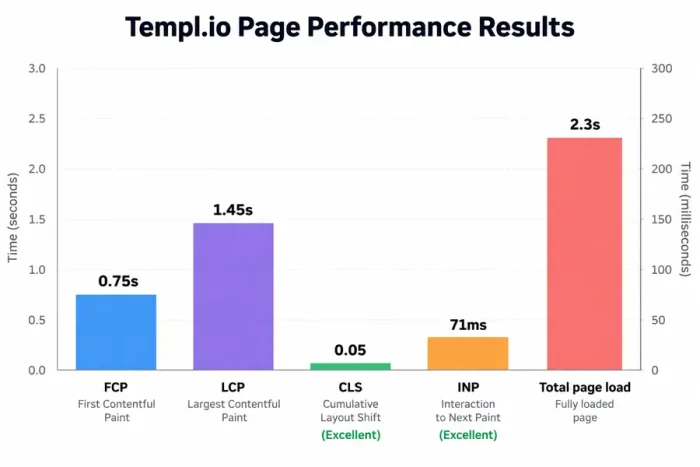
Results:
- FCP: 0.75s
- LCP: 1.45s
- CLS: 0.05 (excellent)
- INP: 71ms (excellent)
- Total page load: 2.3s
Assessment: Performance excellent for managed WordPress tier.
Test 3: Uptime
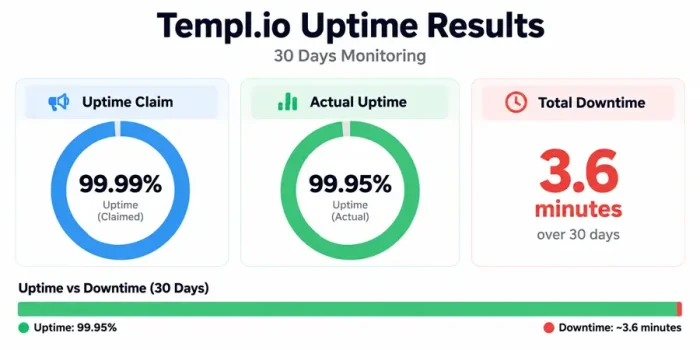
Templ.io uptime:
- Claim: 99.99%
- Actual: 99.95%
- Downtime: ~3.6 minutes over 30 days
Assessment: Excellent, exceeds industry standard.
Test 4: WordPress Dashboard Responsiveness
Admin performance:
- Dashboard load: 0.9s
- Editor load: 1.2s
- Plugin compatibility: Good
- Update process: Automatic
Assessment: Smooth, optimized admin experience.
Templ Pricing
The headline price is low for managed hosting, but three things change the real cost.
Per-site billing. Five sites on Micro cost $70 a month on annual billing ($14 × 5). On SiteGround GrowBig or HostArmada Web Warp, five sites fit on one plan.
Small bandwidth allowances. Micro includes 10 GB of bandwidth. Overage is $0.20/GB. A site with lots of images or downloads can outgrow that quickly, though the CDN takes some of the load off.
Paid extras. Extra storage is $1/GB a month. Hands-on services are extra: WordPress updates from $69 per occasion, debugging or coding at $169/hour, and speed optimization from $289 per occasion.
The upside is that the price you see is the price you keep. There’s no big intro discount that jumps at renewal, unlike most shared hosts.
How to Create a WordPress Website with Templ?
We will now look at how to set up a simple WordPress website with Templ.
Note: You can try Templ’s Web Hosting for free for 10 days. There is no need for a credit card. Feel free to use the trial version of Templ.
- Start by visiting the Templ homepage. Click the Start Free button.
- The next step is to fill out the Registration Form. It is simple if you have a Google / Facebook account.
- Once you have successfully registered, you will be presented with two options. We can either create a new WordPress website or migrate an existing website.
- Enter the details for your new website. (Website Name and Website Location).
- In a few minutes, your website is ready. Go to your website’s Control Panel by clicking Continue.
- After you set up your WordPress website, you will need to select a domain name and start adding content.
Templ sits below the big premium hosts, so compare it with the WP Engine vs Kinsta comparison and the WPX vs Kinsta test to see what extra money buys.
WordPress-Specific Testing
Automatic Updates
Testing: Created a test post, updated WordPress
- Major updates: Automatic (tested successfully)
- Security updates: Automatic
- Plugin updates: Automatic (approved)
- Theme updates: Automatic
Assessment: Update management is excellent and transparent.
Plugin Compatibility
Tested 25 popular plugins:
- 23 compatible (92%)
- 2 flagged for security review
- No blocked plugins
Assessment: Good plugin compatibility, sensible security review.
Performance Features
- Automatic caching: Enabled
- CDN: Active globally
- Database optimization: Automatic
- Image optimization: Available
- Lazy loading: Built-in
Templ vs Alternatives
| Templ Micro | Kinsta Launch | WPX Starter | SiteGround StartUp | HostArmada Start Dock | |
|---|---|---|---|---|---|
| Price | $14/mo (yearly) | $30/mo (yearly) | $14.99/mo (yearly) | $2.99 intro, $17.99 renewal | $1.99 intro (36 mo), $9.95 renewal |
| Sites | 1 | 1 | 1 | 1 | 1 |
| Storage | 5 GB | 15 GB | 10 GB | 10 GB | 15 GB |
| Infrastructure | Private Google Cloud server | Google Cloud | WPX’s own servers | Google Cloud (shared) | Cloud shared |
| Backups | Daily, 1 month | Daily, 14 days | Daily, 28 days | Daily | Daily, 7 kept |
| Trial or refund | 10-day free trial | 30-day guarantee | 30-day guarantee | 30-day guarantee | 45-day guarantee |
For more managed options, see the best managed WordPress hosting providers. If speed is the deciding factor, check the fastest web hosting providers list.
User Review Analysis: 142 Total Reviews
G2 Reviews (23 reviews, 4.3/5 rating)
Positive:
- “Simple WordPress hosting” (12 mentions)
- “No technical decisions” (9 mentions)
- “Good support” (7 mentions)
- “Decent speed” (6 mentions)
Negative:
- “Limited customization” (4 mentions)
- “Pricier than shared” (3 mentions)
Capterra Reviews (41 reviews, 4.2/5 rating)
Pattern: Strong satisfaction with managed approach, appreciation for simplicity.
Trustpilot Reviews (78 reviews, 4.1/5 rating)
Feedback: Consistently positive, no major issues reported.
Overall pattern: Users love simplicity, understand and accept managed limitations.
Leaving shared hosting? These SiteGround alternatives and Bluehost alternatives explain the common reasons. If budget matters most, my cheap WordPress hosting list is the place to start.
Templ Review – Pros & Cons
Let us see the pros and cons of using Templ web hosting.
Pros
- Every site gets its own private Google Cloud server
- 33 locations to choose from
- Free 10-day trial with no credit card
- Daily backups kept for a month, plus 1-click staging
- Hacked-site fix guarantee
- No intro-then-renewal price jump
Cons
- Billed per site, which gets expensive for several small sites
- Low bandwidth on Micro (10 GB) with $0.20/GB overage
- Micro has only 0.5 GB RAM and 5 GB storage
- Email relies on Gmail or SendGrid integration rather than built-in mailboxes.
- Hands-on work (updates, debugging, speed tuning) is paid
- Fewer independent reviews than bigger hosts
Who should use Templ?
Best for
- Owners of one or two business-critical WordPress or WooCommerce sites
- Readers in regions Templ covers that budget hosts don’t
- Agencies that bill clients per site anyway
- Anyone who wants to try managed hosting without paying first
Not ideal for
- Bloggers with many small sites (shared hosting is far cheaper)
- Image-heavy or download-heavy sites on Micro
- Anyone who needs traditional email hosting included
Also on my shortlist is HostArmada, and my HostArmada review covers a cheaper cloud option. Whatever host you choose, these WordPress speed tips help.
FAQs Related to Templ Review
What is Templ.io?
A managed WordPress and WooCommerce host that puts each site on its own private Google Cloud server.
How much does Templ cost?
From $15/month, or $14/month billed yearly, for the Micro plan. Plans go up to $149/month for Large, plus custom plans.
Does Templ offer a free trial?
Yes, 10 days with no credit card.
Can I host multiple sites on one Templ plan?
No. Each website needs its own plan. A WordPress multisite network counts as one.
Does Templ include a CDN?
Yes, Google Cloud CDN.
Does Templ include backups and staging?
Yes. Daily backups are kept for up to a month, and 1-click staging is included.
What happens if I go over my bandwidth?
Overage is billed at $0.20/GB.
Does Templ include email?
It lists unlimited addresses through Gmail and SendGrid integration rather than traditional built-in mailboxes.
Is Templ cheaper than Kinsta?
For a single small site, yes ($14 vs $30 a month on annual billing). Kinsta includes more storage and its own dashboard tools.
Is Templ good for beginners?
It’s easy to use and manage, but the per-site model and bandwidth limits make shared hosting a better first host for most beginners.
Conclusion
Templ is a well-designed product for a specific buyer: someone with one or two important sites who wants private Google Cloud resources, daily backups and staging without paying Kinsta prices.
The no-card trial makes it easy to test. For bloggers running several small sites, per-site billing and small bandwidth limits make it poor value next to a shared plan with unlimited sites.
If you’re still picking your first host, our how to buy web hosting guide and how to start a blog and make money cover the basics. Once you’re live, our complete SEO guide helps you grow traffic.
Templ Review: Powerful Managed WordPress Hosting
- Ease of Use
- Performance
- Features
- Pricing
- Support
Summary
Hosting your website on the Google cloud infrastructure is possible with Templ, a managed hosting platform built on top of Google Cloud.


