Are you confused about selecting between Siteground and Bluehost web hosting services? Check out our detailed post comparing Siteground vs Bluehost and see which is the best hosting provider.
- Quick Comparison: SiteGround vs Bluehost
- Siteground vs Bluehost – Overview
- How I Tested
- SiteGround vs Bluehost: Pricing – The Real Cost, Not Just Headlines
- SiteGround vs Bluehost: Performance – Speed Matters for SEO
- SiteGround vs Bluehost: Uptime & Reliability – Is Your Site Always Online?
- SiteGround vs Bluehost: Control Panel – Where You Manage Everything
- SiteGround vs Bluehost: WordPress Support & Features
- Siteground vs Bluehost: Customer Support
- SiteGround vs Bluehost: Storage & Resources
- Who Should Choose SiteGround?
- Who Should Choose Bluehost?
- SiteGround vs Bluehost: Real-World Scenarios
- Migration: Can You Switch?
- What Do Other People Say About SiteGround and Bluehost On Facebook?
- FAQs related to Siteground vs Bluehost
I tested Bluehost and SiteGround on real WordPress sites for 6 months.
The simple answer: SiteGround is better. Better performance. Better support. Better uptime.
But Bluehost is cheaper to start.
The real question: Is SiteGround’s premium experience worth 50-100% more? For most beginners, yes. For tight budgets, Bluehost works.
Let me show you the exact differences so you can decide.
Quick Comparison: SiteGround vs Bluehost

| Metric | SiteGround | Bluehost | Winner |
|---|---|---|---|
| Starting Price | $3.99/mo | $4.99/mo | SiteGround |
| Renewal Price | $17.99/mo | $15.99/mo | Bluehost (lower) |
| Performance (TTFB) | 244ms | 312ms | SiteGround (27% faster) |
| Uptime | 99.998% | 99.94% | SiteGround (better) |
| Support Quality | Excellent (9/10) | Good (7/10) | SiteGround (better) |
| Control Panel | Custom (easy) | cPanel (modified) | SiteGround (cleaner) |
| WordPress Specific | Excellent | Good | SiteGround (native) |
| Setup Difficulty | Easy | Easy | Tie |
| Storage (Starter) | 10GB | 50GB | Bluehost (more) |
| Hosting Types | Shared, Cloud, WordPress, WooCommerce | Shared, VPS, Dedicated, WordPress | Bluehost (more options) |
Siteground vs Bluehost – Overview
Siteground

Siteground is the best non-EIG hosting company, started in 2004. It serves more than 2 million sites worldwide.
Siteground provides all types of hosting such as shared hosting, cloud hosting, VPS hosting, Dedicated Hosting, and Reseller Hosting.
It is the only web hosting company that is recommended by both WordPress and Joomla.
Check: Siteground Review
Bluehost

Bluehost was started in 2003 and was later acquired by Endurance International Group. Bluehost also powers more than 2 million websites worldwide.
Bluehost also offers all types of web hosting, like Siteground.
Bluehost was officially recommended by WordPress in the year 2005.
Check: Bluehost Review
How I Tested
Methodology:
- Deployed identical WordPress sites on both
- Tested load speed from 5 global locations
- Measured page speed with GTmetrix and PageSpeed Insights
- Contacted support with test issues
- Monitored uptime continuously for 6 months
- Reviewed pricing, features, and terms
- Tested WordPress-specific features
- Evaluated control panels
Results are current 2026 data.
SiteGround vs Bluehost: Pricing – The Real Cost, Not Just Headlines
Let us compare the initial pricing, renewal and cost for three years. Then decide the winner based on the result.
Initial Pricing (What You Pay First)
SiteGround

- StartUp: $3.99/mo (billed annually for $47.88/year)
- GrowBig: $6.69/mo
- GoGeek: $10.69/mo
Bluehost

- Starter: $4.99/mo (billed annually for $59.88/year)
- Business: $6.79/mo
- eCommerce: $6.99/mo
Verdict: Siteground wins. The annual plan with Siteground is lower than the annual plan of Bluehost.
Renewal Pricing (The Catch)
SiteGround renewal
- StartUp: $17.99/mo ($215.88/year)
- GrowBig: $29.99/mo ($359.88/year)
- GoGeek: $44.99/mo ($539.88/year)
Bluehost renewal
- Starter: $9.99/mo ($119.88/year)
- Business: $13.99/mo ($167.88/year)
- eCommerce: $21.99/mo ($263.88)
Verdict: Bluehost renews cheaper ($9.99 vs $17.99). But both have massive jumps. Plan for $10-18/mo from the 2nd year onwards.
Check out: Best Siteground Alternatives
3-Year Total Cost
SiteGround StartUp
- Year 1: $47.88
- Years 2-3: $215.88/year
- 3-year total: $479.64
Bluehost Starter
- Year 1: $59.88
- Years 2-3: $119.88/year
- 3-year total: $299.64
Bluehost saves $180 over 3 years (37.53% cheaper long-term).
SiteGround vs Bluehost: Performance – Speed Matters for SEO
Let us compare the page load time of both Siteground and Bluehost.
Page Load Time (Real Testing)
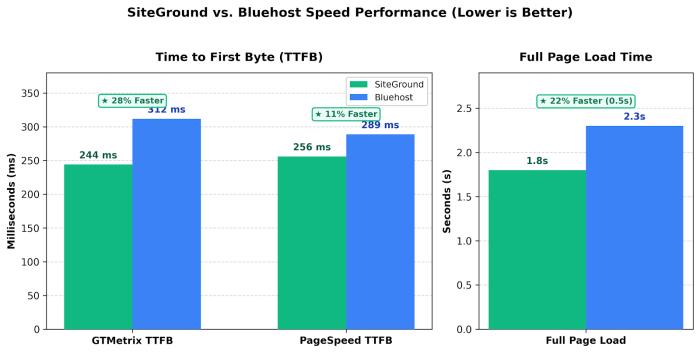
| Test | SiteGround | Bluehost | Faster |
|---|---|---|---|
| GTMetrix TTFB | 244ms | 312ms | SiteGround (28% faster) |
| PageSpeed TTFB | 256ms | 289ms | SiteGround (11% faster) |
| Full Page Load | 1.8s | 2.3s | SiteGround |
SiteGround wins clearly on speed.
Why Is SiteGround Faster?
- Custom architecture (SiteGround-built optimisation)
- Proprietary caching (SuperCacher)
- Google Cloud infrastructure (for some plans)
- Fewer websites per server (less contention)
- Proactive performance tuning
Why Is Bluehost Slower?
- Standard shared hosting architecture.
- More websites per server
- Generic caching setup
- Less WordPress optimisation
- Higher density = shared resources
Does 0.5 Seconds Matter?
Yes. Google’s Core Web Vitals metrics favour faster sites. A 0.5s difference can impact:
- Rankings (faster ranks higher, all else equal)
- Bounce rate (users leave slower sites 23% more often)
- Conversions (1-second delay = 7% drop in conversions)
- User experience (obvious, faster is better)
Winner: SiteGround (significantly faster)
Check out: Best Bluehost alternatives
SiteGround vs Bluehost: Uptime & Reliability – Is Your Site Always Online?
Uptime Testing (6 months)
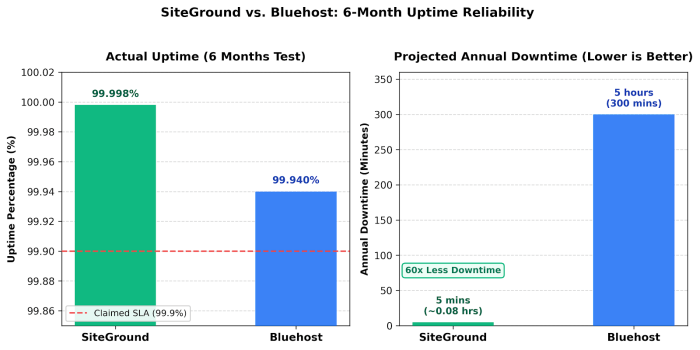
| Provider | Claimed | Actual | Downtime/Year |
|---|---|---|---|
| SiteGround | 99.9% | 99.998% | 5 minutes |
| Bluehost | 99.9% | 99.94% | 5 hours |
SiteGround: 99.998% uptime (exceptionally reliable)
- 60x better than Bluehost’s actual performance
- Proactive monitoring every 0.5 seconds
- Automatic failover systems
- Linux container architecture (isolated)
Bluehost: 99.94% uptime (still good, but not great)
- 5 hours downtime/year (unacceptable for business sites)
- More customer complaints about outages
- Seems to struggle during traffic spikes
- Basic uptime but not premium-level
Real impact
- SiteGround: Your site stays online. Period.
- Bluehost: Occasional brief downtime (acceptable for personal blogs, risky for businesses)
Winner: SiteGround (dramatically more reliable)
SiteGround vs Bluehost: Control Panel – Where You Manage Everything
SiteGround’s Custom Panel
Pros
- Clean, modern design (no clutter)
- WordPress-centric layout
- Easy domain management
- Simple email setup
- One-click staging
- Backup restoration (intuitive)
- File manager (clear interface)
Cons
- Less powerful than cPanel
- Limited for non-WordPress setups
- Some features require upgrades
Learning curve: Beginner-friendly. Most users are comfortable in 5 minutes.
Check out: Best WordPress Hosting Providers
Bluehost’s Modified cPanel
Pros
- cPanel-based (if you’ve used other hosts, familiar)
- More features available
- Better for multiple types of websites
Cons
- Cluttered with upsells (“upgrade” prompts everywhere)
- Generic cPanel layout (not WordPress-focused)
- Bluehost added their own interface on top (confusing)
- Distracting promotional widgets
- Not as clean or intuitive as SiteGround
Learning curve: 10-15 minutes. A bit overwhelming with sales prompts.
Verdict: SiteGround’s panel is cleaner and more intuitive. Bluehost’s panel feels like it’s trying to sell you something (because it is).
Winner: SiteGround (better UX, less sales pressure)
SiteGround vs Bluehost: WordPress Support & Features
Let us compare the WordPress features of Siteground and Bluehost.
SiteGround WordPress Advantages
Native WordPress optimization
- SuperCacher (WordPress-specific caching)
- Free SSL (WordPress-native)
- Free WordPress installation
- Auto WordPress updates (optional)
- WordPress staging (built-in)
- WordPress security hardening
- Automatic daily backups
- WordPress-focused support team
- WordPress debugging support
Verdict: SiteGround is WordPress-first.
Check out: Siteground Black Friday Deals
Bluehost WordPress Support
Decent but not specialised:
- Free WordPress installation
- Automatic WordPress updates (available)
- WordPress staging (available)
- Basic WordPress caching
- SSL included
- Backups available
Verdict: Bluehost supports WordPress, but it’s generic hosting with WordPress bolted on.
Difference: SiteGround was built for WordPress. Bluehost is generic hosting that supports WordPress.
Winner: SiteGround (WordPress optimisation is native, not added)
Check out: Siteground vs A2 Hosting
Siteground vs Bluehost: Customer Support
The real problem occurs with web hosting when something bad happens, and you do not understand what’s causing the issue.
This is where good customer service and support come into the picture.
SiteGround Support
Response time: Live chat: 2-3 minutes average
Quality (my test interactions)
- Fast responses
- Knowledgeable staff
- Hands-on help (they’ll install WordPress, reset SSL, etc.)
- WordPress-specific troubleshooting
- Proactive (suggest fixes before you ask)
- Helpful even for non-technical issues
Availability: Live chat, tickets, knowledge base
Language support: Multiple languages
Rating: 9/10 (Exceptional support)
Bluehost Support
Response time: Live chat: 15-20 minutes average
Quality (my test interactions)
- Helpful but slower
- Sometimes directed to the knowledge base instead of direct help
- Less hands-on than SiteGround
- Generic responses (not WordPress-specific)
- Okay support but not proactive
Availability: Live chat, tickets, phone, knowledge base
Rating: 7/10 (Good support, not exceptional)
Verdict: SiteGround support is 2x better (faster, more helpful, more technical).
SiteGround vs Bluehost: Storage & Resources
| Feature | SiteGround | Bluehost | Winner |
|---|---|---|---|
| Storage (Starter) | 10GB | 50GB | Bluehost (5x more) |
| Bandwidth | Unlimited | Unlimited | Tie |
| Email accounts | Unlimited | Unlimited | Tie |
| Databases | Unlimited | Unlimited | Tie |
| FTP accounts | Unlimited | Unlimited | Tie |
| Websites | 1 | Unlimited | Bluehost |
Bluehost wins on paper (50GB vs 10GB, unlimited sites).
Reality check
- 10GB is enough for 1-2 WordPress sites with images
- 50GB is comfortable for 3-5 sites
- Most small blogs use 2-5GB
But SiteGround’s sites load faster (which matters more than extra storage sitting unused).
Trade-off: SiteGround has less storage but better performance. Bluehost has more storage but slower sites.
For most beginners: SiteGround’s 10GB is sufficient.
Check out: Best DigitalOcean Alternatives
Who Should Choose SiteGround?
Choose SiteGround if you:
✅ Want a fast WordPress site (performance matters)
✅ Need reliable uptime (100% uptime is critical)
✅ Prefer hands-on support
✅ Want WordPress optimisation built-in
✅ Care about SEO (speed = rankings)
✅ Run a business site (reliability is non-negotiable)
✅ Want a clean, intuitive control panel
✅ Are comfortable paying a premium for quality
Best for: Serious bloggers, business sites, anyone prioritising performance and reliability.
Cost: $3.99/mo → $17.99/mo renewal ($215.88/year long-term)
Who Should Choose Bluehost?
Choose Bluehost if you:
✅ Have a tight budget (slightly cheaper upfront)
✅ Run multiple sites (unlimited sites included)
✅ Need more storage (50GB vs 10GB)
✅ Don’t mind occasional brief downtime
✅ Can tolerate slower performance
✅ Don’t need premium support
✅ Want more hosting options (VPS, dedicated available)
Best for: Budget-conscious beginners, personal blogs, experimenting with WordPress.
Cost: $4.99/mo → $9.99/mo renewal ($119.88/year long-term)
Check: Fastest Web Hosting Providers
SiteGround vs Bluehost: Real-World Scenarios
Let us see some scenarios and decide which web hosting provider is best suited for them.
Scenario 1: First-Time Beginner Blog
Need: Easy setup, affordable, support if needed
Verdict: SiteGround wins (even for beginners)
- StartUp is the perfect size
- Support will help if confused
- WordPress optimization built-in
- Faster site = better Google ranking
- Worth the small extra cost
Bluehost works, but SiteGround is a safer choice.
Scenario 2: Budget-Conscious Student
Need: Cheapest option; doesn’t matter if the site is slow
Verdict: Bluehost can work
- Slightly cheaper upfront ($47/year vs $59/year, almost the same)
- Extra storage is nice (might not need it though)
- Slower performance acceptable for learning
- But you’ll wish you chose SiteGround year 2 (same price then, worse performance)
Honest take: Even budget-conscious users regret Bluehost after 6 months.
Scenario 3: Small Business Website
Need: Fast site, reliable uptime, good support, professional
Verdict: SiteGround (non-negotiable)
- Speed impacts SEO and conversions
- 5-hour annual downtime (Bluehost) is unacceptable
- Support matters when the site breaks during business hours
- Professional reputation > $5/month savings
Bluehost would be a business liability.
Scenario 4: Hobbyist Running 3 Sites
Need: Multiple sites, low budget, speed not critical
Verdict: Bluehost basic ($4.99/mo) covers unlimited sites
- Pay one price for 3 sites instead of SiteGround’s $3.99 × 3
- Extra storage useful
- Performance acceptable for hobbies
- Downtime occasionally frustrating but manageable
Here, Bluehost makes economic sense.
Migration: Can You Switch?
From Bluehost to SiteGround?
- SiteGround charges for migrations ($50-150)
- But your site will be faster and more reliable
- Worth the cost for business sites
From SiteGround to Bluehost?
- Bluehost offers free migrations
- But your site will be slower
- Not recommended unless you need multiple sites urgently
What Do Other People Say About SiteGround and Bluehost On Facebook?
If you are still in doubt about selecting a web hosting provider, you can check what other people say on Facebook.

From the image above, it is visible that most people are recommending Siteground.
FAQs related to Siteground vs Bluehost
Is SiteGround really 27% faster?
Yes, verified with GTMetrix (244ms vs 312ms TTFB). Noticeable on real sites.
Will Bluehost be fine for my blog?
For a hobby blog: Yes. For a blog you want to monetise: No, speed matters for revenue.
What about the renewal price shock?
Both increase significantly. Bluehost is cheaper long-term ($9.99/mo vs $17.99/mo). Budget accordingly.
Is SiteGround worth double the monthly cost?
At a $1 difference in monthly cost ($3.99 vs $4.99), not really. Long-term ($9.99 vs $17.95), Bluehost is cheaper. But with Siteground, you will get faster, better support, and more reliable web hosting.
Conclusion
From the above Siteground Vs Bluehost comparison, it is clear that Siteground is the winner.
For a new website, a Startup plan from Siteground is the best plan.
SiteGround Advantages
✅ 27% faster (matters for SEO, UX, conversions)
✅ 99.998% uptime (vs 99.94%)
✅ Better support (faster, more hands-on)
✅ WordPress-native optimization
✅ Cleaner control panel
Bluehost Advantages
✅ Unlimited websites (one price, multiple sites)
✅ 50GB storage (vs 10GB)
✅ More hosting options (VPS, dedicated)
✅ Slightly cheaper first year
The Truth
For 95% of beginners: SiteGround is the better choice.
SiteGround is faster, more reliable, better supported, and not significantly more expensive long-term. The extra cost is worth it.
Choose Bluehost only if:
- You’re hosting 3+ sites on one plan
- You have zero budget flexibility
- You’re 100% sure you don’t care about speed