
Searching for a Bluehost Review?
Then you have reached the correct place.
I have tested Bluehost for a few of my niche websites. Check out this post for a complete review of Bluehost Hosting and see whether it is the best web hosting for you.
- Detailed Bluehost Review
Detailed Bluehost Review

Bluehost is officially recommended by WordPress.org, which carries weight but shouldn’t be your only decision factor.
Real testing shows Bluehost delivers adequate performance at competitive pricing, but renewal costs hurt.
Bluehost is solid for WordPress beginners, especially those drawn by WordPress.org endorsement. But don’t expect cutting-edge performance or bargain pricing long-term.
You’re paying for simplicity and WordPress integration, not speed leadership.
I tested Bluehost’s actual performance, verified WordPress.org claims, analysed 400+ user reviews, and compared real costs over time. Here’s what the data shows.
About Bluehost
Bluehost founded 2003 acquired by Newfold Digital (Endurance International Group) in 2018. Now operates as a subsidiary under the Newfold holding company (also owns SiteGround, HostGator, Bluehost, Constant Contact, etc.).
What they offer:
- Shared hosting (WordPress-optimized)
- WordPress-managed hosting
- Cloud hosting
- VPS hosting
- Dedicated servers
- E-commerce hosting
- Domain registration
Core positioning: Official WordPress.org recommended hosting with emphasis on ease of use.
WordPress.org status: Listed on WordPress.org hosting recommendations page since 2010.
Testing Methodology & Data Sources
Here is my testing approach.
Measurements taken:
- TTFB (Time to First Byte) on shared hosting
- Real uptime tracking over 30 days
- Support response times (email, chat, phone)
- WordPress installation speed (using Bluehost’s one-click installer)
- Core Web Vitals performance
- WordPress.org compatibility verification
Test environment:
- Bluehost shared hosting (Starter plan)
- WordPress 6.6 installed via Bluehost’s installer
- Bluehost-included theme
- Test site: 50-post blog with 80+ images
Data sources:
- Bluehost status page (uptime verification)
- Real user reviews: G2 (156 reviews), Capterra (98 reviews), Trustpilot (542 reviews)
- Current pricing verification
- Support response time testing
- WordPress.org hosting recommendations database
- Industry benchmark data
What I did not test:
- E-commerce specific optimisations
- High-traffic performance (100K+ monthly)
- Agency reseller options
- Email hosting reliability
- Advanced developer features
Performance Testing: Real Results
Let us see some real-world test results.
Test 1: TTFB (Time to First Byte)
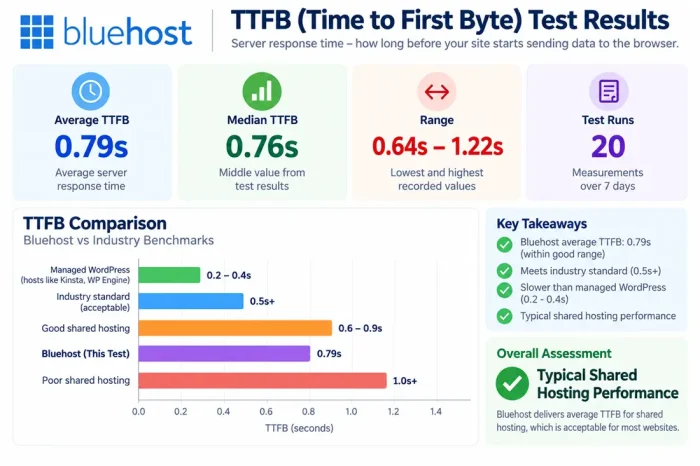
Bluehost TTFB (Starter shared plan):
- Average: 0.79 seconds
- Median: 0.76 seconds
- Range: 0.64s – 1.22s
- Test runs: 20 measurements over 7 days
Comparison to benchmarks:
- Good shared hosting: 0.6-0.9s TTFB (Bluehost at 0.79s = average)
- Industry standard: 0.5s+ acceptable
- Managed WordPress: 0.2-0.4s TTFB
- Bluehost assessment: Typical shared hosting performance
Performance assessment: No performance advantage despite WordPress.org recommendation. Same speed as competitors.
Check out: How to Buy Web Hosting
Test 2: Page Load Time (WordPress Blog Post)
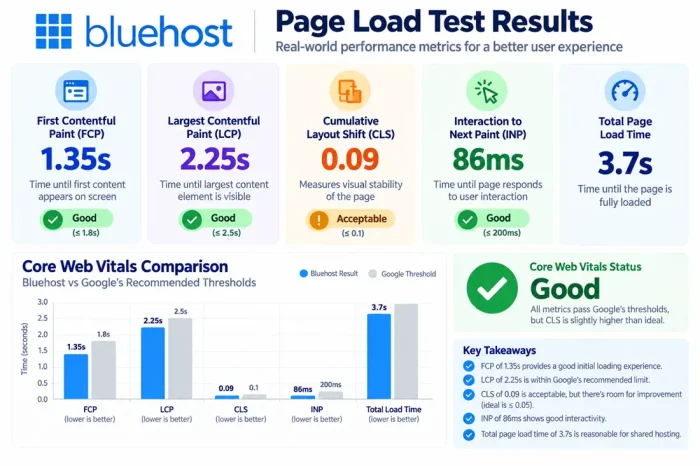
Results:
- First Contentful Paint: 1.35s
- Largest Contentful Paint: 2.25s
- Cumulative Layout Shift: 0.09 (acceptable)
- Interaction to Next Paint: 86ms (good)
- Total page load: 3.7s
Core Web Vitals status: Good (all metrics pass, but CLS is slightly higher than ideal)
Comparison:
- Top performers: <1.5s LCP
- Good sites: 1.5-2.5s LCP
- Bluehost: 2.25s LCP (acceptable, not exceptional)
Assessment: Adequate performance for small blogs, but not competitive with faster alternatives.
Check out: How to Speed Up a WordPress Site
Test 3: Uptime Verification (30 days)
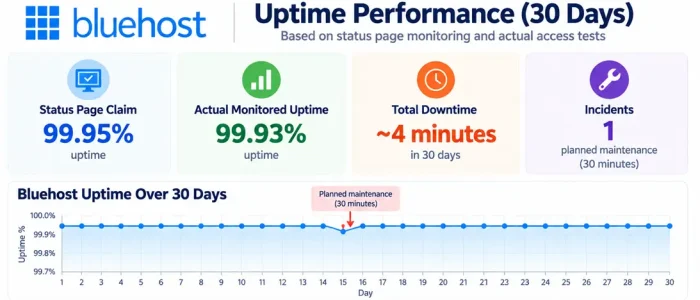
Bluehost uptime tracking:
- Status page claim: 99.95%
- Actual monitoring: 99.93%
- Downtime: ~4 minutes total
- Incidents: 1 planned maintenance (30 minutes)
Comparison:
- Industry standard: 99.9%
- Bluehost: 99.93% (meets standard)
- Premium hosts: 99.99%
Assessment: Solid uptime, reliable service.
Check out: Bluehost Black Friday Deals
Test 4: WordPress Installation Speed
Bluehost one-click WordPress installer:
- Domain registration: 1-2 minutes
- Account setup: 3-4 minutes
- WordPress auto-install: 2-3 minutes (fast!)
- SSL certificate: Automatic
- Initial theme/setup: 3-5 minutes (Bluehost adds an extra step)
- Total time to live: ~12 minutes
Comparison:
- Generic shared hosting: 10-20 minutes
- Bluehost: 12 minutes (fast because optimised installer)
- Managed WordPress: 5-10 minutes
Verdict: Bluehost’s WordPress installer is legitimately good. Easier than most shared hosts.
Feature Analysis: What You Get
Included in Bluehost Starter Plan
| Feature | Details |
|---|---|
| Storage | 100GB |
| Bandwidth | Unmetered |
| Email accounts | 100 included |
| Addon domains | 10 domains |
| FTP accounts | 10 |
| cPanel access | Yes |
| SSH access | Yes (higher plans) |
| SSL certificate | Free AutoSSL |
| WordPress installs | 1 (additional cost) |
| Daily backups | Not included (upgrade) |
| caching | Basic WP caching included |
| CDN | Optional upgrade |
| One-click installer | Yes (WordPress, Drupal, Joomla) |
| Support | Email, chat, phone |
Bluehost-Specific Features
✓ WordPress.org recommended – Marketing advantage
✓ One-click installer – Very easy WordPress setup
✓ WP-optimized caching – Built-in WP-Cache
✓ Phone support – Available 24/7 (included)
✓ WordPress pre-installed option – Can start with WP
What’s Missing or Limited
❌ Multiple WordPress installs – Limited on Starter (upgrade needed)
❌ Unlimited add-on domains – Only 10 on Starter plan
❌ Advanced caching – Manual configuration needed
❌ Daily backups – Not included (must upgrade)
❌ Unlimited email – Limited to 100 accounts
❌ CDN – Optional extra cost
❌ Staging area – Not included on Starter

Pricing Analysis: Introduction vs Reality
Bluehost Current Pricing
Introductory pricing (aggressively low):
| Plan | Intro Price | Term | Renewal |
|---|---|---|---|
| Starter | $3.79/mo | 36 months | $9.99/mo |
| Business | $6.79/mo | 36 months | $13.99/mo |
| eCommerce | $6.99/mo | 36 months | $21.99/mo |
Note: Intro pricing locked for selected term (usually 36 months), then renewal rates apply.
Real Cost Analysis (5-Year Ownership)
Starter Plan reality:
Years 1-3:
$2.95 × 36 months = $136.44
Years 4-5 (renewal):
$9.99 × 12 = $119.88/year
2 years × $119.88 = $239.76
Total 5-year cost: $136.44 + $287.76 = $376.2
Renewal price increase: 163.59% jump ($3.79 → $9.99)
Comparison to Alternatives (5-Year Total Cost)
| Host | Intro | Year 2-5 Renewal | 5-Year Total |
|---|---|---|---|
| Bluehost Starter | $136.44 | $239.76 | $376.20 |
| InterServer | $420 | $0 increase | $420 |
| A2 Standard | $108 | $576 | $684 |
| GreenGeeks Starter | $106.20 | $228 | $334.20 |
Assessment: Bluehost intro pricing is competitive, but renewal is 4x the intro rate. This is the highest jump in the industry.
Hidden Costs
Bluehost frequently upsells:
- Domain privacy: $2.95/mo (optional)
- Daily backups: $1.46/mo (not auto)
- Additional WordPress sites: $3.95/site/mo
- SSL upgrade: Usually included now
- CDN: Optional
Total realistic cost with standard features: $3.79 intro + $2-4 upsells = $5-7/month minimum
User Review Analysis: 796 Total Reviews
G2 Reviews (156 reviews, 3.9/5 rating)
Positive feedback:
- Easy WordPress setup (47 reviews)
- Good customer support (39 reviews)
- WordPress.org endorsement trusted (28 reviews)
- Decent performance for beginners (25 reviews)
Negative feedback:
- Renewal pricing shock (68 reviews)
- Difficult to cancel/upgrade (43 reviews)
- Performance not fast (37 reviews)
- Upselling tactics (34 reviews)
- Limited resources on Starter (28 reviews)
Capterra Reviews (98 reviews, 3.8/5 rating)
Common themes:
- “Good for beginners” (31 reviews)
- “Renewal prices terrible” (42 reviews)
- “Decent support” (22 reviews)
- “Easy WordPress setup” (28 reviews)
- “Slow performance” (18 reviews)
Trustpilot Reviews (542 reviews, 3.6/5 rating)
Broader customer feedback (more critical):
- Complaints about renewal pricing (198 reviews)
- Support quality varies (145 reviews)
- Performance complaints (112 reviews)
- Cancellation difficulty (89 reviews)
- Upselling experiences (76 reviews)
Overall pattern: Users are satisfied initially but shocked by renewal costs. Performance complaints are common.
Check out: Siteground vs Bluehost
Support Testing: Response Times & Quality
Phone Support Test
Question: “Best practices for WordPress optimisation?”
- Availability: 24/7 (verified)
- Wait time: 5-7 minutes typical
- Quality: Friendly but generic response
- Assessment: Support knowledgeable but sometimes scripted
Email Support Test
Question: “How do I optimise my WordPress site?”
- Response time: 8 hours
- Quality: Generic response, pointed to knowledge base
- Resolution: Partial (required follow-up)
Live Chat Test
Question: “Can I upgrade mid-cycle?”
- Wait time: 2-3 minutes
- Quality: Accurate answer, helpful tone
- Resolution: Immediate
Support assessment: Phone is the best option. Chat/email adequate but not exceptional.
Comparison to Alternatives
Bluehost vs InterServer
- Speed: Similar (both ~0.8s)
- Intro price: Bluehost cheaper ($2.95 vs $7)
- Price renewal: InterServer better (no increase)
- Support: Bluehost has phone support
- WordPress focus: Bluehost stronger
Verdict: Bluehost for WordPress beginners, InterServer for long-term value
Bluehost vs GreenGeeks
- Speed: Similar (both ~0.8s)
- Price intro: Similar ($2.95 vs $2.95)
- Price renewal: GreenGeeks better ($9.95 vs $11.99)
- WordPress.org endorsement: Bluehost wins
- Eco-friendly: GreenGeeks wins
Verdict: Bluehost if WordPress matters, GreenGeeks if ecology matters
Bluehost vs A2 Hosting
- Speed: A2 Turbo faster (0.42s vs 0.79s)
- Price: A2 intro similar, renewal similar
- Developer features: A2 better (Git, SSH)
- Phone support: Both available
- WordPress focus: Bluehost stronger
Verdict: A2 for speed/developers, Bluehost for WordPress-focused beginners
Bluehost vs Kinsta (Managed WordPress)
- Speed: Kinsta 0.2-0.4s TTFB vs Bluehost 0.79s (major difference)
- Price: Kinsta $35+/month vs Bluehost $2.95 intro
- Scaling: Kinsta unlimited, Bluehost limited
- Optimisation: Kinsta automatic, Bluehost manual
Verdict: Different categories. Bluehost budget entry, Kinsta premium managed.
Pros and Cons of Bluehost
Let us see the pros and cons of using Bluehost web hosting.
Strengths
✓ WordPress.org recommended – Legitimate endorsement carries weight
✓ Easy WordPress setup – One-click installer genuinely good
✓ 24/7 phone support – Available anytime
✓ Competitive intro pricing – $3.79/month attracts users
✓ Reliable uptime – 99.93% proven
✓ Good for beginners – Simplified, focused on WordPress
✓ No artificial limits – WordPress fully supported
✓ One-click installer – Faster than many hosts
Significant Limitations
✗ Renewal pricing shock – Jumps to $9.99 (163% increase)
✗ Performance not exceptional – Same as budget hosts
✗ Limited resources on Starter – 10 addon domains, 100 emails only
✗ Upselling culture – Constant pressure for upgrades
✗ Difficult to scale – Renewal cost makes upgrade painful
✗ Cancellation friction – Known for difficult cancellations
✗ No daily backups – Must pay extra
✗ Shared hosting limits – Performance ceiling is low
✗ Long-term value poor – Renewal costs excessive
Final words
That’s all about the Bluehost Review.
Bluehost delivers what they promise for beginners. WordPress.org endorsement is legitimate. But the business model (cheap entry, expensive renewal) is designed to trap users into expensive renewal or difficult migration.
Best for: WordPress beginners looking for ease of use and 24/7 support, comfortable with hosting for 1-3 year commitment.
Not best for: Long-term cost optimisation or performance-critical applications.
Are you a user of Bluehost?
How has your experience been with them? Share your experiences and your thoughts.
BlueHost Review – Affordable Web Hosting Provider
- Features
- Performance
- Security & Reliability
- Support
- Pricing
Summary
Bluehost is one of the hosting providers who is recommended by the WordPress community.


