
Wondering “How To Start A Blog and make money online“? Then you have reached the right place.
Forget everything for some time, sit in a peaceful corner of your house and focus on every word of this guide.
When I started blogging, I had a few questions in my mind, like whether I could start blogging for free.
How to make money from blogging? etc. So, if you also have the same questions, then you will get the answers after going through this article.
Here, I am going to give you the exact directions and steps that I used to build my blogs.
Read this complete guide to start a blog and start your blogging journey.
- Is Blogging Worth Starting in 2026?
- Why Are You Starting This Blog? (Define Your Goal First)
- How Much Does It Cost to Start a Blog in 2026?
- Can You Start a Blog for Free?
- How To Start A Blog And Make Money
- Decide Your Blog Goal & Niche
- Choose Your Blog Name (Domain)
- Choose Your Blogging Platform Or CMS
- Get Hosting For Your Blog
- Install WordPress
- Choose The Perfect Theme (Design Of Your Blog)
- Install Recommended Plugins
- Set Up Google Search Console & Analytics
- Learn SEO Basics (1 hour, then ongoing)
- Find Your First 20 Blog Topics
- Understand Search Intent Before Writing
- Start Your Social Media Accounts Now
- Write Your First High-Quality Blog Post
- Build an Email List From Day One
- Drive Traffic To Your Blog
- How to Make Money From Your Blog?
- 30-Day Blog Launch Plan
- FAQs related to How to Start a Blog
Is Blogging Worth Starting in 2026?
That depends on your goal.
Blogging isn’t passive income or fast money. I’ve run multiple blogs for over 8 years.
The truth: blogging works when you have something useful to say, and you’re willing to publish consistently for months before seeing traffic.
Blogging works if you want to:
- Build authority in your field
- Generate qualified leads for a service business
- Create an audience for products/courses
- Share expertise and build a personal brand
- Create long-term affiliate income
Blogging probably won’t work if you want:
- Money in your first 30 days
- Completely passive income (it requires ongoing content)
- To rank for competitive keywords without expertise
- Quick viral success
Blogging is a medium-term play (6-12 months to meaningful results). But once traffic builds, it compounds.
Why Are You Starting This Blog? (Define Your Goal First)
Before choosing a niche or buying hosting, answer this single question:
What do you want this blog to achieve?
Your goal changes everything: niche selection, platform choice, content strategy, monetisation method, even how you measure success.
Goal #1: Personal Blog
What it is: Share experiences, interests, life updates (similar to a journal or social media channel).
Niche examples: Travel stories, personal finance journey, parenting, hobby projects
Traffic expectations: 100-500/month (modest, friends and search)
Monetisation: Low (ads, affiliate if relevant, mostly passion project)
Best platform: WordPress.com (free), Blogger (free), or self-hosted WordPress
Effort level: 1-2 posts/month sufficient
Goal #2: Build Personal Authority/Brand
What it is: Establish yourself as an expert in a specific field (before launching a business or finding opportunities).
Niche examples: Cybersecurity for small businesses, content marketing, software development, fitness coaching
Traffic expectations: 1,000-10,000/month (SEO-focused, targeting specific audience)
Monetisation: Medium (consulting leads, speaking invitations, job offers, affiliate)
Best platform: Self-hosted WordPress (need full control)
Effort level: 2-4 posts/month, 6-12 month commitment before meaningful results
Goal #3: Generate Business Leads
What it is: Attract potential customers to your service business through content marketing.
Niche examples: Real estate advice, local SEO, web design for solopreneurs, business coaching
Traffic expectations: 500-5,000/month (targeted audience at decision stage)
Monetisation: High (leads for consulting, services, coaching, worth $500-$5,000 per lead)
Best platform: Self-hosted WordPress on quality hosting
Effort level: 2-3 posts/month, highly targeted content
Goal #4: Build an Income-Generating Website
What it is: Create a blog that generates revenue through multiple channels: affiliate marketing, ads, products, courses, email.
Niche examples: Product reviews, comparison guides, tutorials, how-tos in profitable niches
Traffic expectations: 10,000-50,000+/month (months 6-12)
Monetisation: High (affiliate commissions ₹1-10 per click, ads ₹0.50-₹5 per impression, products)
Best platform: Self-hosted WordPress (non-negotiable for earning sites)
Effort level: 3-5 posts/month, 12+ months building period
How Much Does It Cost to Start a Blog in 2026?
This is a real question beginners ask. Let me give you honest numbers instead of vague “start free” claims.
Cost Breakdown by Category
| Expense | Cost | Required? | Notes |
|---|---|---|---|
| Domain name (.com) | 10 USD | Yes | Register for a minimum of 1 year |
| Web hosting | 27 USD | Yes | Varies by quality; self-hosted WordPress |
| WordPress | 0 | N/A | Free, open-source software |
| Theme | 0 | No | Free themes work; premium adds design |
| Essential plugins | 0 | Mostly free | Most cost nothing; some premium features are helpful |
| Email marketing | 0 | No | Free up to 1,000 subscribers |
| Logo/branding | 0 | No | Free tools available |
| SEO/analytics tools | 0 | No | Free tier sufficient to start |
| Total Cost | 37 USD |
You can start free on WordPress.com, Blogger, or Medium, but self-hosted WordPress is better long-term.
Three Budget Scenarios
Scenario 1: Ultra-Budget ($16–$24/year)
- Domain: $3 (Namecheap, GoDaddy)
- Hosting: $21 (budget shared hosting)
- Theme: Free (Astra, GeneratePress free)
- Plugins: Free versions
- Email: Free (Mailchimp up to 500)
- Total first year: $24
- Reality: Works, slow at times, limited support.
Scenario 2: Practical Beginner Setup ($42–$74/year)
- Domain: $5 (premium registrar)
- Hosting: $42–53 (quality shared hosting)
- WordPress: Free
- Theme: Free
- 12 essential plugins: Free
- Email marketing: Free (Mailchimp)
- Total first year: $53
- Reality: Reliable, fast enough, good support. Recommended for most.
Scenario 3: Professional Setup ($106+/year)
- Domain: $8.50
- Hosting: $74–106 (faster, better support)
- WordPress: Free
- Premium theme: $32–53 (optional)
- Advanced plugins: $21–53 (optional)
- Email marketing: $21+ (ConvertKit, ActiveCampaign)
- Total first year: $159+
- Reality: Premium performance, advanced features, priority support.
My recommendation: Start with Scenario 2 ($53/year). It’s reliable, affordable, and you can upgrade later.
Can You Start a Blog for Free?
Yes, but there’s a catch.
Free Blogging Platforms Compared
| Platform | Free? | Best For | Monetization | Own Domain? | Limitations |
|---|---|---|---|---|---|
| WordPress.com | Yes | Beginners | Limited | Yes (paid upgrade) | Can’t install plugins, limited customisation |
| Blogger | Yes | Beginners | Adsense only | Yes (free) | Outdated, limited design |
| Wix | Yes | Simple sites | Limited ads | Yes (paid) | Slow, ads shown, limited SEO |
| Medium | Yes | Writers | Medium partner program | No (their domain) | Can’t build email list easily, lose readers |
| Substack | Yes | Newsletter | Substack takes 10% | Yes | No website, newsletter-only, harder to build SEO |
| Self-hosted WordPress | No | Serious bloggers | Full control | Yes | Costs some money, but best long-term |
Free vs. Self-Hosted: Which is Better for Money?
If your goal is to eventually make money, self-hosted WordPress wins:
Free platforms problems
❌ Limited monetisation options (Medium, Substack take cuts)
❌ Can’t install plugins needed for SEO, email, advanced features
❌ Platform owns your content (they can shut you down, delete posts)
❌ Harder to build an email list (crucial for income)
❌ Limited customisation for audience building
Self-hosted WordPress advantages
✅ Full monetisation control (affiliate, ads, products, email all yours)
✅ Install any plugin (email, SEO, security, conversion tools)
✅ You own your content and audience
✅ Build email list directly
✅ Customise design and experience
✅ Long-term: grows in value
Verdict: Start free to test the idea (WordPress.com free, Blogger). But migrate to self-hosted WordPress within 3 months if you’re serious about building an audience or business.
Check out: How to start a Ten Dollar Blog
How To Start A Blog And Make Money

Decide Your Blog Goal & Niche
Don’t skip this. Your goal determines everything else.
By now you know:
- What you want the blog to achieve (authority? income? leads?)
- That blogging is a 6-12 month play
- The actual costs
Now the critical question: What will you write about?
This is where most beginners fail. They choose a niche based on passion alone, not demand.
How to Choose a Blog Niche That Can Actually Grow
Use this framework:
Your Interest + Your Expertise/Experience + Audience Demand + Monetization Potential + Reasonable Competition = Viable Niche
All five matter.
❌ Common mistake: Picking “technology” because you like it.
✅ Better: “WordPress hosting for small business owners” (specific, monetizable, audience exists, you can learn).
❌ Common mistake: “Fitness blogging” (massive competition, vague).
✅ Better: “Strength training for desk workers” (specific audience, clear demand, lower competition).
Four Niche Examples Broken Down
Example 1: Tech for Beginners
- Interest: ✅ (you like technology)
- Expertise: ✅ (you’ve used WordPress for 5 years)
- Audience demand: ✅ (6,000+ searches/month for WordPress tutorials)
- Monetisation: ✅ (WordPress themes, hosting, tools, courses)
- Competition: ⚠️ (high, but long-tail keywords available)
- Verdict: Viable if you target specific problems (WordPress SEO, WordPress security, etc.)
Example 2: Personal Finance in India
- Interest: ✅ (you manage your money)
- Expertise: ❌ (you’re not a financial advisor)
- Audience demand: ✅ (huge market)
- Monetisation: ✅ (affiliate for brokers, courses, products)
- Competition: ❌ (extremely high, established experts)
- Verdict: Difficult unless you have a specific angle (young professionals, freelancers, small business owners)
Example 3: Freelancing for Remote Workers
- Interest: ✅ (you work remotely)
- Expertise: ✅ (you’ve been freelancing 3+ years)
- Audience demand: ✅ (200,000+ searches/month)
- Monetisation: ✅ (courses, tools, freelance platforms, email list)
- Competition: ⚠️ (medium-high, but room for unique voice)
- Verdict: Strong niche, clear monetisation, specific audience
Example 4: SEO for Local Dentists
- Interest: ✅ (you’re interested in SEO)
- Expertise: ✅ (you’ve done local SEO for 3 businesses)
- Audience demand: ✅ (small but targeted, 2,000 dentists in India)
- Monetisation: ✅ (high-value: ₹5,000-20,000 for SEO service)
- Competition: ✅ (low, very specific niche)
- Verdict: Excellent niche for lead generation
Key insight: Narrower niches are often better. “Fitness” is too broad. “Home workouts for busy parents” is specific, searchable, and profitable.
How to Validate Your Niche Before Buying a Domain
Don’t spend $10 on a domain and then discover nobody wants to read about your topic.
Validation takes 1-2 hours. Do it.
Step 1: Google Search Validation
Search for your main keyword. Look at:
- How many results? (500K+ = competition, 10K-100K = opportunity)
- Are there people already blogging about it? (If zero, no audience)
- Do you see commercial intent? (ads = monetisation possible)
- Can you see angles you could cover better?
Example: Search “WordPress hosting for beginners“
- Results: 2.4M (competitive, but lots of content = demand)
- Top results: Mixed (big sites + smaller blogs = opportunity)
- Ads visible: Yes (Google Ads shown = commercial intent confirmed)
- Opportunity: Yes (many results focus on features, few focus on beginners specifically)
Step 2: Competitor Research
Find 5-10 existing blogs covering your topic.
- Are they updated regularly? (Active = viable niche)
- Do they have comments? (Audience = demand)
- What topics get most engagement?
- What’s missing from their coverage?
Step 3: Search Demand Check
For your seed keyword, check:
- Monthly search volume (aim for 500+ searches/month minimum)
- Search trends (growing or declining?)
- Seasonal or evergreen?
Free tools: Google Trends, Google Search Console (later), Ubersuggest free tier
Step 4: Reddit/Forum Validation
Find communities where your audience hangs out:
- r/WordPress (for tech niches)
- r/freelance (for freelancing)
- r/PersonalFinance (for finance)
- Quora (search your topic)
- Niche forums
Ask: Do people ask questions about this? (yes = demand confirmed)
Step 5: Affiliate Program Check
If income is a goal, does monetisation exist?
- Are there affiliate programs for products in your niche?
- Do businesses pay for leads/customers in this niche?
- Would ads (Google AdSense, sponsorships) work?
If yes to any = monetisation possible.
Step 6: Email List Potential
Could you build an email list around this?
- Would your audience want updates via email?
- Is there a product/service you could promote?
Email is crucial for long-term income, so this matters.
Validation verdict: If you answer YES to questions 1-3 and at least one of 4-6, your niche is probably viable.
Choose Your Blog Name (Domain)
Your domain is important, but less than you think.
Domain Name Principles
Good domain
- Easy to spell (no numbers, hyphens optional)
- Easy to say aloud (can you describe it over the phone?)
- Memorable (short is better: 1-2 words)
- .com preferred (but .in, .co work fine)
- Relevant if possible (but not required)
Branded vs. Exact-Match
❌ Exact-match: “websitebuilderforsmallbusiness.com” (long, hard to say, limits growth)
✅ Branded: “WebNest.com” or “Buildly.in” (short, memorable, works for any angle)
Most successful blogs use branded names, not exact-match keywords.
How to Choose a Domain Name
- Brainstorm 10 name ideas
- Check availability (Namecheap, GoDaddy)
- Say each aloud (easy to pronounce?)
- Check social media handles (ideally matching)
- Pick the shortest memorable one
Examples that work
- OnlineDecoded (my site – branded, memorable, works for multiple topics)
- SmartPassive (passive income niche)
- Backlinko (SEO niche)
- CopyBlogger (copywriting niche)
Notice: Most don’t have keywords in the domain. Personality > keywords.
Check out: How to choose a domain name
Registrar Recommendations
Register your domain with:
Avoid: Super cheap registrars with poor support.
Check out: Best Domain Name Registrars
Choose Your Blogging Platform Or CMS
Most serious bloggers use self-hosted WordPress.
Platform Comparison
| Platform | Cost | Control | SEO | Plugins | Earning | Best For | |
|---|---|---|---|---|---|---|---|
| WordPress.com | $0-$36 | Limited | Good | No | Limited | Limited | Beginners testing |
| Self-hosted WordPress | $36-$72 | Full | Excellent | Yes | Full | Full | Serious bloggers |
| Blogger | $0 | Limited | Good | No | No | Limited | Personal blogs |
| Wix | $18 | Limited | Fair | Limited | Limited | Limited | Designer-focused |
| Medium | $0-$60 | Minimal | Fair | No | No | Limited | Writers, newsletters |
For this guide: Self-hosted WordPress is best.
Why?
✅ Full control and ownership
✅ Unlimited plugins (SEO, security, email, conversion)
✅ Full monetisation (affiliate, ads, products, email)
✅ Build an email list (crucial for income)
✅ Long-term investment in your asset
Why do I recommend WordPress for blogging?
Freedom to develop anything because it is an open-source platform.
Easy dashboard and editors.
Just one-click installation with your hosting cPanel.
If you are stuck anywhere in WordPress, then you can get help from WordPress users, where many users share their views and help others in the community.
You will feel free after using this platform.
Check out: Best Blogging Platforms
Get Hosting For Your Blog
After selecting the domain name, you need to get hosting to store your website information.
You need to select a hosting plan from a reputed company that has the capability of providing 24×7 service.
Hosting quality directly impacts
- Site speed (affects rankings)
- Uptime (affects visitors)
- Support (affects peace of mind)
- Growth (affects scalability)
- What Beginners Need
For your first year
- Uptime: 99.5%+ (40+ minutes/month downtime acceptable)
- Page load: Under 1 second (most hosts achieve this)
- Support: 24/7 chat (important when things break)
- Price: $50-$100/year (reasonable)
- Storage: 50GB+ (plenty for 100+ articles)
- Bandwidth: Unlimited (most providers offer this)
Recommended Hosting
Best All-Around
Bluehost ($42-54/year, one-click WordPress, good support)
SiteGround ($48-72/year, excellent support, fast)
Best Budget
Hostinger ($36/year, decent performance, adequate support)
GreenGeeks ($40/year, eco-friendly, good speed)
Best Performance
Kinsta or WP Engine ($84+/year, advanced, for serious sites)
Check out our detailed guide on how to buy web hosting.
My recommendation: Start with GreenGeeks or Hostinger ($24-48). Upgrade later if needed.
What to Check Before Buying
- Money-back guarantee (30 days minimum)
- Renewal pricing (doesn’t triple after year 1)
- Support availability (24/7 chat matters)
- One-click WordPress (easier installation)
- SSL included (free HTTPS)
- Backups included (automatic daily backups)
I recommend GreenGeeks.
As a newbie, you can select shared hosting in the beginning. Later, you can choose dedicated or VPS hosting.
The available shared hosting plans are shown in the image below:

Follow the steps to buy the web hosting plan:
- Click on this link to activate the discount.
- Click on Shared Hosting and choose the Pro plan (to host multiple sites).
- Select the option “I will use my existing domain and update my nameservers” since you have already bought a domain.
Choose the billing for more than 2 years to save money.
Enter the details and complete the payment.

Congrats!! You have bought your hosting.
Install WordPress
If you want to create a WordPress blog, you need to install WordPress software.
When you completed purchasing the web hosting in the previous step, you should have received an email from GreenGeeks with details on how to log in to the cPanel.
Log in to cPanel and choose WordPress to install.

Enter the Site Name, username, password, and other details for your site.
Once WordPress is finished installing, you will see the success notice.
Your WordPress login URL will look like this:
https://yoursite.com/wp-admin
Click on the link to log in to your dashboard.
First-Time WordPress Setup (15 minutes)
Once logged in
Site settings
- Dashboard → Settings → General
- Site title: Your blog name
- Tagline: One-line description
- Save
Permalink structure
- Settings → Permalinks
- Choose “Post name” (cleaner URLs)
- Save
Basic security
- Delete default “Hello World” post
- Delete “Sample Page”
- Remove default user “admin” (if possible)
Create essential pages
- New → Page → “About”
- New → Page → “Contact”
- New → Page → “Privacy Policy”
You now have a working WordPress blog. Next: Choose a theme.
If you are migrating from Blogger, check out this detailed guide on How to Migrate from Blogger to WordPress.
Choose The Perfect Theme (Design Of Your Blog)
The theme is the front end of your blog where users access your blog with a menu and links.
You can pick the theme according to your category and install the theme easily. WordPress has tons of free themes available on wordpress.org/themes.
Your theme affects
- Site speed (biggest factor after hosting)
- Design/User experience
- Mobile responsiveness
- SEO capability
- Best Lightweight Themes
Free themes
- Astra (lightweight, fast, 1M+ installations, free)
- GeneratePress (ultra-lightweight, 300KB free version, excellent)
- OceanWP (clean, responsive, fast)
Premium themes
Astra and GeneratePress are the fast loading Themes in WordPress.
- Astra Pro ($36/year, more features)
- GeneratePress Premium ($50/year, highly customizable)

My recommendation: Start with free Astra or GeneratePress. Upgrade to Pro later if you want advanced features.
Check out this complete guide on how to choose a WordPress Theme.
Top Points To Follow Before Buying a WordPress Theme
- Always buy an unlimited site license.
- Always choose a simple and sober theme.
- The theme must be compatible with the latest version of WordPress, and the theme service provider must give you updates for life.
- The theme must be responsive (Compatible with all devices like mobile, tablets, laptops, and desktops).
- The theme must suit your topic.
Check: Fastest WordPress Themes
Install Recommended Plugins
Once you have installed the right theme for your blog, you need to install the essential plugins.
Using plugins, you can add new features to your blog. Most essential ones are free.
10 Must-Install Plugins
| Plugin | Why | Free? | Time |
|---|---|---|---|
| RankMath | SEO (replaces 3 plugins) | Yes (Limited) | 5min |
| Akismet | Spam protection | Yes | 2min |
| WP Rocket | Caching/Speed | No (₹3,000/yr) | 5min |
| ShortPixel | Image optimization | Yes (Limited) | 3min |
| WPForms | Contact forms | Yes (Limited) | 3min |
| UpdraftPlus | Backup | Yes (Limited) | 5min |
| Wordfence | Security | Yes (Limited) | 10min |
| MonsterInsights | Google Analytics | Yes (Limited) | 20min |
| Novashare | Social sharing | Yes (Limited) | 5min |
| WP Review Pro | Reviews + rich snippets | Yes (Limited) | 10min |
Read our detailed guide: Best WordPress Plugins
Installation:
- Dashboard → Plugins → Add New
- Search for each plugin
- Click Install → Activate
- Configure (most have a setup wizard)
Don’t go overboard: 12-15 plugins is plenty. More = slower site.
Set Up Google Search Console & Analytics
This is crucial. You need to measure your blog.
Google Search Console (10 minutes)
Tells Google about your site + shows search performance.
Setup
- Go to search.google.com/search-console
- Add your domain
- Verify ownership (choose HTML tag method)
- Go back to WordPress → Google Site Kit
- Connect your Google account
- Follow prompts (5 minutes)
What to do next
- Submit your sitemap (Google Site Kit does this automatically)
- Monitor indexing status
- Check Core Web Vitals
- Monitor search queries (find your keywords performing)
- Google Analytics (15 minutes)
Tells you where visitors come from, what they read, and where they leave.
Setup
- Go to analytics.google.com
- Create a property for your domain
- Create da ata stream (web)
- Copy measurement ID
- In WordPress → MonsterInsights → Connect Google Account
- Paste measurement ID
- Analytics now tracking
What to monitor initially
- Total visitors (growth over time)
- Top pages (which posts get traffic)
- Traffic sources (Google search? social? direct?)
- Bounce rate (below 70% is good)
Key insight: Don’t obsess over analytics in week 1. Traffic takes time.
Learn SEO Basics (1 hour, then ongoing)
SEO isn’t optional in 2026. But it’s not complicated either.
Google wants to rank
- Helpful content (answers the reader’s question)
- From experienced authors (you know what you’re talking about)
- That’s well-written (easy to read)
- With good technical setup (fast, mobile-friendly)
On-Page SEO Checklist (for every post)
Before publishing, check
- Title includes main keyword (e.g., “How to Start a Blog for Beginners”)
- H1 matches title (only one H1 per post)
- Use H2/H3 subheadings (breaks up text, helps Google understand)
- First 100 words answer the question (tell reader they’re in the right place)
- Internal links (2-3) to related posts (helps Google see topic clusters)
- External links (1-2) to authoritative sources (shows you’ve researched)
- Meta description (160 characters, includes keyword, compelling)
- Image alt text (describe image for accessibility and SEO)
- Post length (1,500+ words for competitive topics, 1,000+ for long-tail)
- Mobile preview (looks good on phone)
Technical SEO Basics
WordPress already handles most of this, but verify
- HTTPS enabled (green lock in browser)
- XML sitemap created (RankMath creates automatically)
- Mobile-friendly (test in Google Mobile-Friendly Tool)
- Page speed acceptable (Google PageSpeed Insights score 70+)
- Core Web Vitals green (monitored in Search Console)
Content SEO
Don’t write for Google. Write for humans.
Then make sure Google understands it.
- Write naturally (no keyword stuffing)
- Answer the question completely
- Use examples and evidence
- Cite sources when relevant
- Update old posts when information changes
Check out: Complete SEO Guide
Find Your First 20 Blog Topics
This is where most blogs fail: They write about random topics instead of building a content strategy.
Don’t do this.
How to Find Topics Your Audience Actually Searches For
Step 1: Seed Keyword
Start with your main topic. Example: “WordPress hosting“
Step 2: Generate Related Questions
Use these free tools to find what people actually search:
- Google Search (type keyword, scroll to “People also ask”)
- Ubersuggest (free, shows search volume for related terms)
- AnswerThePublic (free, shows question searches)
Step 3: Understand Search Intent
Don’t write an article just because a keyword has search volume.
Search Google for the keyword and ask: “What does Google think the searcher wants?”
Example topic breakdown for “WordPress hosting”:
| Keyword | Volume | Intent | Best Post Type | Monetization |
|---|---|---|---|---|
| WordPress hosting for beginners | 1,200/mo | Informational | Guide | Medium |
| Best WordPress hosting 2026 | 3,500/mo | Commercial | Comparison | High ✅ |
| Cheap WordPress hosting | 2,100/mo | Commercial | Budget guide | High |
| WordPress hosting vs web builder | 800/mo | Informational | Comparison | Medium |
| GreenGeeks WordPress hosting | 200/mo | Transactional | Review | High |
The “How to” keywords (informational) get traffic but don’t convert.
The “Best of” keywords (commercial) get fewer searches but better conversion.
Target a mix, but prioritise commercial intent for income goals.
Your First 20 Topics
Generate using this framework:
5 informational topics (help readers learn, build authority)
“How to choose a niche“
“WordPress SEO for beginners“
“How to write better blog posts“
10 commercial topics (help readers choose/buy, generate income)
- “Best WordPress hosting 2026”
- “WordPress themes comparison”
- “Top blogging platforms“
5 deep-dive topics (own your expertise angle)
- “WordPress security: step-by-step guide”
- “WordPress speed optimisation”
This gives you 6 months of content (2-3 posts/month).
Understand Search Intent Before Writing
This separates bloggers who rank from bloggers who don’t.
Mistake: Write about “WordPress hosting” because it has search volume.
Better: Look at the top 3 Google results for “best WordPress hosting 2026” and match that format.
Why? Google already determined what format and content angle searchers want.
If you write a guide but searchers want a comparison table, you won’t rank. Match intent.
Search Intent Template
Before writing every post:
- Search the keyword on Google
- Note the format (guide? list? comparison? video? news?)
- Note the angle (beginners? advanced? budget? premium?)
- Note the structure (how many sections? depth?)
- Find the gap (what’s missing from top 3 results?)
Write to beat that, not to create something different.
Start Your Social Media Accounts Now
In today’s world, we all know the importance of social media. It is the most powerful tool for bloggers to increase their visitors and followers.
The first task after selecting the domain and blogging platform is to start all Social Media accounts, like a Facebook Page, Twitter, and Instagram.
If you want to save time before making all the social media accounts, just check out this website (NameSearch) and find your name available on all social media platforms.
Write Your First High-Quality Blog Post
Your first post should demonstrate expertise and provide genuine value.
Avoid
❌ Thin 500-word posts
❌ Listicles without depth
❌ Copied content from competitors
❌ AI-generated content without review
❌ Excessive promotions
Check out: How to write the best blog post
Blog Post Structure That Works
Hook + intro (150 words)
- Answer: Why should they read this?
- Set expectations: What will they learn?
Quick summary
- For long posts, state key takeaways upfront
Main content (1,500+ words)
- Answer the question completely
- Use examples, evidence, data
- Break into clear sections (H2/H3)
- Include images with alt text
Comparison/options table (if relevant)
- Helps readers compare quickly
- Shows you’ve done research
Internal links (2-3 natural mentions)
- Link to related posts on your blog
- Use descriptive anchor text
FAQ (5-10 related questions)
- Capture long-tail keywords
- Answer questions readers have
Conclusion (100 words)
- Summarise key points
- Call to action (subscribe, share, next post)
Build an Email List From Day One
Your email list is your most valuable asset.
Blog visitors are temporary. Search traffic is unpredictable. Social followers come and go.
Email subscribers? You own those.
Why Email Matters
- Revenue: Email converts 5-10x better than blog posts
- Control: You own the list; social algorithms don’t
- Relationships: Direct communication with readers
- Leverage: Promote your products/services directly
Simple Email List Setup (30 minutes)
Step 1: Choose an email platform
Free options
- Mailchimp (free up to 500 subscribers)
- Brevo (free up to 300/month emails)
- Substack (free, but they take 10% of paid subs)
Paid options (when growing)
- ConvertKit ($33+/month, creator-focused)
- ActiveCampaign ($15+/month, automation-focused)
For beginners: Mailchimp is free and sufficient.
Step 2: Create opt-in offer (lead magnet)
Give away something valuable in exchange for an email:
- PDF guide (checklist, template, resource list)
- Email mini-course (5 lessons over 5 days)
- Template or tool
- Free resource list
Example: “Get 20 Free WordPress Blog Topics (PDF)”
Step 3: Create signup form
Use WPForms (plugin you installed earlier):
- New form
- Add email field, name field, submit button
- Connect to Mailchimp
- Publish form to sidebar or page
Step 4: Add to your site
- Homepage: “Subscribe to new posts”
- Sidebar: “Free guide + weekly tips”
- Exit popup (when visitor leaves): “Before you go, free guide?”
Email Strategy
Send 2 types of emails:
New post notifications (weekly or 2x/week)
- Summary of new post
- Link to read full post
- CTA to reply with questions
Email-only content (weekly)
- Tips and insights not on the blog
- Personal stories and lessons
- Asks for feedback/questions
- Builds relationship with audience
Key insight: Email is where you build real relationships and eventually make money.
Drive Traffic To Your Blog
You have everything for your blog. Now you need to drive traffic to your blog.
Blog traffic doesn’t come automatically. You need a strategy.
Traffic Strategy: Week-by-Week
Weeks 1-4: Publish and optimise
- Publish 2-3 high-quality posts (keyword-optimised)
- Promote to your personal network (email, LinkedIn, WhatsApp)
- Aim: 100-200 visitors (mostly from personal network)
Weeks 5-8: Build amplification
- Publish 2-3 more posts (build content library)
- Optimise existing posts for long-tail keywords
- Add to email list actively
- Aim: 500-800 visitors (some organic search starting)
Weeks 9-16: Wait for organic to grow
- Publish consistently (2-3/month)
- Internal links between posts (build topic clusters)
- Share on email/social
- Aim: 1,000-2,000 visitors (organic search compounding)
Traffic Sources to Leverage
Google Search (Long-term, 60-70% of traffic)
- Keyword-optimised posts
- Building content clusters
- Internal linking
- Earning backlinks over time
Email (immediate, 15-20% of traffic)
- Notify subscribers of new posts
- Build email list aggressively
- Email delivers consistent traffic
Social media (short-term, 10-15% of traffic)
- Share on LinkedIn (if B2B niche)
- Share on Facebook groups (if relevant)
- Share on Reddit (if appropriate community)
- Share on Pinterest (if visual niche)
Direct traffic (5-10%)
- Personal network
- Business referrals
- Word of mouth
Check out: How to Build Quality Backlinks
First 1,000 Visitors Timeline
Realistic expectations
- Month 1: 50-150 visitors (mostly your network)
- Month 2: 150-400 visitors (some organic search)
- Month 3: 300-800 visitors (organic growing)
- Month 4-6: 800-2,000+ visitors (compounding organic traffic)
Most blogs take 4-6 months to reach 1,000 monthly visitors.
If you want faster growth, you need paid traffic (ads), but that’s beyond this guide.
There are many ways to drive traffic to your new blog. Here is the complete guide on “How to promote the blog to increase traffic?“
How to Make Money From Your Blog?
I hope you have learned how to start a blog in WordPress easily.
The next part is to make money.
Wondering how to make money from your blog?
There are different ways to make money online. Most of the get-rich-quick schemes available online are scams.
Blogging is not about making money. It is about creating useful content that benefits your visitors.
It should attract them and make them come back again to your site.
Once your blog has enough traffic and visitors, you can make money easily from your blog.
I need to be honest: Most new blogs make $0 in the first 3-6 months. That’s normal.
After 6-12 months with consistent traffic, earnings vary widely: $12/month to $1,200+/month depending on niche, traffic, and strategy.
Affiliate Marketing (Most common for affiliate blogs)
How it works: Recommend products, get commission ($50-$100 per sale)
Pros
- No product creation
- Works at small audience size
- Passive once set up
- High commission potential
Cons
- Need trust with audience first
- Commissions vary by niche
- Not appropriate for every blog
Best for: Reviews, comparisons, recommendations
Example: Writing about WordPress hosting? Recommend Bluehost, earn $50-100 per sign-up.
Read our guide: Comprehensive Affiliate Marketing Guide
Display Ads (Google AdSense, Mediavine)
How it works: Show ads on your site, earn per impression ($0.06–$0.6 per 1,000 views)
Pros
- Passive income
- No need to promote products
- Easy setup
Cons
- Requires 10,000+ monthly visitors to earn meaningfully
- Revenue is unpredictable
- Ads hurt user experience
Best for: High-traffic niche blogs
Earnings estimate: At $0.24 per 1,000 impressions, 100,000 monthly visitors = $24/month (not much)
There are many ad networks available online. But Google AdSense is the best one.
If you are in a niche that is not approved by Google AdSense, then you can check out these AdSense alternatives.
Sponsored Posts
How it works: Brands pay you to write about their product ($100-$200 per post)
Pros
- High per-post income
- Works even with modest traffic
Cons
- Needs audience first
- Requires pitching/negotiation
- Can hurt credibility if not relevant
Best for: Authority blogs in specific niches
Check out: How to get Sponsored Posts on your blog
Digital Products (eBooks, courses, templates)
How it works: Create and sell your own products ($6–$60 per product)
Pros
- High margins (100% yours)
- One-time creation, ongoing sales
- Builds authority
Cons
- Requires expertise and time
- Need an audience to sell to
- Marketing overhead
Best for: Blogs with 5,000+ monthly readers
Example: eBook on “WordPress SEO” sold for $14; sell 20/month = $280/month
Services/Consulting
How it works: Use a blog to attract clients for consulting/services ($100-$5000 per client)
Pros
- Highest earning potential
- Blog proves expertise
- Works with a small audience
Cons
Time-intensive (trades time for money)
Limited scalability
Requires expertise
Best for: Authority blogs with business services (consulting, coaching, design)
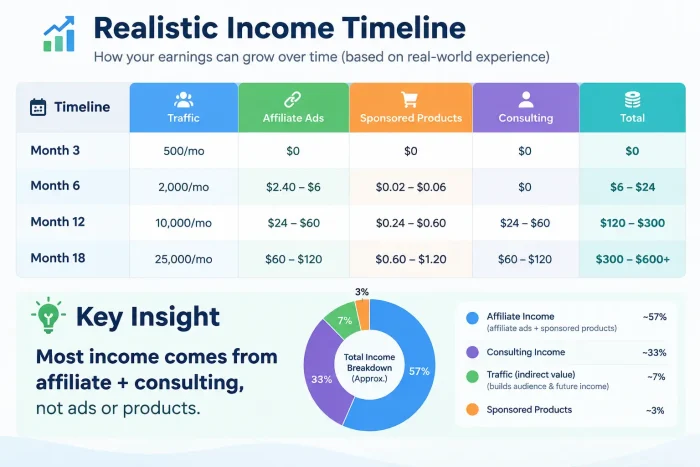
Realistic Income Timeline
| Timeline | Traffic | Affiliate | Ads | Sponsored | Products | Consulting | Total |
|---|---|---|---|---|---|---|---|
| Month 3 | 500/mo | $0 | $0 | $0 | $0 | $0 | $0 |
| Month 6 | 2,000/mo | $2.40–$6 | $0.02–$0.06 | $0 | $0 | $6–$24 | $8.40–$30 |
| Month 12 | 10,000/mo | $24–$60 | $0.24–$0.60 | $24–$60 | $6–$12 | $60–$120 | $120–$300 |
| Month 18 | 25,000/mo | $60–$120 | $0.60–$1.20 | $60–$120 | $12–$24 | $120+ | $300–$600+ |
Key insight: Most income comes from affiliate + consulting, not ads or products.
My Recommendation for Starting Out
Focus on: Affiliate marketing + building an email list
Why?
- Works with a small audience (1,000-5,000 readers)
- No product creation needed
- Can monetise within 6-12 months
- Email list becomes a valuable asset
Strategy
- Write honest reviews of products you’ve tested
- Build email list with lead magnet
- Recommend products via email (2-3x/month)
- Earn commissions from sales
Can AI Help You Run a Blog in 2026?
Yes. But there’s a right way and a wrong way.
AI Tools That Actually Help
Brainstorming & Outlining
- Use AI to generate topic ideas (you verify demand)
- Use AI to create a content outline (you write actual content)
- Use AI for research (you fact-check everything)
Editing & Improvement
- Use AI to improve clarity (Grammarly, Hemingway)
- Use AI to shorten wordy sections
- Use AI to improve headlines
Content Brief Creation
- Use AI to create writing guidelines for your posts
- Use AI to generate keyword variations
Image Ideation
- Use AI to generate image ideas (you find/create actual images)
What AI Cannot Do (Yet)
❌ Don’t
❌ Publish AI-generated posts without review (it hallucinates data and examples)
❌ Use AI to replace your expertise (content lacks originality, authority)
❌ Generate dozens of thin posts (they’re low-quality, won’t rank)
❌ Use AI without fact-checking (errors damage credibility)
Google’s official position: AI content isn’t automatically bad. The problem is using automation to manipulate search rankings or producing low-value content at scale.
Focus on: Original, useful, people-first content with demonstrated expertise.
AI is a tool, not a replacement for your expertise and judgment.
Final Words
Thanks for reading my guide on how to start a blog and make money online.
I am sure you are happy to start your blogging journey.
I always prefer to help people around me, and if you also prefer the same, share this guide with your friends and help others because sharing knowledge is always the best way to help others.
Blogging Mistakes to Avoid
Learn from errors others (and I) have made.
- Choosing a niche based on passion, not demand
- Fix: Validate demand before buying a domain (people actually search for it? competitors exist?)
- Changing niches every 3-6 months
- Fix: Give one niche 12 months minimum before pivoting
- Writing for Google instead of readers
- Fix: Answer the reader’s question first, then make sure Google understands it.
- Publishing thin, shallow posts
- Fix: 1,500+ words minimum, go deep, provide genuine value
- Ignoring internal linking
- Fix: Link 2-3 times per post to related content (builds topic clusters)
- Not optimising for mobile
- Fix: Check preview on phone before publishing
- Publishing inconsistently
- Fix: Set a schedule and stick to it (2-4 posts/month minimum)
- Ignoring email list building
- Fix: Add opt-in form to every page from day 1
- Buying too many plugins too fast
- Fix: Start with 12 essential plugins, add only when needed
- Not setting up Google Search Console/Analytics
- Fix: Do this before publishing first post
- Expecting income in the first 3 months
- Fix: Understand realistic timeline (6-12 months typically)
- Copying competitors verbatim
- Fix: Read competitors, then write your own angle with original examples
- Using cheap hosting to save money
- Fix: Invest in quality hosting ($50-$100/year); it’s worth it
- Installing “best-selling” plugins without need
- Fix: Install only plugins that solve specific problems
- Giving up after 3-6 months of no traffic
- Fix: Most blogs need 4-6 months before traffic compounds. Stick with it.
Check out: Blogging Mistakes to Avoid
30-Day Blog Launch Plan
Overwhelmed? Here’s exactly what to do, day-by-day.
Week 1: Foundation
Days 1-3: Niche & Domain
- Validate niche (Google search, Reddit, forums)
- Brainstorm domain names
- Register domain ($5-$10)
- Total time: 4 hours
Days 4-7: Hosting & WordPress
- Choose hosting (Bluehost, Hostinger, SiteGround)
- Buy hosting + install WordPress
- Install theme (Astra free)
- Install 12 essential plugins (1 hour per plugin setup)
- Total time: 6 hours
Week 2: Setup & Pages
Days 8-10: WordPress Configuration
- Configure site settings (title, tagline, permalink)
- Create core pages (About, Contact, Privacy)
- Set up Google Search Console + Analytics
- Create simple email opt-in
- Total time: 4 hours
Days 11-14: First Blog Post
- Research keyword (Google Trends, Ubersuggest)
- Outline post (1-2 hours)
- Write first post (2-3 hours, don’t rush)
- Optimise for SEO (title, headings, images)
- Publish + promote to personal network
- Total time: 6 hours
Week 3: Content Strategy
Days 15-18: Topic Research
- Generate 20 potential blog topics (keyword research)
- Map out 3 months of content (6 months, ideally)
- Create content calendar
- Total time: 4 hours
Days 19-21: Second Blog Post
- Write second post (using content calendar)
- Publish + email subscribers
- Optimise first post based on feedback
- Total time: 4 hours
Week 4: Growth Fundamentals
Days 22-25: Email & Social
- Create email welcome sequence (3-5 emails)
- Set up social sharing on posts (Novashare plugin)
- Share posts on LinkedIn/Facebook/Reddit (5 minutes/day)
- Total time: 3 hours
Days 26-28: Analytics & Optimisation
- Check Google Search Console (any search impressions?)
- Review Analytics (visitor source, top pages)
- Optimise posts for long-tail keywords
- Identify content gaps
- Total time: 2 hours
Days 29-30: Plan Next Month
- Write 3rd blog post
- Create email for subscribers
- Plan social promotion strategy
- Set goal for month 2 (1-2 more posts)
- Total time: 2 hours
30-Day Total: ~35 hours (roughly 1 hour/day)
FAQs related to How to Start a Blog
Can I start a blog with zero writing experience?
Yes. Most successful bloggers didn’t start as writers. You improve through practice.
Day 1 writing is awful. Day 100 is much better.
How to get better:
- Write consistently (practice matters)
- Read other blogs in your niche
- Edit ruthlessly (remove fluff, clarify)
- Get feedback from others
- Use the Hemingway app to catch wordiness
Can I start a blog without technical knowledge?
Yes. WordPress handles most technical stuff. You mainly:
- Write blog posts
- Publish on the WordPress dashboard
- Manage plugins (basic settings)
No coding required.
How many posts before getting traffic?
Most blogs need 20-50 posts before significant organic traffic.
Timeline: 6-12 months at 2-3 posts/month.
Patience is the main skill blogging requires.
Should I use AI to write posts?
Use AI for outlining and editing, not as your primary writer.
Google doesn’t ban AI content, but it doesn’t reward low-value automation either.
Best practice: Write from your expertise/experience, use AI to edit/improve, fact-check everything, publish with confidence in original accuracy.
Do I need an email list to make money?
Not technically, but it helps dramatically.
Email converts 5-10x better than blog posts for:
Affiliate sales
Course sales
Services
Digital products
Start email list building on day 1.
Your Next Steps (Today)
You now have a complete roadmap. Here’s how to actually start:
Right now (next 30 minutes)
- Validate a blog niche (2 hours of research)
- Register domain (5 minutes, $5-$10)
- Choose hosting (5 minutes, pick Bluehost or Hostinger)
- Start installation
This week: 5. Install WordPress + theme + plugins. 6. Create core pages 7. Set up Google Search Console + Analytics. 8. Create email opt-in
Next week: 9. Write and publish first post. 10. Share to personal network 11. Start email list
Ongoing: 12. Publish 2-3 posts/month 13. Build email list 14. Track metrics (Search Console, Analytics) 15. Adjust strategy based on what works
This isn’t hard. It’s just consistent.
Most bloggers fail from quitting, not from lack of ability.
Conclusion
That’s all about how to start a blog and make money from it.
You have everything you need.
Start with your niche validation (2 hours). Buy your domain (5 minutes). Set up WordPress (1 hour). Write your first post (3 hours).
You’re done with technical setup in a day.
The real work is writing consistently for 6-12 months while building an audience; that’s the actual challenge.
But if your goal is blogging, that’s exactly what blogging is. It’s not a shortcut to money. It’s a deliberate, consistent build.
And if you do it right, by month 12 you’ll have:
- 20-30 blog posts
- 5,000-20,000 monthly readers
- An email list of 500-2,000 subscribers
- $500-$1000 monthly income
That’s a real business. That’s worth building.



Thanks for your detailed tutorial. This is my first time reading your post and really enjoyed it. Great work done.
Hello Arpita,
Glad you liked it. Thanks for your comment.
Good post! We are linking to this great post on our site. Keep
up the great writing.
Great tips and well explained guide on starting a Blog. I would like to chat to you about referencing SeekaHost on this guide. Let me know and I’m happy to share this great guide and this surely should be read by all the blog starters as their top guide to starting a blog in 2021.