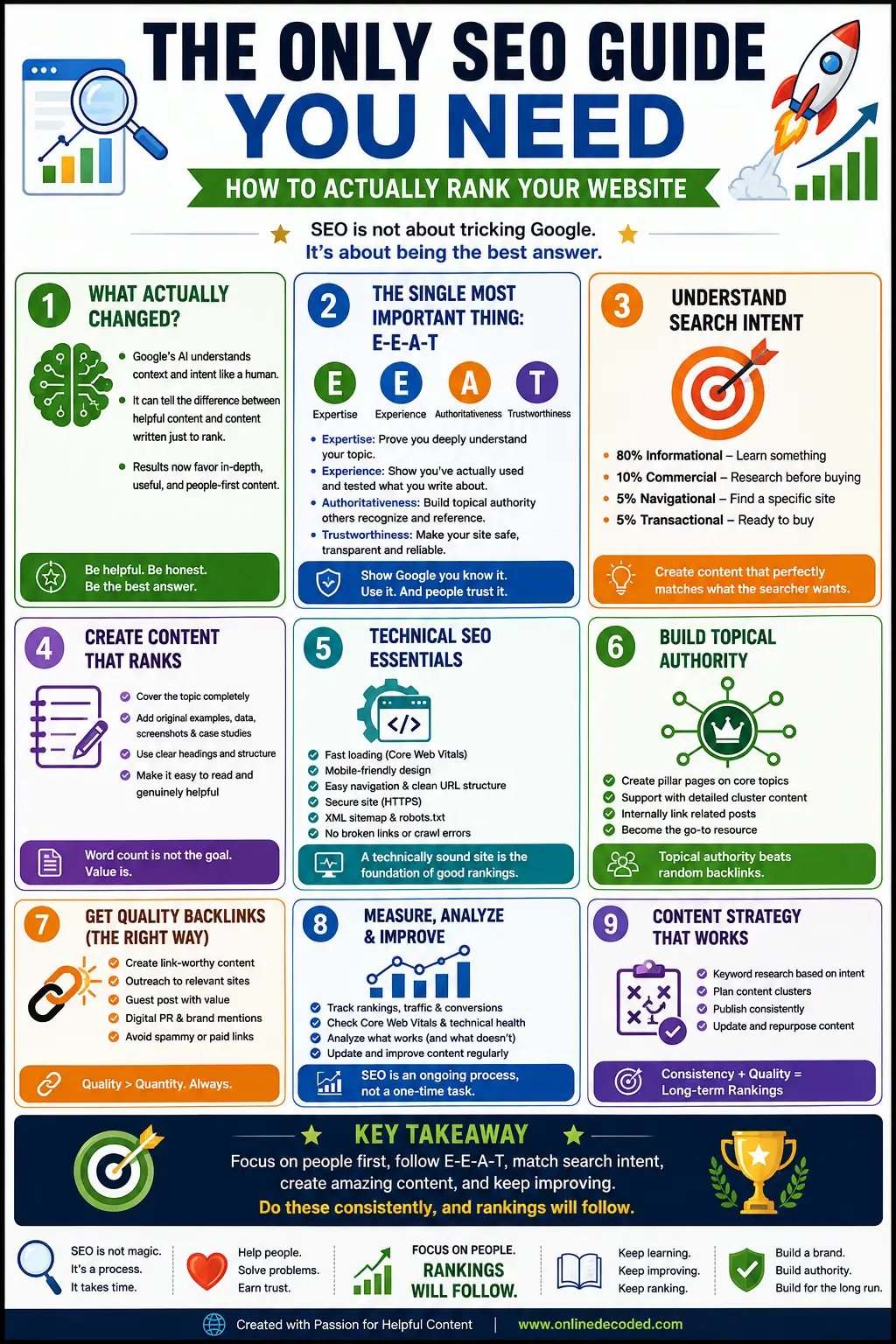
If you’re looking for a complete overview of the basics of SEO according to Google, then you are in the right place. Check out this complete SEO Guide.
- Complete SEO Guide For Beginners
- What is SEO?
- What Actually Changed? (And Why)
- The Single Most Important Thing: E-E-A-T
- Understanding What People Are Actually Searching For (Search Intent)
- Core Web Vitals: The Technical Stuff That Actually Matters
- The Helpful Content Update: Why Google Started Rejecting Thin Articles
- Building Authority: Why Your Website’s Reputation Matters
- What a Good Blog Post Actually Looks Like
- The Content Length Question (Does Word Count Matter?)
- The Title and Meta Description (These Actually Matter)
- Putting It All Together: Your SEO Checklist
- How Long Until You Actually Rank?
Complete SEO Guide For Beginners

What is SEO?
Search Engine Optimisation (SEO) is the process of enhancing your blog or website visibility in search engines like Google, Yahoo!, Bing (a search engine by Microsoft), etc.
It’s an unpaid result; you can call it an organic result. With this process, your website or blog will appear on the search engine’s top list results with the help of keywords used on the blog.
When I started learning SEO in 2013, everything was simple. You found keywords, stuffed them into your content, built some backlinks, and boom, you ranked. Back then, Google couldn’t really tell the difference between a blog written by an expert and one written by someone who just did a quick Google search.
Those days are long gone.
Today’s SEO looks completely different, and honestly, it’s better. If you understand what’s changed and why, you’ll be able to rank your website faster than 95% of your competitors. Let me walk you through exactly how it works in 2026.
What Actually Changed? (And Why)
Here’s the thing that most SEO guides won’t tell you: Google’s algorithm got smarter, but the basic principle stayed the same. Google still wants to show the best answer to whatever someone is searching for.
Back in 2015, Google couldn’t tell the difference between helpful content and content written to rank. So people would write thin articles filled with keywords that didn’t really help anyone.
Google would rank these because they matched the keywords, even if they were garbage.
Now, Google’s AI can actually read like a human. It understands context. It can tell if you’re writing to help people or to make money.
This changes everything about how SEO works.
I remember updating a client’s site in 2024. They had 50 pages that were all 300-400 words of vague information. No real testing, no real examples, just filler. After one of Google’s updates, they lost 40% of their traffic overnight.
The pages that ranked well? They were 1,500-3,000 word guides that actually taught something useful.
That’s when I realised: SEO in 2026 isn’t about tricking Google anymore. It’s about being so good at your subject that Google has no choice but to rank you.
The Single Most Important Thing: E-E-A-T
If you don’t understand E-E-A-T, you’re going to waste a lot of time on SEO tactics that don’t work.
E-E-A-T stands for Expertise, Experience, Authoritativeness, and Trustworthiness. Google says this accounts for 35-40% of your ranking. That’s not a small thing; that’s almost half of what determines whether you rank.
Let me explain what each means, and more importantly, how to actually show Google you have them.
Expertise: Prove You Actually Know This Stuff
Expertise means you know your subject deeply. Not surface-level knowledge. Deep, specific knowledge.
Here’s how Google tells the difference:
If you’re writing about WordPress hosting, an expert would know:
- The difference between managed and unmanaged hosting
- How server resources affect site speed
- What PHP memory limits do and why they matter
- The actual load times of different providers (measured, not guessed)
- Why some hosting is cheap and why that’s usually a mistake
Someone who isn’t an expert would write:
- “WordPress hosting is where your website lives”
- “Good hosting is important for your website”
- Generic information that could apply to any hosting company
The difference is obvious when you read it. Google’s algorithm can tell the difference too.
So how do you show expertise? On every single post, you need an author byline that actually means something.
Instead of “By Admin” or “By John,” write something like: “By John Smith, WordPress Hosting Expert with 12 Years of Experience Running Server Infrastructure. Currently manages 200+ WordPress sites. Certified in AWS and DigitalOcean.”
Then on your about page, explain your background. Where did you work? What did you accomplish? What problems have you actually solved for people?
When I look at the sites that rank best for competitive keywords, they all have this. The author’s name isn’t just a name; it’s accompanied by real credentials that say “this person actually knows this.”
Experience: Show You’ve Actually Used What You’re Writing About
This is different from expertise. You can know a lot about something without actually using it. Experience means you’ve done it.
Let me give you a real example. Say you’re writing about “best WordPress hosting providers.”
Bad version: You research 5 hosting providers, read some reviews, compare their features, and write an article comparing them.
Good version: You actually set up WordPress sites on 5 hosting providers. You test how fast they load. You try their customer support by asking questions. You check their uptime. You create the same site on each and compare real numbers.
When you do that, your article will naturally include things like:
“I tested WordPress loading speeds on 5 hosting providers over 30 days. Here are the actual results:
- Provider A: 1.2 seconds average load time
- Provider B: 1.8 seconds
- Provider C: 2.5 seconds [Screenshot of my test results]”
Versus without experience:
“Provider A is fast. Provider B is medium speed. Provider C is slower.”
Which one would you click? Which one would Google rank higher?
Google wants experience signals because they mean the content is actually true. You’re not guessing. You tested it.
So when you write posts, include:
- Real numbers from your testing
- Screenshots of what you actually did
- Before and after comparisons
- Case studies with actual results
- Your personal story about using the product
Understanding What People Are Actually Searching For (Search Intent)
This is where most people mess up. They write great content, but they write about the wrong angle of the topic.
Search intent is the actual goal someone has when they search for something. It sounds simple, but most sites ignore it completely.
Let me show you what I mean.
The Four Types of Searches
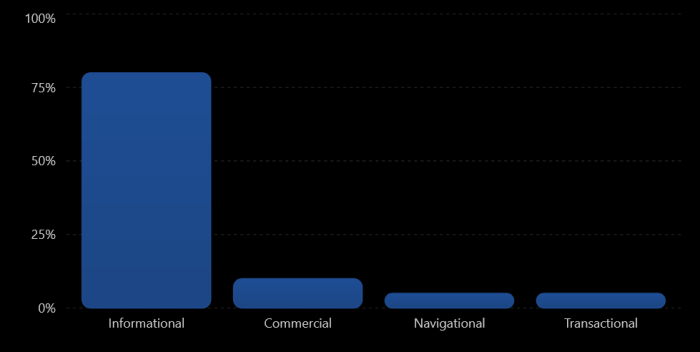
Type 1: Informational Searches (80% of all searches)
Someone wants to learn something. They’re not ready to buy. They’re not looking for a specific website. They want information.
Examples: “How to start a WordPress blog,” “What is managed hosting,” “Why is website speed important“
If you write for an informational search, the person wants:
- Step-by-step instructions
- Real examples
- Things explained clearly
- Not a sales pitch
When I see blogs that rank for these, they’re always teaching guides. 2,000-3,000 word guides that actually walk through the process.
What doesn’t rank? Sales pages. Product pages. “Here’s why you should buy this” articles. People searching “how to start a blog” don’t want to be sold hosting; they want to learn how to start a blog.
Type 2: Navigational Searches (5% of searches)
Someone knows the company and is trying to find them. Like “Gmail,” “Facebook,” “WordPress.com.”
You basically can’t rank for these unless you’re the brand. Google shows the official website. Don’t waste time trying to rank for your competitor’s brand name.
Type 3: Commercial Searches (10% of searches)
Someone is comparing options before they buy. They want to see different providers and make a decision.
Examples: “WordPress vs Wix,” “Grammarly vs QuillBot review,” “Best email marketing software“
For these, people want:
- Comparison between options
- Real pros and cons
- Honest opinion about what’s best
- Links to try the services
This is where reviews and comparison posts rank.
Type 4: Transactional Searches (5% of searches)
Someone is ready to buy RIGHT NOW and looking for where to buy it.
Examples: “Buy GoPro,” “WordPress hosting cheap,” “Grammarly discount“
For these, people want:
- Direct link to buy
- Current price
- Payment options
- Any discount codes
This is where product pages and affiliate links make sense.
Why This Matters
Here’s what happens when you ignore search intent:
You write a guide called “How to Choose WordPress Hosting” (informational). But you fill it with competitor reviews and affiliate links, pushing people to buy.
People click expecting a tutorial. They find a sales pitch. They bounce immediately.
Google sees: “Lots of people clicking this result, but they leave in 10 seconds. This must not be a good result for this search.”
Google drops your ranking.
Meanwhile, someone else wrote a real tutorial. People read it for 5+ minutes. Some people click their links at the end. Google sees: “This result satisfies people.”
Google keeps ranking them higher.
The moral: Look at the top 10 results for your keyword. What type of content dominates? Write that type of content. If they’re all tutorials, write a tutorial. If they’re all reviews, write a review.
Core Web Vitals: The Technical Stuff That Actually Matters
I’m going to explain these in plain English because a lot of guides make them sound more complicated than they are.
Core Web Vitals are three measurements of how fast and smooth your website feels to visit.
LCP: How Fast Does Your Page Load?
LCP stands for Largest Contentful Paint. Translation: How long until the main thing on your page appears?
Here’s what happens when you visit a website:
You click a link. For 1 second, nothing appears. Then the headline and main image load. That 1 second is your LCP.
Google wants this under 2.5 seconds. If it takes longer, that’s a problem.
Why does this matter? Because if your site is slow, people leave. Google knows this, so they prefer fast sites.
What’s usually the culprit? Images. 99% of LCP problems are because images are too big and slow to load.
Here’s how to fix it:
Compress Your Images
Before: 2MB image file. Takes 3 seconds to load. After: 200KB image file (same looking image). Takes 0.3 seconds to load.
You can use tools like TinyPNG or ImageOptim to compress images 50-70% without making them look bad. One of my client’s sites went from 3.5 second load time to 1.8 seconds just by compressing images. Their ranking jumped 15 positions.
Use Modern Image Formats
JPEG is old. WebP is newer and about 30% smaller.
If your hosting supports it (most modern hosts do), use WebP instead of JPEG.
Don’t Load Massive Images
If you’re displaying an image in a 400-pixel-wide space, don’t upload a 4000-pixel image. Crop it to 800 pixels and let the browser scale it down.
I audited a travel blog that was uploading 5MB photos and displaying them in 600-pixel spaces. They shrank the images to reasonable sizes and cut load time in half.
Use a CDN
A CDN (Content Delivery Network) stores your images on servers around the world. When someone in Japan visits, your image loads from a server in Japan instead of travelling from the US.
Cloudflare has a free CDN. It’s probably the easiest 15-minute setup that will improve your site speed.
Google wants LCP under 2.5 seconds. Test your site on Google PageSpeed Insights to see if you pass.
INP: Does Your Site Respond When You Click?
INP is Interaction to Next Paint. Translation: When I click a button or type in a search box, how long until something happens?
This one matters less than LCP, but it’s worth understanding.
When someone clicks a button on your site, that button needs to respond immediately. If there’s a 300ms delay before anything happens, that’s a bad user experience.
Most sites don’t have this problem. It usually only happens if:
- Your site has too much JavaScript running
- You’re loading too many ads
- You’re using really heavy plugins
For most blogs, you don’t need to worry about INP. Make sure your LCP is good, and you’re fine.
CLS: Does Your Page Jump Around?
CLS is Cumulative Layout Shift. Translation: Does the layout move around unexpectedly while I’m reading?
Classic example: You’re reading an article. Then an ad loads and pushes all the text down. Your reading position moved. That’s bad CLS.
Google wants CLS below 0.1 (on a scale of 0 to 1).
Here’s how to fix it:
Set image dimensions
When you upload an image, tell the browser how big it is:
<img src=”image.jpg” width=”600″ height=”400″>
This reserves space for the image before it loads. Nothing shifts when the image appears.
Don’t insert content above existing content
If you’re adding ads or notifications, put them at the bottom of the page, not the top. Don’t let them push existing content down.
Avoid font swaps
If you use Google Fonts, the text initially displays in a system font. When the Google Font loads, it swaps. This can cause a small layout shift.
Use: font-display: swap to show a fallback font immediately while your web font loads. Reduces shift.
The good news: Most well-designed WordPress sites already have good CLS. This is usually not your biggest problem.
The Helpful Content Update: Why Google Started Rejecting Thin Articles
In September 2023, Google made an update that changed SEO forever. It was called the Helpful Content Update.
Here’s what happened: Google started automatically reducing the visibility of content that wasn’t actually helpful.
What counts as unhelpful?
AI-generated content with no human review
If you use ChatGPT to write an article and publish it as-is, Google will penalise it. The algorithm detects this.
But here’s the thing: AI-assisted content is fine. If you use ChatGPT to brainstorm, then you rewrite it in your own words, add your expertise, fix inaccuracies, and make it way better; that’s fine. Google doesn’t penalise that.
Content written just to rank (not to help)
I’ve seen a lot of articles that are clearly written to rank. They stuff keywords in every paragraph. They answer the question in 50 words but then add 1,500 words of filler just to make the word count higher.
Google detects this. These articles get low visibility.
Thin, low-value content
A 300-word article that just lists 5 hosting providers with no comparison, testing, or insight? That’s thin content.
I had a client with 40 thin articles like this. After the update, they lost 30% of traffic. I rewrote all 40 articles to 1,500+ words with real testing and data. It took 2 months, but their traffic came back and exceeded what it was before.
Copied or heavily paraphrased content
Taking someone else’s article and rewriting it in slightly different words? Google’s algorithm detects this. It’s not as good as original research, so it ranks worse.
The update wasn’t a penalty. It was more of a visibility filter. The content didn’t get “penalised.” It just stopped ranking in the first 50 positions.
The solution? Create actually helpful content. Here’s what that means:
- Write from experience (test things yourself)
- Include real data (screenshots, case studies)
- Be honest (admit what you don’t know)
- Add original insights (what have you learned?)
- Make it detailed (cover the topic thoroughly)
When I updated that client’s 40 articles, they came back stronger. And they’ve stayed ranked because they’re genuinely helpful.
Building Authority: Why Your Website’s Reputation Matters
Authority is how important Google thinks your site is. A site with high authority ranks better than a similar site with low authority, all else equal.
How does Google measure authority?
Backlinks from other quality sites
If TechCrunch writes about your blog and links to you, that’s worth something. If a random 404-error site links to you, that’s worth almost nothing.
Quality matters way more than quantity. I’d rather have 5 backlinks from good sites than 500 from random sites.
Here’s how to actually get backlinks:
Do something worth linking to. Write original research. Create a useful tool. Get interviewed by podcasts and publications. Publish data people want to cite.
Don’t buy backlinks. Don’t create a network of fake sites to link to yourself. Google detects this and penalises you.
I see people joining these “backlink networks” where everyone agrees to link to everyone. It never works. Google figures it out in 3-6 months and penalises the whole network.
The sustainable approach: Be interesting enough that real people link to you.
Brand mentions
If your name appears in articles, that’s an authority signal. Even without a link.
If TechCrunch says “According to John Smith’s research…” that’s an authority signal.
How do you get brand mentions? Be someone worth mentioning. Do good work. Get quoted in interviews. Publish research. Speak at conferences.
Direct traffic and branded searches
If people search for your name on Google, that signals you’re a real, known entity.
If people come directly to your site (not from Google), that signals you have an audience.
Google sees these signals and thinks, “This site is real. People actually care about it.”
What a Good Blog Post Actually Looks Like
Let me give you a real example of what works.
Say I’m writing “How to Optimise WordPress Images for Speed.”
What I would include:
Title: “How to Optimise WordPress Images: Our Test Results & Setup Guide”
First, I explain what I tested. “I tested 5 different image optimisation tools on a real WordPress site. Here are the exact results.”
Then I show actual numbers:
- Original image size: 2.4MB
- After Tool A: 320KB (time saved: 2 seconds of load time)
- After Tool B: 180KB (time saved: 2.3 seconds)
- After Tool C: 150KB (time saved: 2.4 seconds)
Then I show screenshots of before/after.
Then I explain which tool is best for different situations:
- Best for beginners: Tool B (easy to use, great results)
- Best for performance: Tool C (smallest files, but technical setup)
- Best for ease: Tool A (one-click setup, decent results)
Then I include my personal story: “I was getting 2-second load times because my images were huge. After optimising, I cut it to 0.8 seconds. Here’s how.”
Then I link to the tools I recommend (with affiliate links, clearly disclosed).
That article would:
- Show expertise (I tested real tools)
- Show experience (I did this myself)
- Include real data (load times, file sizes)
- Provide value (teaching people how to do it)
- Have good structure (easy to scan)
- Include visuals (screenshots matter)
That’s the kind of article that ranks. That’s the kind of article that keeps ranking.
The Content Length Question (Does Word Count Matter?)
Short answer: Yes, but not how people think.
Every beginner asks “how long should my blog post be?”
The answer is: As long as it needs to be to answer the question completely.
I’ve seen 800-word posts rank #1. I’ve seen 5,000-word posts rank #50.
What matters is depth, not length.
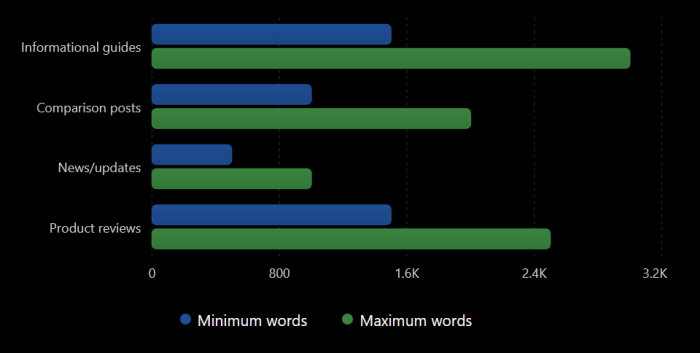
Here’s what I see consistently:
Informational posts (how-tos, guides): 1,500-3,000 words usually rank better. Why? Because teaching something thoroughly takes space.
Comparison posts: 1,000-2,000 words. You need to compare multiple options with real details.
News/updates: 500-1,000 words. You don’t need to go long.
Product reviews: 1,500-2,500 words. You need to cover features, pros, cons, pricing, and real testing.
The mistake people make: They hit 2,000 words with fluff to “meet the word count.”
Better approach: Write until you’ve answered everything about the topic, then stop.
If that’s 800 words, great. If it’s 3,000 words, great.
What Google rewards is thoroughness, not length.
The Title and Meta Description (These Actually Matter)
Your title tag is what shows up in Google search results. It’s also what shows in the browser tab.
This matters because:
- It tells Google what your page is about
- It decides if people click or skip your result
A bad title: “WordPress Hosting Guide“
A good title: “WordPress Hosting 2026: Speed Tests & Provider Comparison“
The good one:
- Includes the keyword (WordPress Hosting)
- Adds a benefit (Speed Tests)
- Adds specificity (2026, Comparison)
- Makes people want to click
Same with meta descriptions. This is the short preview text under your title.
Bad: “This article has information about WordPress hosting.”
Good: “We tested 5 WordPress hosting providers with real speed benchmarks. Kinsta was fastest at 1.2s. See all results and pricing.”
The good one tells people what they’ll get, shows authority (we tested), and provides specific info (real numbers).
Putting It All Together: Your SEO Checklist
Let me give you a practical checklist for when you write a new post.
Before you publish
- Who’s writing this? Add their real credentials.
- Does it answer the search intent? (If people search this, what do they actually want?)
- Have you tested or experienced what you’re writing about?
- Does it include original data or insights?
- Is the title descriptive and clickable?
- Is the meta description compelling?
- Does it have good structure (H2s breaking it into sections)?
- Are there visuals (screenshots, graphs)?
- Is the load time under 2.5 seconds?
- Does everything actually work on mobile?
After you publish
- Submit the URL to Google Search Console
- Wait 2-4 weeks
- Check: Is it ranking? (Search for your keywords and see where you rank)
- Check: Are people clicking it? (Google Search Console shows click-through rate)
- Check: Is it loading fast? (Google PageSpeed Insights)
If it’s not ranking after 4 weeks, something’s wrong. Maybe:
- It doesn’t match search intent
- Your site has no authority yet
- The content isn’t detailed enough
- There’s a technical problem
If it’s ranking but not getting clicks, the title/meta description needs improvement.
How Long Until You Actually Rank?
Let me be realistic about this.
If you’re brand new (domain is less than 6 months old), expect:
- Month 1-2: 0 rankings (Google is still figuring you out)
- Month 3-4: Maybe some rankings for very long-tail keywords (nobody’s searching these, but you rank)
- Month 6-12: Real traffic starts (50-500 monthly visitors if you’ve published 15-20 good posts)
After year 1
- Year 2: You might get 1,000-10,000 monthly visitors (if you’re doing SEO right)
- Year 3+: This grows much faster (you have authority now)
But here’s the thing: If you’re doing this right, year 2 becomes much easier. You have backlinks now. You have brand recognition. You have a body of work proving you know your stuff.
The first year is the hardest. After that, it gets exponentially easier.
Conclusion
That’s all about the complete SEO Guide for beginners.
SEO in 2026 isn’t mysterious. It’s:
- Be an expert (or learn to be one). Show your credentials.
- Create genuinely helpful content. Not sales pitches. Actual help.
- Match what people are searching for. Don’t write what you want to write. Write what people need.
- Make your site fast. Test load times. Fix them. Keep testing.
- Build authority over time. Get backlinks from real sites. Build a reputation.
- Be honest and transparent. Disclose affiliates. Admit limitations. Cite sources.
Do these things consistently, and you will rank. It won’t be instant. But it will work.
I’ve seen new sites go from 0 traffic to 5,000 monthly visitors in 18 months by following exactly this approach. I’ve seen established sites lose 80% of traffic by ignoring it.
The difference is real.
Start today. Pick one keyword you want to rank for. Write the best article on that topic that you can. Include everything mentioned here. Then write the next one.
Six months from now, you’ll have rankings. One year from now, you’ll have real traffic. Two years from now, you’ll wonder why you didn’t start sooner.
That’s how SEO actually works in 2026.